


LinkedIn outreach is a mess for most people. Not because they are lazy or bad at sales. Because the tools they use either get their accounts restricted within two weeks, blast 500 generic connection requests a day like it is 2018, or cost $200/month with a UI that requires a PhD in SaaS to navigate. The bar for “good LinkedIn automation” has quietly gotten much higher, and a lot of tools that were fine three years ago are now genuinely risky to use.
We-Connect is one of the tools that has been floating around in LinkedIn automation circles for a few years. It gets mentioned in cold outreach communities, B2B sales Slack groups, and the occasional Reddit thread where someone is trying to figure out which tool will not get them banned. So this We-Connect review is going to go past the feature checklist. We will get into how it actually works, what the pricing looks like, where it falls short, and whether it is worth using in 2026 compared to what else is out there.
The tool sits in a pretty specific niche: cloud-based LinkedIn automation for small sales teams, solo founders, recruiters, and agency operators who want to send connection requests and follow-up messages at scale without babysitting a Chrome extension 24/7. That audience is real and large. Whether We-Connect actually serves them well is what this whole article is about.
We-Connect Review: What the Tool Actually Does
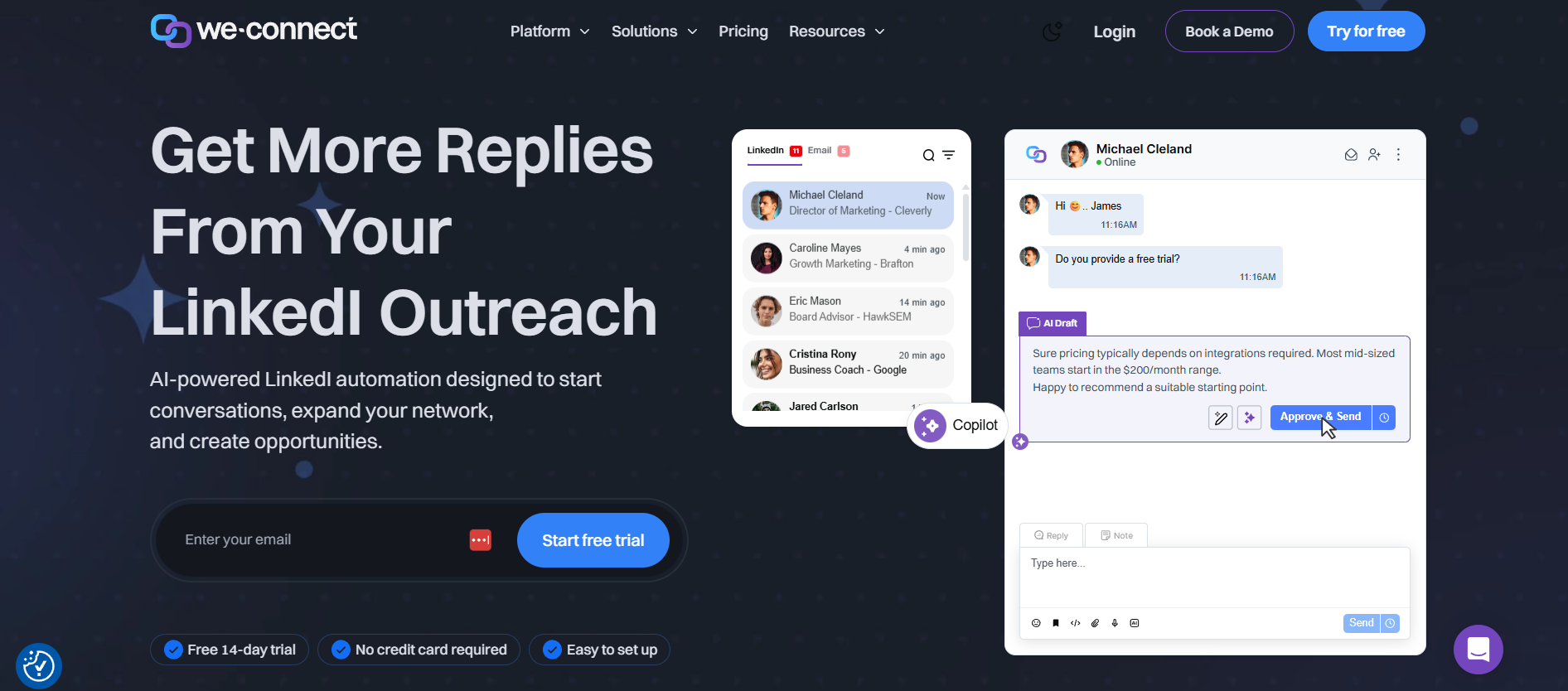 We-Connect is a cloud-based LinkedIn outreach platform. That means it runs on its own servers, not on your browser, which is the first thing to check with any LinkedIn automation tool. Browser extensions like Dux-Soup or older versions of Phantombuster work by injecting code into your Chrome session. LinkedIn can detect that pattern. Cloud-based tools like We-Connect operate through a dedicated IP address that simulates a normal user login, which is less detectable, though not invisible.
The core of what We-Connect does is simple: it automates LinkedIn connection requests and follow-up message sequences. You set up a campaign, define your target audience using LinkedIn search or Sales Navigator, write your message templates with personalization variables like first name, company, job title, and the tool handles the sending on a schedule you control.
That is the foundation. But there is more to it.
Campaign Types and Outreach Sequences
We-Connect supports several campaign types. You can run connection request campaigns where the tool sends requests with or without a note. You can run message campaigns to your existing first-degree connections. There are also InMail campaigns if you have Sales Navigator, and profile visit sequences that warm up leads before the actual ask.
The sequence builder is genuinely decent. You can create multi-step flows like: visit profile on day 1, send connection request with a short note on day 2, send a follow-up message 3 days after acceptance, send a second follow-up 5 days later if no reply. That kind of drip logic is what separates a proper outreach tool from just bulk-sending connection requests manually.
Each step in the sequence lets you add conditions. If someone replies, the sequence stops automatically. That sounds obvious but a surprising number of cheaper tools do not handle this cleanly and will keep sending messages to people who already responded.
Personalization Features
The personalization in We-Connect is good but not deep. You get standard variables like {{first_name}}, {{last_name}}, {{company}}, {{job_title}}, and {{location}}. There is also an option to add custom variables if you are importing a CSV of leads with extra columns, which is useful if you are doing account-based outreach and want to reference something specific like a recent funding round or a shared connection.
What We-Connect does not have is AI-powered personalization like Hyperise or some of the newer tools that auto-generate a custom first line per prospect based on their LinkedIn activity. That gap matters if you are doing high-touch outreach at low volume. For higher-volume campaigns where you need good personalization at scale, the custom CSV variables get you most of the way there if you are willing to do the data prep.
Inbox Management
The inbox inside We-Connect is functional. It pulls your LinkedIn messages into the tool’s interface so you can reply without switching back to LinkedIn constantly. There is basic filtering and lead status tagging. You can mark leads as interested, not interested, or add custom labels.
It is not a full CRM. Do not confuse it for one. If you are managing 500 active conversations across 10 campaigns, the native inbox will start feeling cramped. But for solo users managing one or two active campaigns, it works fine.
We-Connect Features That Actually Matter in 2026
A lot of We-Connect reviews list features like bullet points in a spec sheet. Here is the thing: most LinkedIn automation tools have the same features listed on their marketing page. What matters is how well those features actually work and what is missing.
Smart Limits and Safety Controls
This is the part most reviews gloss over. LinkedIn has been aggressive about account restrictions since 2021. They do not just ban accounts. They throttle them, show captchas, and send warnings. The single biggest risk factor in any LinkedIn automation tool is whether it sends too many actions too fast.
We-Connect lets you set daily limits for connection requests, messages, and profile views. The recommended safe range most practitioners follow is 20 to 30 new connection requests per day for accounts under 6 months old, and up to 50 per day for seasoned accounts with strong SSI scores. We-Connect does not enforce these limits by default. The tool will let you set 100 connection requests per day if you want. That is a bad idea and the tool does not stop you.
So the safety is on you. What We-Connect does offer is randomized sending times within a schedule window you define. Instead of firing off messages at exactly 9:00 AM, 9:05 AM, 9:10 AM like a robot, it spreads actions across a time window with randomized delays. That pattern is meaningfully better than tools without this feature.
There is also a blacklist feature where you can exclude certain companies or profiles from your campaigns, which is useful if you are in a niche where you absolutely cannot reach out to competitors’ employees or specific enterprise accounts.
Team and Agency Features
We-Connect has a multi-seat setup that works reasonably well for small teams. Each LinkedIn account gets its own seat with its own settings, campaigns, and inbox. An admin account can view activity across seats, manage billing, and access aggregate reporting.
For agencies managing LinkedIn outreach on behalf of clients, this matters. You can add a client’s LinkedIn account to your We-Connect workspace, run campaigns from it, and the client never needs to touch the tool. The reporting you can pull is basic but enough to show a client weekly connection acceptance rates and reply rates.
The agency pricing gets more complicated, which we will get into in the pricing section.
Integrations
Here is where We-Connect starts to show its limitations. The native integrations are thin. There is a Zapier connection, which opens up workflows to HubSpot, Salesforce, Pipedrive, Notion, and hundreds of other tools through triggers and actions. But you are building those workflows yourself inside Zapier, which adds friction and cost.
Expandi, which is a direct competitor at a similar price point, has tighter native CRM integrations and a webhook system that is easier to use. If your sales workflow depends heavily on pushing LinkedIn data into your CRM in real time, We-Connect is not the smoothest path. You will get there via Zapier but expect some setup time.
There is also a CSV export for lead data, which covers the basics for teams that prefer to manage follow-up in spreadsheets or manual CRM updates.
Analytics and Reporting
The reporting dashboard shows campaign-level data: connection requests sent, acceptance rate, messages sent, reply rate. You can filter by date range and campaign. It is clean and easy to read.
What it does not show is deep funnel data. If you want to know which specific message variant in your sequence is getting the most replies, you have to do that math yourself by looking at raw numbers across sequence steps. There is no built-in A/B testing that auto-rotates message variants and picks a winner.
For most users doing straightforward outreach campaigns, the current reporting is enough. If you are running growth experiments across 20 campaigns with multiple variants per sequence, you will want a tool with more analytics depth.
We-Connect Pricing: What You Actually Pay
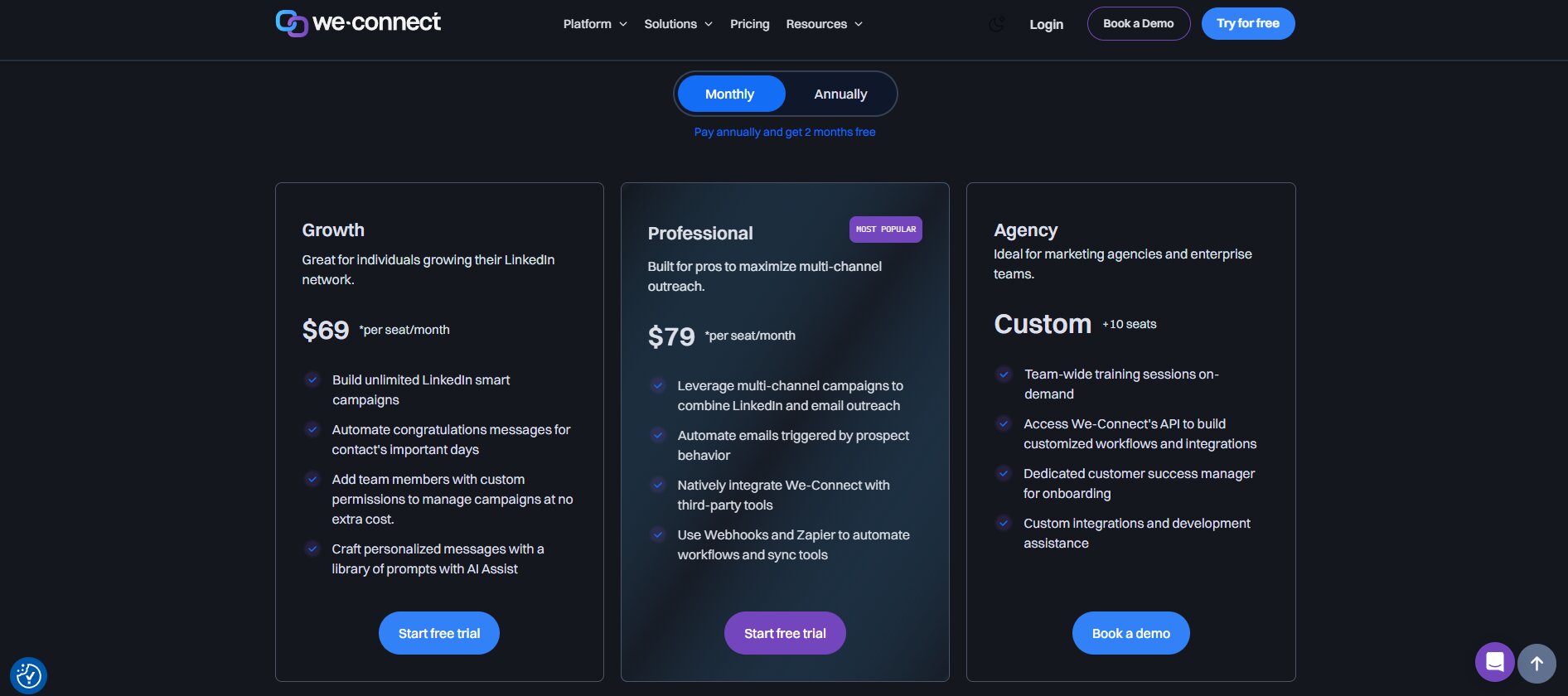
We-Connect pricing is seat-based. As of 2026, the base plan runs at $49 per month per LinkedIn account. There is no free plan, but there is a 14-day free trial with full feature access that does not require a credit card upfront. That is worth noting because several competitors require payment info to start a trial.
Plan Breakdown
The $49/month plan covers a single LinkedIn seat with access to all campaign types, the inbox, basic integrations, and standard support. There is no feature-gated “starter vs pro” split where the core automation is locked behind a higher tier. You get the full tool at the base price.
For teams with multiple LinkedIn accounts, the per-seat pricing stacks. Two accounts cost $98/month, five accounts cost $245/month. There are discounted rates for larger team sizes, and annual billing drops the per-seat cost noticeably, around 20% off depending on current promotions.
How It Compares to Alternatives
Expandi starts at $99/month per seat with more native integrations and a stronger inbox. Dripify offers a three-tier model starting at $39/month for its basic plan, though the basic plan restricts campaign types. Lemlist, if you are adding email outreach alongside LinkedIn, starts at $59/month per seat but covers both channels.
For pure LinkedIn automation at the solo or small team level, We-Connect’s $49 is competitive. The tool does not charge extra for Sales Navigator campaigns, which some tools treat as a premium feature. That is a real advantage if Sales Navigator is part of your workflow.
Agency Pricing
Agencies managing LinkedIn outreach for multiple clients can reach out to We-Connect for a custom pricing arrangement. There is no publicly listed agency tier on the main pricing page as of this writing, which is a minor frustration because it means a sales call before you can budget accurately. Most agencies running 10 or more seats end up negotiating something lower than the standard per-seat rate.
We-Connect Pros and Cons: The Straight Version
Choosing a LinkedIn automation tool is not just about features. It is about whether the platform helps you generate more conversations, book more meetings, and save time without putting your LinkedIn account at unnecessary risk. We-Connect has built a reputation as a cloud-based LinkedIn automation platform that focuses on simplicity and reliability, but it is not the perfect solution for everyone.
What We-Connect Does Well
Cloud-based operation with dedicated IP assignment is the single biggest practical advantage. Your LinkedIn account is not running through your personal browser or IP. That reduces detection risk compared to extension-based tools.
The sequence builder is intuitive. You do not need to watch three tutorial videos to set up a multi-step campaign. The interface is clean and the logic is straightforward: action, delay, condition, next action. Getting a campaign live takes maybe 20 minutes if your lead list is ready.
The 14-day free trial with no credit card is genuinely useful. You can run a real campaign, see your acceptance rates, test the inbox, and decide whether it fits before paying anything.
Customer support is responsive. The live chat during business hours has been reliably fast in most user reports across communities where this tool comes up. The onboarding documentation is decent, not exceptional, but it covers the main use cases.
Where We-Connect Falls Short
The integration ecosystem is the main weak point. Zapier gets you connected to your CRM but that is a workaround, not a solution. If you are a sales team where every LinkedIn reply needs to auto-create a contact in HubSpot with a task assigned, the setup in Zapier takes real work and occasionally breaks.
There is no built-in email outreach. If your outreach strategy involves touching leads on LinkedIn and email in a coordinated sequence, you need a separate tool. Lemlist or Instantly handles the email side and has LinkedIn steps too, which makes We-Connect feel narrow by comparison for multi-channel teams.
The default daily limits not being capped at safe levels is a real issue for non-technical users. Someone who just found the tool, signed up, and cranked the settings to 100 connection requests per day because “more is better” is going to have a bad time within a month. The tool needs better guardrails or at least more prominent warnings.
Reporting lacks A/B testing and deep sequence analytics. For anyone running outreach experiments or trying to optimize message copy through data, the dashboard does not give you enough to work with.
Who Should Use We-Connect (And Who Should Not)
Not every LinkedIn automation tool fits every user. Before investing in We-Connect, it is important to understand which types of professionals are likely to benefit most from the platform and who may be better served by another solution.
The Right Fit
Solo founders doing B2B outreach for their own business. If you are sending 30 to 50 connection requests per day, managing replies yourself, and do not need deep CRM integration, We-Connect at $49/month is a clean, capable tool that will get out of your way.
Recruiters using LinkedIn Recruiter or Sales Navigator to source candidates. The InMail campaigns and the sequence logic work well for recruitment workflows where you want to reach out, follow up, and track who responded without manually doing it all.
Small sales teams of 2 to 5 people where each rep runs their own LinkedIn outreach. The multi-seat setup is simple enough and the per-account reporting gives team leads visibility without a complex admin setup.
Agencies managing LinkedIn outreach for 5 to 15 clients. The workspace structure handles multiple accounts without the chaos you get from trying to manage everything through individual LinkedIn logins.
Not the Right Fit
Multi-channel outreach teams. If LinkedIn is one step in a sequence that also hits email, SMS, and paid retargeting, get a tool built for that workflow. Lemlist, Reply.io, or Outreach are built for this. We-Connect is LinkedIn-first and only.
Teams that need real-time CRM syncing without Zapier overhead. The native integration depth is not there yet.
High-volume outreach operations sending 200 or more actions per day per account. That volume is risky on LinkedIn regardless of the tool, but if that is your strategy, you need a tool with much more sophisticated safety infrastructure and rotating account warmup capabilities.
Anyone who wants AI-personalized first lines at scale. Tools like Hyperise paired with a sequencer, or newer AI-native tools that auto-write custom openers per prospect, are ahead of what We-Connect offers on the personalization side.
Conclusion
We-Connect is a solid tool if you know exactly what you need it for. Cloud-based operation, clean sequence builder, reasonable pricing at $49/month, and a free trial that actually lets you test real campaigns. For solo founders, recruiters, and small sales teams doing focused LinkedIn outreach, it does the job without unnecessary complexity.
But it is not for everyone. Thin native integrations, no email channel, no AI personalization, and reporting that stops short of real experimentation data are genuine limitations. If your outreach stack is multi-channel or your team lives inside HubSpot and needs everything synced in real time, We-Connect will create friction, not remove it.
The honest verdict on this We-Connect review: it earns its place in the toolkit for the right user profile. A B2B founder sending 30 to 40 targeted connection requests a day with a well-written 3-step sequence can absolutely generate pipeline with this tool. A 15-person sales team that needs CRM sync, A/B testing, and email coordination will outgrow it fast or find the workarounds exhausting.
Start with the 14-day trial. Set your daily limits conservatively, around 25 to 30 connection requests per day. Write one focused campaign to a specific audience segment. See what your acceptance rate looks like after two weeks. That data will tell you more than any review can.
Frequently Asked Questions
What is We-Connect used for?
We-Connect is a cloud-based LinkedIn automation tool used to send connection requests, follow-up messages, and InMail campaigns at scale. It is primarily used by B2B sales teams, recruiters, founders, and agencies to automate LinkedIn outreach without manually sending each message.
Is We-Connect safe for LinkedIn accounts?
We-Connect is a cloud-based tool, which is safer than browser extensions because it runs from a dedicated IP rather than your personal browser. That said, safety depends on the limits you set. Keeping daily connection requests at 20 to 50 per day and using randomized sending windows reduces the risk of LinkedIn account restrictions significantly.
How much does We-Connect cost?
We-Connect costs $49 per month per LinkedIn seat. There is no free plan, but a 14-day free trial is available without a credit card. Annual billing brings the per-seat cost down by roughly 20%. Agencies with larger seat counts can negotiate custom pricing.
Does We-Connect work with Sales Navigator?
Yes, We-Connect works with LinkedIn Sales Navigator. You can pull lead lists from Sales Navigator directly into campaigns and run InMail sequences using your Sales Navigator credits. This is included in the standard plan, not a paid add-on.
Can We-Connect send automated InMail messages?
Yes, We-Connect supports automated InMail campaigns for users with Sales Navigator or LinkedIn Premium. InMails get sent using your available monthly credits. The sequence logic works the same way as regular message campaigns.
What happens if LinkedIn detects We-Connect activity?
LinkedIn will not automatically detect We-Connect by name. What triggers restrictions is unusual activity patterns: too many connection requests in a short window, connections sent at inhuman speeds, or activity outside normal hours. If LinkedIn flags your account, you typically get a warning or a temporary restriction on connection requests. We-Connect has no ability to reverse a LinkedIn account restriction once it happens.
Does We-Connect integrate with HubSpot or Salesforce?
There is no native HubSpot or Salesforce integration. We-Connect connects to both via Zapier, which lets you build custom workflows to push leads and activity data into your CRM. Setting up the Zapier connection requires some configuration time but is manageable for anyone comfortable with automation tools.
Can I manage multiple LinkedIn accounts in We-Connect?
Yes. We-Connect is designed for multi-account management. Each LinkedIn account operates as a separate seat with its own campaigns, inbox, and reporting. An admin view lets you see activity across all accounts from a single dashboard.
How does We-Connect compare to Expandi?
Expandi costs roughly twice as much at $99/month per seat and offers stronger native CRM integrations, better inbox management for high-volume conversations, and more detailed analytics. We-Connect is more affordable and simpler to set up. For solo users and small teams on a budget, We-Connect is a reasonable choice. For teams where CRM integration quality is a priority, Expandi is worth the extra cost.
Is there a free trial for We-Connect?
Yes. We-Connect offers a 14-day free trial with full feature access and no credit card required at signup. You can run actual outreach campaigns during the trial, which makes it a genuinely useful evaluation period rather than a limited sandbox demo.
Can I stop a sequence if someone replies?
Yes. We-Connect automatically stops sending sequence steps when a prospect replies to a message. This is an important feature that prevents awkward situations where someone gets a follow-up after already responding. The stop condition triggers immediately when a reply comes in.
What is the best alternative to We-Connect?
The best alternative depends on your use case. Expandi is the closest competitor with more integration depth at a higher price. Dripify is cheaper with some feature trade-offs. If you need multi-channel outreach combining LinkedIn and email, Lemlist or Reply.io are more appropriate than We-Connect.