


There’s a specific moment most sales reps hit with Wiza. The Chrome extension feels smooth, the Sales Navigator export clicks perfectly, contacts land in HubSpot clean and formatted — and then someone opens a spreadsheet at month-end and does the actual math on cost-per-email. That’s when the conversation changes.
This review covers what Wiza actually does, what the pricing really adds up to (not the listed plans — the real number), how accurate the email data is according to independent tests, and who should genuinely be using it. No padding, no affiliate cheerleading.
What Is Wiza?
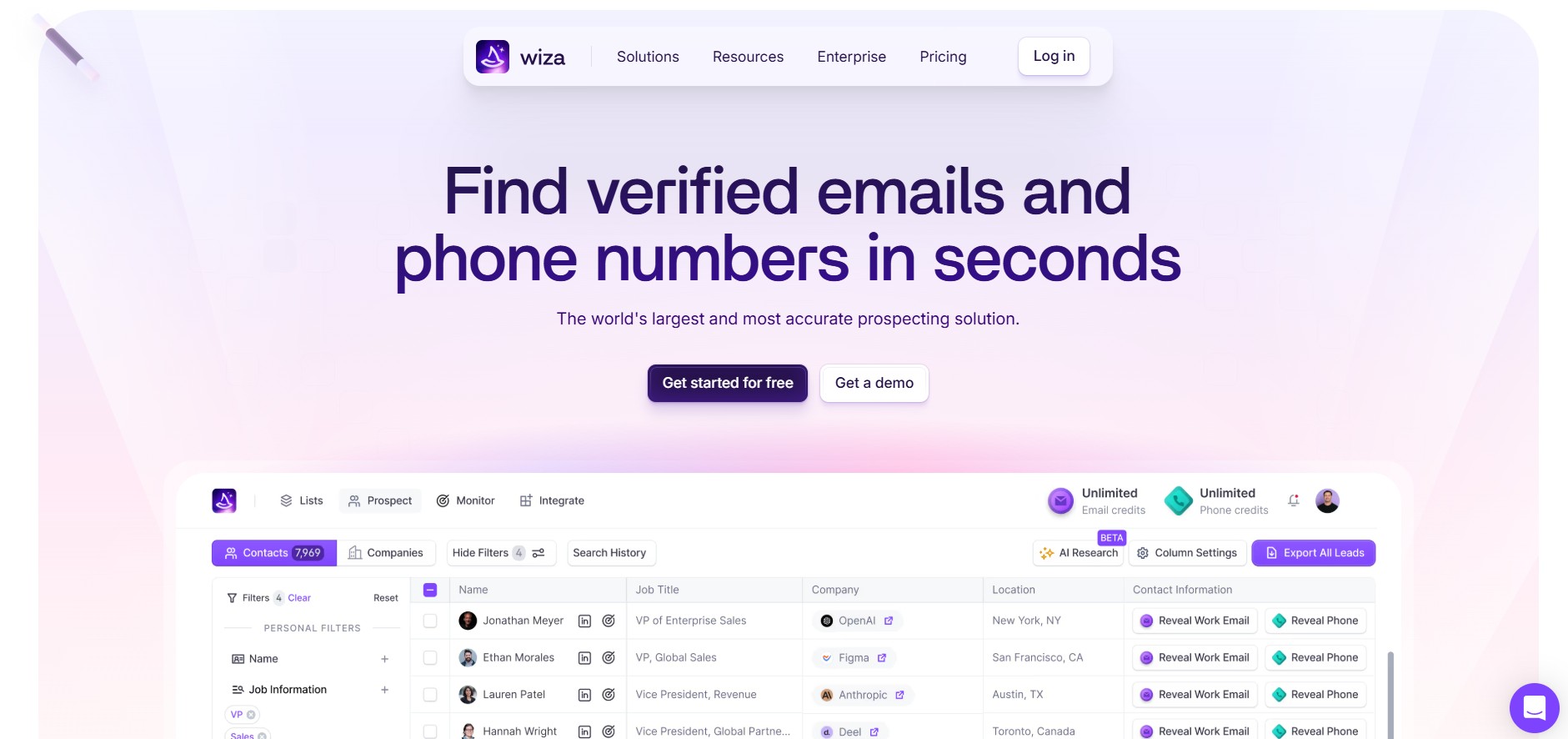
Wiza is a B2B contact data platform. Its whole job is finding and verifying emails and phone numbers, then getting them into your CRM or outreach tool. It’s not a sequencer. It doesn’t run LinkedIn campaigns. It doesn’t manage replies. It sits at the data layer of your stack and does that one thing.
There are two ways to use it. First is the Chrome extension — install it, visit any LinkedIn profile or Sales Navigator search, click the Wiza button, and it reveals verified contact info in real time. Second is bulk export — run a Sales Navigator search, click once, and the entire result set exports to Wiza for processing. From there you download a CSV or push directly to your CRM.
Wiza also has its own prospecting database of 850M+ contacts with 30+ filters (job title, seniority, company size, industry, location, skills). So if you’re not starting from a Sales Navigator list, you can build one inside Wiza itself.
What it’s best for: SDRs, sales reps, recruiters, and marketing teams who need clean, verified contact data before handing off to an outreach tool.
Wiza Features — What It Actually Does
Chrome Extension & LinkedIn Integration
This is genuinely the strongest part of Wiza. The Sales Navigator-to-CSV workflow is one of the fastest in the category. You run your search, hit the Wiza button, and it processes the list. No manual copy-paste, no fiddling with scraper settings.
- Reveals emails and phone numbers on individual LinkedIn profiles in real time
- Bulk exports entire Sales Navigator searches or saved lead lists in one click
- Works on both standard LinkedIn and Sales Navigator
- Consistent G2 reviewers flag this as the standout feature
One thing that’s easy to miss before signing up: the core use case requires an active LinkedIn Sales Navigator subscription, which runs $80–100/month separately. Wiza doesn’t include it, doesn’t discount it, and doesn’t offer a workaround. Without Sales Navigator, you’re largely left using Wiza’s own database rather than exporting your curated LinkedIn searches. That changes the value proposition pretty significantly.
Wiza Prospecting Database
The 850M+ contact database with 30+ search filters is a real feature, not just a marketing claim. You can search by job title, seniority, industry, company size, location, and skills — and build a prospect list entirely inside Wiza without touching LinkedIn at all.
Honest take: this database is functional but it’s not where Wiza has its edge. Competitors like Apollo and ZoomInfo have built more robust discovery layers with richer filtering. If database prospecting is most of what you need, Wiza isn’t the obvious first choice. But if you’re supplementing your Sales Navigator workflow with some direct database pulls, it works fine.
Email Verification
Wiza verifies at export time using SMTP checks and real-time source lookups rather than pulling from a static database. That’s the right way to do it — stale databases are where bounce rates come from.
The credit system reflects this too: you only burn credits on contacts where Wiza successfully verifies an email. Contacts that can’t be resolved don’t count. That’s actually a fair model.
Wiza claims 99%+ email accuracy and a sub-1% bounce rate. Those numbers are better than what independent testing shows, but the real numbers are still solid. In a 7-tool benchmark run on 1,000 B2B leads, Wiza returned 671 emails — the highest coverage of any tool tested — but 38 of those failed neutral verification, leaving 633 usable addresses. Good coverage, not perfect accuracy. Real-world deliverability consistently lands between 90–95% based on third-party data.
The gap between the claimed 99% and the tested 90–95% comes almost entirely from catch-all domains. These are domains configured to accept all inbound email regardless of whether the specific address exists — so SMTP verification can’t actually confirm anything. Wiza can’t solve for this; almost no tool can. But it’s worth knowing before you send to a list heavy with SMB or company domains.
Phone Number Data
Phone numbers are available on the Email + Phone tier ($199/month or $166/month annual). The data quality is solid for US-based contacts and gets patchy outside North America. If your ICP skews European, Kaspr does this better.
The phone overage rate is $0.35/contact versus $0.15/email on the Email plan. Plan accordingly.
Wiza Monitor (Job Change Alerts)
Upload your CRM contacts and Wiza tracks when they change roles or companies. Alerts come through Slack and email, and Wiza updates job titles and company info in your CRM automatically.
This is actually useful. Job changes are one of the best outbound triggers in B2B — a new VP of Sales at a target account is a far warmer conversation than a cold reach to someone who’s been in the same role for three years. The automation here saves real time that most teams are currently spending on manual LinkedIn checks or not spending at all and missing the window.
AI Research Feature
Relatively new. It lets you ask questions about a contact or company and get structured answers. Useful for quick company context before a call or before personalizing a message sequence.
Still maturing. It’s helpful for surface-level enrichment but it’s not a replacement for actual intent data tools. Don’t buy Wiza for this feature.
CRM & Outreach Integrations
Native integrations with HubSpot, Salesforce, Pipedrive, and Outreach. Contacts sync automatically with titles and company data. CSV export is available on every plan.
No built-in outreach sequencing. Wiza is explicit about being a data provider that feeds your stack, not an all-in-one. That’s fine — it just means you need another tool for the execution layer.
Wiza Pricing — The Real Cost
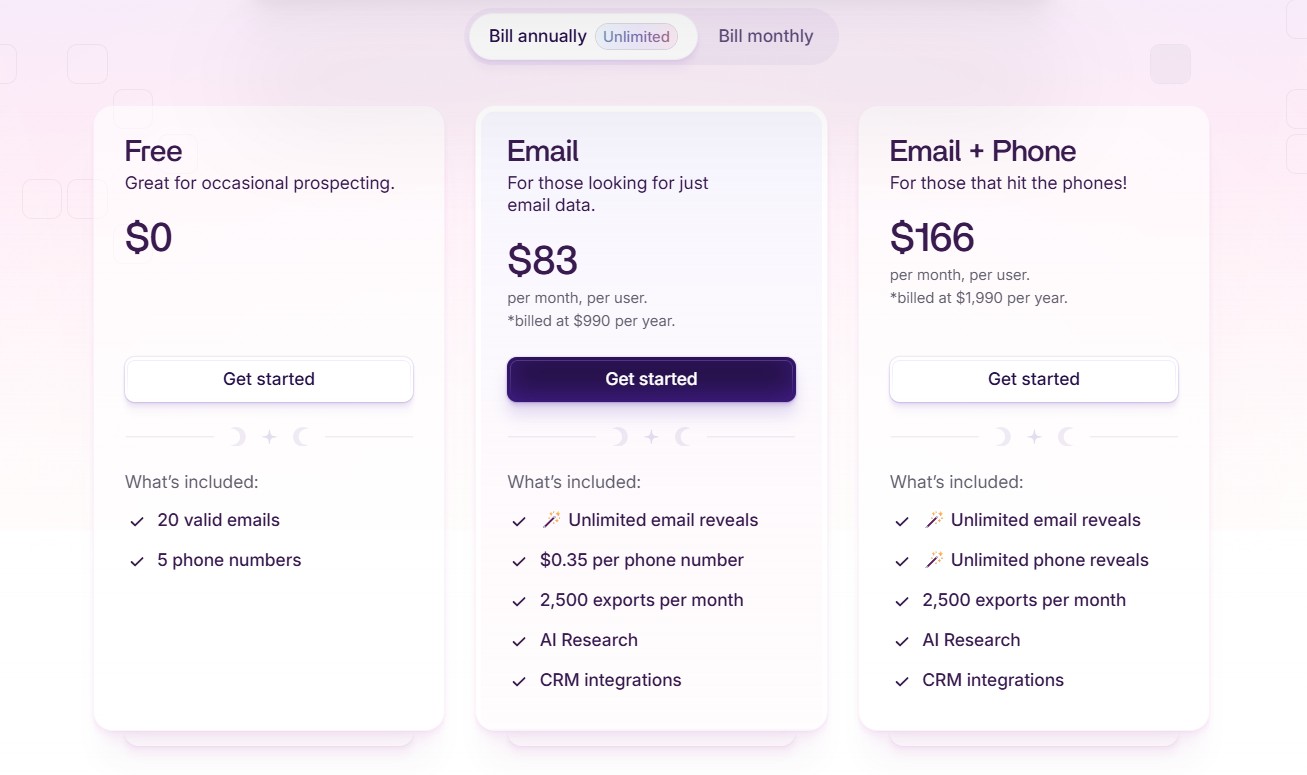
Here’s where most reviews lose the plot. They list the Wiza plans, maybe note the annual vs monthly difference, and call it done. The number that actually matters is what you’re paying all-in.
The Sales Navigator problem: Wiza’s full value depends on Sales Navigator. Add $80–100/month and the real entry cost for the $49/month Starter plan is closer to $129–149/month. For the $99/month Email plan, you’re at $179–199/month before you’ve exported a single contact.
| Plan | Monthly Price | Annual Price | What’s Included |
|---|---|---|---|
| Free | $0 | — | 20 email reveals, no credit card required |
| Starter | $49/mo | — | Usage-based credits, core features |
| $99/mo | $83/mo ($990/yr) | 500 emails/month; unlimited on annual | |
| Email + Phone | $199/mo | $166/mo ($1,990/yr) | Emails + phone numbers |
| Team (3+ users) | Custom | Custom | No longer publicly listed |
Credits don’t roll over. On any plan, unused credits reset monthly. Annual plans give you unlimited monthly exports (up to 30,000/year), but the unused capacity from quiet months doesn’t carry forward. If your prospecting volume is seasonal or inconsistent, you will waste money.
Annual is the obvious call at volume. The Email annual tier ($83/month, $990/year) gives unlimited email reveals. On the monthly plan at $99/month, you get 500. Any team doing more than 500 emails/month — which isn’t a lot — should be on annual.
Overage fees: $0.15/email and $0.35/phone contact on monthly plans. These compound fast if you’re not watching usage.
Effective cost per email on monthly plans runs $0.20–$0.49 depending on plan and usage volume. On annual unlimited, the math improves significantly, but you’re also locked in for a year.
The free plan’s 20 email reveals is enough to check if the interface works. It’s not enough to validate data quality at scale.
One more thing: Wiza requires a corporate email address to sign up. No Gmail, no Yahoo. Freelancers and independent consultants hit this wall first.
Email Finder Accuracy — Tested
Wiza claims 99%+ email accuracy and a sub-1% bounce rate. Here’s what the data actually shows.
On G2, across 1,139 reviews, 161 reviewers specifically cite accuracy as a positive. 57 cite inaccurate data as a negative. That’s a 2.8:1 ratio in favor — decent, not exceptional. The G2 crowd is generally happy with Wiza’s data quality, but “generally happy” and “99% accurate” are different claims.
In a 7-tool head-to-head benchmark on 1,000 B2B leads, Wiza returned the highest coverage (671 emails found) but 38 failed on neutral third-party verification — leaving 633 usable addresses. Volume leader, not accuracy leader.
Real-world deliverability lands between 90–95% based on third-party analysis. The delta from 99% comes from catch-all domains, where standard SMTP verification is essentially useless. Wiza can’t fix this; almost nobody can. But if your prospect list is heavy with company domains that run catch-all configurations (very common in SMB), expect a meaningful chunk of your exports to carry that uncertainty.
What this means for your stack: A 90–95% deliverability rate is fine for outbound at moderate volumes. Sub-5% bounce rate is the practical threshold for maintaining sender reputation, and Wiza’s data clears that bar. For teams running 1,000+ contacts/month, running Wiza output through a secondary verification pass with NeverBounce or ZeroBounce before sending is worth the small additional cost — especially on lists that skew SMB.
Where Wiza’s accuracy does hold up well: LinkedIn-sourced contacts. Starting from a verified LinkedIn profile rather than guessing at email patterns from a company domain gives the verification a meaningful head start. The data is cleaner when the source is cleaner.
Wiza Pros and Cons
Pros
- Fastest LinkedIn Sales Navigator to CSV workflow in the category
- Real-time email verification at export — not a static database
- 850M+ contact database with 30+ prospecting filters
- Wiza Monitor for job change alerts is genuinely useful for outbound timing
- Only charges credits for verified contacts — unresolvable contacts don’t count
- Clean, low-friction interface; setup is fast
- Free plan available, no credit card required
Cons
- Sales Navigator dependency is the biggest hidden cost — true entry price is ~$149/month, not $49
- Credits don’t roll over on any plan — dead money during low-volume months
- Monthly overage fees ($0.15/email, $0.35/phone) compound fast at scale
- No built-in outreach sequencing — need a separate tool for that
- LinkedIn-only as a data source — can’t enrich inbound leads, event lists, or non-LinkedIn contacts without a second tool
- No intent data, technographics, or org charts
- Phone data quality degrades outside North America
- Catch-all domain accuracy is a known gap across the whole category, Wiza included
- Corporate email required to sign up — blocks freelancers and independents from the free trial
Who Is Wiza Best For?
Wiza makes sense if your prospecting workflow is already built around LinkedIn Sales Navigator and you want the cleanest possible path from a Sales Nav search to a verified contact list in your CRM. The Chrome extension and bulk export workflow genuinely are the best in class for that specific job.
It also makes sense if you’re on annual billing. The unlimited email tier at $83/month annual is solid value for a team doing consistent outbound volume. The monthly math is trickier.
Wiza is a good fit if:
- You live in Sales Navigator and want to stop manually handling exports
- You’re a solo rep or small SDR team doing focused, targeted outbound
- You can commit to annual billing and have predictable monthly volume
- You already have a separate outreach tool and just need the data layer to feed it
Wiza is not the right call if:
- You don’t already have Sales Navigator — the real cost is $149+/month before you export anything
- You prospect from multiple sources — Wiza only enriches LinkedIn contacts, so inbound leads, event attendee lists, and content download leads need a different tool
- You need outreach sequencing built into the same platform
- You need intent signals, technographics, or org chart data
- You’re doing high-volume outbound (1,000+ contacts/month) on a tight budget — the per-contact math stops working
Wiza Alternatives Worth Knowing
Apollo.io — Best all-in-one for teams that want data and outreach in one place
Apollo combines a large B2B database with built-in email sequences, task automation, and CRM sync. The appeal is obvious: one tool instead of two. The trade-off is data accuracy — Apollo’s database is broad, but users regularly report stale or mismatched data compared to Wiza’s LinkedIn-sourced exports. If the appeal is simplicity and budget over precision, Apollo is worth a serious look.
Hunter.io — Best for email finding without LinkedIn dependency
Hunter finds emails from company domains, not LinkedIn profiles. Starts at $34/month and doesn’t require Sales Navigator. If you have a target company list and just need email addresses without any LinkedIn workflow, Hunter is cheaper and simpler. It’s a fundamentally different tool — domain-first versus profile-first — but the output overlaps enough that small teams often start here.
Kaspr — Best for phone data in European markets
Kaspr does direct dials and mobile numbers well, particularly in European markets where Wiza’s phone data thins out. GDPR-focused positioning makes it a more defensible choice for EU-based sales teams. If the ICP skews European and phone is part of the outreach strategy, Kaspr is a better fit than Wiza’s Email + Phone tier.
Lusha — Best for individual contact lookups with strong phone data
Lusha is faster for one-off lookups and uses multi-source verification rather than Wiza’s LinkedIn-primary approach. Better global coverage. For account-based selling where speed on individual lookups matters more than bulk Sales Nav export, Lusha has a real edge.
Evaboot — Best for pure Sales Navigator scraping without the extras
Evaboot does exactly one thing: clean and export LinkedIn Sales Navigator searches. No database, no extras, just a tighter focus on the scrape-and-clean workflow. Cheaper than Wiza for teams that already have an email finder and just want better Sales Nav exports.
DealsFlow — Best for running the full LinkedIn outreach conversation after the data is sourced
DealsFlow doesn’t compete with Wiza — it’s the next layer of the stack. Wiza finds and verifies the contacts. DealsFlow runs the LinkedIn outreach and handles everything that comes after.
The specific thing DealsFlow does that most outreach tools don’t is Arlo AI. Most LinkedIn tools send a connection request and a message sequence, then hand the conversation back to a human the moment someone replies. Arlo reads every reply, decides the right response, handles objections, and books the meeting — in the rep’s voice, without manual involvement. That’s a real operational gap it’s closing. Manually handling replies across dozens of accounts is where LinkedIn outreach at scale falls apart.
DealsFlow also handles multi-account management across up to 50 LinkedIn accounts from one dashboard, which makes it the practical choice for agencies and SDR teams running outreach for multiple clients or seats.
Pricing: Starter Pilot at $49/month, Scaling Pilot at $129/month, Agency Pilot at $299/month. 14-day free trial, no credit card required.
The natural stack: Wiza for data → DealsFlow for outreach and conversation. They’re built for different jobs, and they fit together cleanly.
Final Verdict
Wiza is a good tool being sold with incomplete pricing. The Chrome extension is genuinely fast, the Sales Navigator export workflow is the best available, and real-time verification at export is a smarter approach than static databases. The data quality in real-world use — 90–95% deliverability on LinkedIn-sourced contacts — is workable for most outbound teams.
The issue is expectation management. The listed Starter plan of $49/month is not what you’ll actually pay. Add Sales Navigator and you’re at ~$149/month before sending anything. Credits don’t roll over, monthly overages compound, and the tool only enriches LinkedIn contacts — which means inbound or multi-source teams need something else for the rest of their list.
On annual billing, committed to LinkedIn-sourced outbound, already running a separate outreach tool: Wiza earns its place. If Sales Navigator isn’t already in the budget or you need outreach built in, look at Apollo first. The real question isn’t whether Wiza is good. It is. The question is whether the specific workflow it’s built for matches yours.
FAQs
1. Does Wiza work without Sales Navigator?
Not really. You can use Wiza’s own 850M+ contact database with 30+ filters, but the core workflow most people buy it for — exporting verified emails directly from LinkedIn searches — requires an active Sales Navigator subscription at $80–100/month on top of any Wiza plan.
2. Do Wiza credits roll over month to month?
No. Credits reset monthly on every plan, including annual. Annual plans give you unlimited monthly exports up to 30,000 contacts/year, but unused capacity from a quiet month doesn’t carry forward. If your outbound volume is seasonal or inconsistent, you’ll burn money on credits you never use.
3. How accurate is Wiza’s email data in practice?
Wiza claims 99%+ accuracy. Independent testing puts real-world deliverability between 90–95%. In a 7-tool benchmark on 1,000 B2B leads, Wiza found 671 emails but 38 failed neutral verification — leaving 633 usable. Good coverage, solid accuracy, not the 99% marketed. Catch-all domains are the main gap, which is an industry-wide limitation, not specific to Wiza.
4. Is Wiza GDPR compliant?
Wiza collects publicly available professional data from LinkedIn. It’s not positioned as a GDPR-certified platform the way Kaspr or Cognism are. Enterprise teams selling into European markets or operating in regulated industries should verify this directly with Wiza’s team before deploying at scale.
5. What’s the best Wiza alternative for teams on a budget?
Hunter.io at $34/month if you just need emails from company domains and don’t need a LinkedIn workflow. Apollo’s free or basic tier if you need data and outreach sequencing bundled in one tool. Neither requires Sales Navigator, which is where the real Wiza cost comes from.
6. Can Wiza send outreach messages or run LinkedIn campaigns?
Nope. Wiza is strictly a data tool. It finds and verifies contact information, then gets it into your CRM or a CSV. For LinkedIn outreach and conversation handling, you need a separate tool. DealsFlow pairs well here — it takes the contact list Wiza produces, runs the LinkedIn outreach, and Arlo AI handles replies and books meetings without manual involvement.