


LinkedIn has transformed from a simple professional networking site into one of the most powerful B2B lead generation engines in the world. With over 1 billion members globally and more than 65 million decision-makers actively using the platform, sales professionals have an unprecedented opportunity to find, connect with, and convert high-quality prospects but only if they know how to separate the real buyers from the casual browsers.
The challenge isn’t finding leads on LinkedIn. The challenge is qualifying them quickly and accurately before investing hours of time and energy into conversations that go nowhere. This is where a structured qualification framework becomes not just helpful, but absolutely essential.
The BANT framework Budget, Authority, Need, and Timeline has been a cornerstone of sales qualification for decades. Originally developed by IBM in the 1950s, it has stood the test of time because it addresses the four fundamental questions every salesperson must answer before pursuing a prospect seriously. In 2026, with AI-assisted selling, social listening tools, and advanced LinkedIn features reshaping how sales teams operate, BANT has evolved into something far more dynamic and actionable than its original form.
This blog will walk you through every dimension of the BANT framework applied specifically to LinkedIn, showing you how to qualify leads on LinkedIn faster, smarter, and with far greater accuracy than you’re likely doing today.
Why LinkedIn Is the Best Platform to Qualify B2B Leads
Before diving into the framework itself, it’s worth understanding why LinkedIn is uniquely suited for lead qualification compared to other channels.
LinkedIn profiles are essentially living, breathing resumes and business cards rolled into one. When a prospect connects with you or engages with your content, you immediately have access to a wealth of information their job title, company size, industry, recent activity, mutual connections, educational background, and often even their business challenges and priorities (if they post or comment actively).
No cold call, no email, and no trade show badge scan gives you that level of instant intelligence. This contextual richness is what makes LinkedIn the ideal environment for applying the BANT framework before you ever send a single message.
Additionally, LinkedIn’s algorithm has become increasingly sophisticated in 2026. It prioritizes content from trusted connections, rewards engagement, and surfaces relevant conversations to decision-makers in ways that allow savvy sales professionals to position themselves perfectly in front of the right people at exactly the right moment.
What is the BANT Framework in the Modern Sales Context
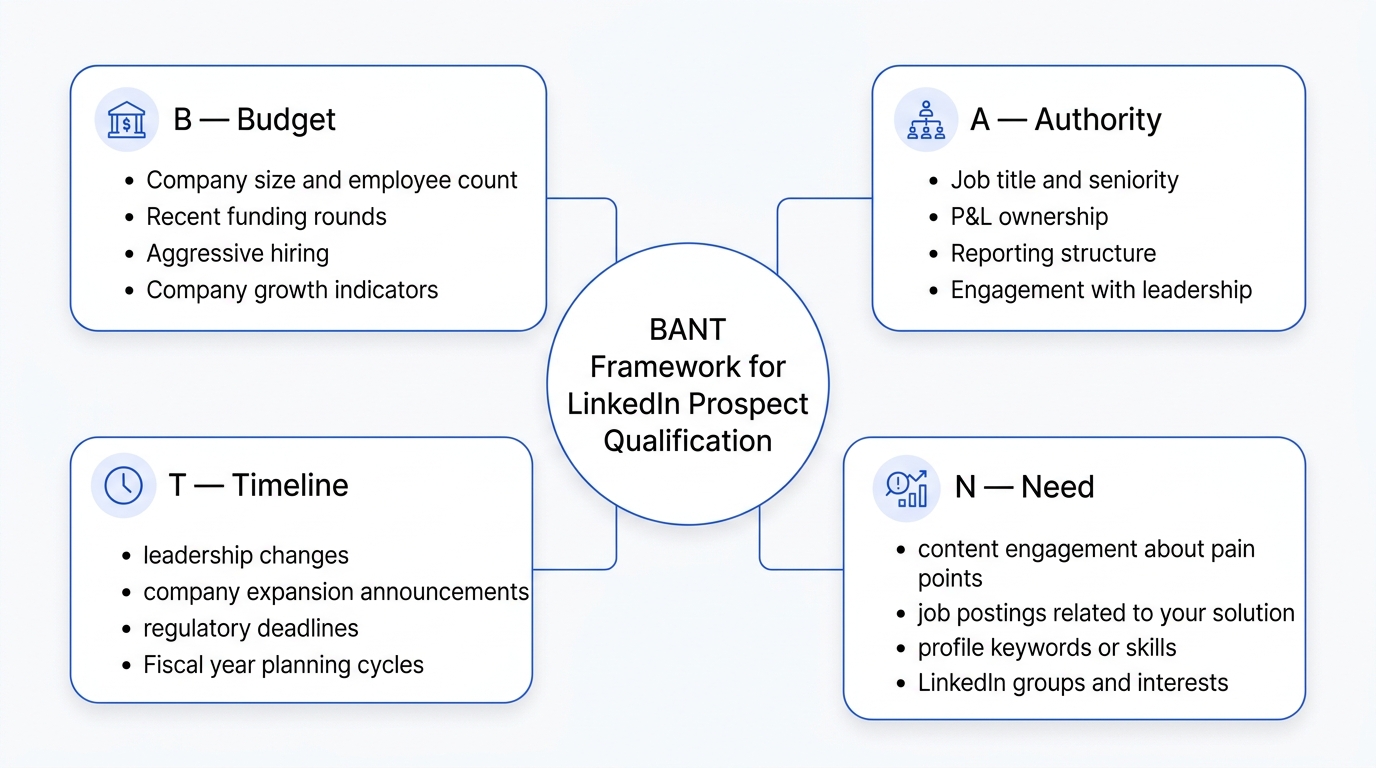
BANT stands for:
- B — Budget: Does the prospect have the financial resources to purchase your solution?
- A — Authority: Is this person empowered to make or influence purchasing decisions?
- N — Need: Does this prospect have a genuine, pressing problem your product or service solves?
- T — Timeline: How soon is the prospect looking to make a decision or implement a solution?
In the traditional sales world, these questions were asked during phone calls or in-person meetings. In 2026, you can answer most of them before you even send a connection request by reading LinkedIn signals intelligently.
The key mental shift is this: BANT is no longer a checklist you run through during a discovery call. It’s an ongoing intelligence-gathering process that begins the moment a prospect appears on your radar.
B — Budget: How to Gauge Financial Readiness on LinkedIn
Budget qualification has always been the most awkward part of the sales process. Asking someone how much money they have feels intrusive, and most prospects won’t volunteer that information upfront. LinkedIn, however, offers a set of indirect signals that can tell you a great deal about a company’s financial capacity without ever asking a single uncomfortable question.
Company Size and Revenue Indicators
LinkedIn shows company size in ranges (1–10, 11–50, 51–200, 201–500, and so on). While this isn’t a precise revenue figure, it’s a reliable proxy. A company with 500+ employees in the SaaS sector almost certainly has a defined budget for tools, software, and services. A 10-person startup may not or if it does, its budget threshold is likely far lower.
Cross-reference the company size with the industry. A 200-person professional services firm might have significantly more discretionary spending than a 500-person manufacturing company operating on thin margins. Industry benchmarks matter enormously here.
Recent Funding and Growth Signals
LinkedIn Company Pages often reflect recent milestones a new office announcement, team expansion posts, or celebratory posts about funding rounds. Companies that have recently secured Series A, B, or C funding are actively looking to spend that money on solutions that drive growth. They have budget, they have urgency, and they’re in buying mode.
You can also look at the “People Also Viewed” section and job postings linked to the company page. If a company is hiring aggressively across sales, marketing, and operations, it’s a sign of financial health and expansion both of which correlate strongly with increased technology and service spending.
Tools That Help
In 2026, tools like LinkedIn Sales Navigator allow you to filter companies by revenue range, headcount growth rate, and funding stage. If you’re serious about lead qualification at scale, Sales Navigator’s advanced filters can essentially pre-qualify prospects on the budget dimension before any human interaction takes place.
| Budget Signal | What It Tells You |
|---|---|
| Company size (200+ employees) | Likely has structured procurement and budget |
| Recent funding round | Actively investing in growth solutions |
| Aggressive hiring in relevant departments | Expanding operations, increased spend likely |
| Premium LinkedIn Company Page features | Investing in employer branding, growth-focused |
| Multiple vendor/tool mentions in posts | Comfortable with SaaS spending |
A — Authority: Finding the Real Decision-Maker on LinkedIn
One of the most common reasons deals stall is that salespeople spend weeks nurturing someone who has zero authority to approve a purchase. LinkedIn is remarkably effective at helping you identify authority if you know what to look for.
Job Title Is Just the Starting Point
A job title tells you something, but not everything. A “Manager” at a 20-person startup may have full purchasing authority, while a “Director” at a 10,000-person enterprise might need to pass a proposal through four layers of approval before anything moves.
Look beyond the title to the responsibilities section of the profile. Decision-makers tend to list things like “P&L ownership,” “vendor management,” “budget oversight,” or “strategic partnerships” in their experience descriptions. These phrases signal genuine authority rather than just seniority.
Seniority and Reporting Structure
LinkedIn’s organizational insights (available through Sales Navigator) can show you the reporting structure within a company. This helps you understand whether you’re talking to someone who reports to the C-suite or someone who is three levels removed from the final decision-maker.
In general, for mid-market companies (100–1,000 employees), your ideal decision-maker contact is typically a VP, Director, or Department Head. For enterprise companies (1,000+ employees), C-level engagement or at least Director-level with C-suite sponsorship is typically required to move deals forward.
Engagement Patterns Reveal Influence
Authority isn’t always about title. On LinkedIn, influence is also visible through engagement patterns. If a prospect’s posts consistently attract comments and shares from their peers and superiors, they hold significant influence within their organization even if their title doesn’t immediately scream “decision-maker.”
Look at who engages with their content. If their CEO regularly likes and comments on their posts, that person likely has significant organizational visibility and influence. Conversely, if their content gets no traction internally, they may be a doer rather than a decision-maker.
Identifying Buying Committees
In 2026, most B2B purchases, especially for solutions above $10,000 annually involve a buying committee of four to seven stakeholders. Your job isn’t just to find one decision-maker; it’s to map the entire decision-making unit.
LinkedIn allows you to identify multiple stakeholders at a target company by searching within that company’s employee list filtered by department and seniority. Building relationships across the buying committee simultaneously, a technique called multi-threading, dramatically reduces the risk of your champion leaving or losing internal support.
N — Need: Identifying Genuine Pain Points Through LinkedIn Activity
Need qualification is arguably the most nuanced dimension of BANT because genuine need isn’t always stated explicitly. On LinkedIn, need is often expressed in subtle, observable ways, through the content someone shares, the questions they ask, the groups they join, and the problems they publicly acknowledge.
Content Engagement as a Need Signal
When someone likes, comments on, or shares a post about a specific business challenge, they’re telling you something important about their priorities. A CFO who consistently engages with content about cash flow management, cost reduction, and financial forecasting is signaling that these are active concerns in their professional life.
Make it a habit to review the recent activity of prospects before reaching out. LinkedIn shows you posts they’ve liked, comments they’ve made, and articles they’ve shared. This “digital body language” is one of the most underused qualification signals available to modern sales professionals.
Profile Keywords and Skill Endorsements
The skills section and profile summary of a LinkedIn profile can reveal a lot about a prospect’s current priorities and gaps. If someone lists skills in legacy technologies or methods that your solution replaces, there’s a natural need conversation to be had. If their summary mentions challenges like “scaling operations” or “improving team efficiency,” those are explicit need signals.
Job Postings as an Indirect Need Indicator
This is one of the most powerful, and least used, need qualification tactics on LinkedIn. When a company posts a job opening for a role that your solution addresses, it often signals one of two things: either they’re trying to solve a problem by hiring, or they’ve solved it by hiring and now need supporting tools and infrastructure.
For example, if a company posts a job for a “Revenue Operations Manager,” they’re actively building their RevOps function, a strong signal that they may need CRM, analytics, or sales enablement tools. If they post for a “Cybersecurity Analyst,” they’re prioritizing security, a strong signal for security software vendors.
| Need Signal | How to Find It on LinkedIn |
|---|---|
| Content about a specific pain point | Check “Activity” section of the profile |
| Groups joined around a problem area | View their profile’s “Interests” section |
| Job postings in relevant departments | Company page → “Jobs” tab |
| Profile summary mentions of challenges | Read the “About” section carefully |
| Skills in legacy or transitional tech | Skills & Endorsements section |
| Commenting on competitor content | Monitor competitor company pages |
LinkedIn Groups as a Need Discovery Tool
LinkedIn Groups, while less active than they were a decade ago, still serve as valuable intelligence hubs. If a prospect is active in a group focused on a specific challenge, say, “B2B Sales Leaders” or “Supply Chain Innovation”, it tells you that this challenge is worth their unpaid time and attention. That’s a meaningful signal.
T — Timeline: Reading Urgency Signals on LinkedIn
Timeline is the dimension that separates prospects who are worth pursuing now from those who belong in a nurture sequence for the next six months. Getting timeline wrong doesn’t mean you lose the deal, it means you waste enormous amounts of time and energy at the wrong moment, while the prospect ultimately buys from whoever they happen to be talking to when they’re actually ready.
Trigger Events That Create Urgency
The most reliable way to qualify leads on LinkedIn based on timeline is to look for trigger events, specific moments that create urgency and push a company into buying mode. Common trigger events include:
Leadership changes: A new VP of Sales, Chief Marketing Officer, or CTO joining a company almost always initiates a review of existing tools and vendors. New leaders want to put their stamp on the tech stack and processes. A LinkedIn job change notification for a senior leader at a target account is one of the highest-value signals in B2B sales.
Company milestones: A company announcing its expansion into a new market, launching a new product line, or hitting a significant headcount milestone signals growth and the likely need for new solutions to support that growth.
Regulatory and compliance deadlines: In industries like finance, healthcare, and data management, regulatory changes create hard deadlines. If a new compliance requirement is coming into effect in Q3, companies in that industry have a defined timeline that your sales process needs to align with.
Fiscal year transitions: Many companies evaluate and approve new vendors and tools at the beginning of a new fiscal year or at the end when budget needs to be spent. Understanding your prospects’ fiscal calendars, often inferable from the industry and company type, helps you time your outreach for maximum receptivity.
How to Monitor Timeline Triggers on LinkedIn
LinkedIn Sales Navigator’s “Alerts” feature is specifically designed for this. You can set alerts for:
- Job changes at target accounts
- Company news and announcements
- New connections and activity from key contacts
- Funding announcements
These alerts turn LinkedIn into an active signal-monitoring system rather than a passive database you search occasionally.
Reading Conversational Urgency
When you’re in early-stage LinkedIn conversations, prospects will often hint at their timeline without stating it directly. Phrases like “we’re currently evaluating options,” “we’re hoping to have something in place by Q3,” or “we’re just starting to look at this” are all timeline signals.
Train yourself to listen for these cues and ask natural follow-up questions that help you understand the buying horizon without being pushy.
How to Qualify Leads on LinkedIn Using a Structured Outreach Sequence
Knowing the BANT signals is only half the equation. The other half is structuring your outreach in a way that gathers qualification data naturally and conversationally, without making prospects feel like they’re being interrogated.
Here’s a proven three-stage LinkedIn outreach sequence designed to qualify leads on LinkedIn efficiently and respectfully:
Stage 1: The Warm Connection Request (Day 1)
Before sending a connection request, engage with two or three of the prospect’s recent posts, leave a thoughtful comment, not just a like. This establishes familiarity and makes your connection request feel natural.
Your connection request message should be short, personalized, and reference something specific about them:
“Hi [Name], I’ve been following your content on [topic] , really insightful perspective on [specific point]. I work with [type of company] on [relevant challenge] and thought it would be great to connect.”
This message does three things: it establishes relevance (Need signal), positions you as attentive (building rapport), and avoids any hint of a sales pitch.
Stage 2: The Value Message (Day 3–5 after connecting)
Once connected, wait two to three days before sending your first message. Use this message to provide genuine value, share a relevant resource, insight, or observation, and ask a single, open-ended question that invites them to share their current situation.
“Thanks for connecting, [Name]. I recently came across [specific report/insight] about [relevant challenge], thought it might be useful given your focus on [area]. Curious is [specific challenge] something you’re actively working on right now?”
This question begins the Need and Timeline qualification process naturally, without triggering any sales resistance.
Stage 3: The Qualification Conversation (Day 7–10)
If they respond positively, move into a genuine conversation. Ask layered questions that naturally surface BANT criteria:
- Need: “What’s been the biggest friction point in [relevant area] for your team lately?”
- Timeline: “Is solving this something that’s on the roadmap for this half of the year, or more of a longer-term initiative?”
- Authority: “Who else typically gets involved when you’re evaluating solutions like this?”
- Budget: “Do you typically handle vendor evaluations internally, or does procurement get involved early on?”
Notice that none of these questions mention budget directly. The budget question is reframed as a process question, it helps you understand buying dynamics while naturally surfacing whether there’s an established budget process.
How to Build a LinkedIn BANT Qualification Scorecard
To make qualification systematic and scalable, build a simple scorecard that your team uses to rate prospects across all four BANT dimensions. This removes subjectivity and ensures consistent qualification standards across your sales organization.
| BANT Dimension | Signal Observed | Score (1–3) | Notes |
|---|---|---|---|
| Budget | Company size, funding, growth indicators | 1 = Unclear / 2 = Likely / 3 = Confirmed | |
| Authority | Title, responsibilities, engagement | 1 = Influencer / 2 = Recommender / 3 = Decision-maker | |
| Need | Content activity, job posts, stated pain | 1 = Potential / 2 = Acknowledged / 3 = Urgent | |
| Timeline | Trigger events, stated timeline, urgency signals | 1 = 12+ months / 2 = 3–6 months / 3 = < 3 months | |
| Total | /12 |
A score of 9–12 = Hot lead. Prioritize immediately. A score of 6–8 = Warm lead. Continue nurturing. A score below 6 = Unqualified. Move to long-term nurture or disqualify.
Mistakes That Slow Down Lead Qualification on LinkedIn
Even experienced sales professionals make avoidable mistakes that drag out their qualification process. Here are the most common ones:
Pitching before qualifying: Sending a product pitch in the first or second message is the fastest way to kill a conversation. LinkedIn users are sophisticated, they recognize a sales pitch immediately and disengage. Always lead with curiosity and value.
Focusing on one stakeholder: As mentioned earlier, most B2B decisions involve multiple people. If you only qualify and nurture one contact, you’re vulnerable to deal collapse the moment that contact changes roles, loses interest, or gets overruled.
Ignoring the LinkedIn profile entirely: Many salespeople reach out without reading the prospect’s profile thoroughly. The profile is a qualification document, use it fully before making contact.
Moving too fast: Rushing from connection to demo request in two messages signals desperation and disrespects the relationship-building nature of the platform. LinkedIn is a long game, and the fastest path through it is patience combined with consistency.
Treating all leads equally: Not all LinkedIn leads deserve the same level of attention and follow-up. Your BANT scorecard exists precisely to force prioritization. Spend 80% of your energy on the top 20% of qualified prospects.
Advanced LinkedIn Features That Accelerate BANT Qualification in 2026
The LinkedIn ecosystem has expanded significantly, offering tools that weren’t available even two or three years ago.
LinkedIn Sales Navigator AI: In 2026, Sales Navigator’s AI features can now summarize account activity, highlight relevant buyer signals, and even suggest outreach timing based on engagement patterns. These AI-driven insights effectively compress the qualification timeline.
LinkedIn’s Conversation Intelligence Integration: For teams using CRM platforms like Salesforce or HubSpot, LinkedIn’s native integrations now sync conversation data directly into your CRM, allowing you to tag leads with BANT attributes and trigger automated nurture sequences based on qualification scores.
LinkedIn Events and Webinars: Prospects who register for or attend LinkedIn Events are signaling interest and at least moderate urgency. Hosting or co-hosting events on LinkedIn is one of the fastest ways to self-select a qualified audience and engage them in a low-pressure environment.
InMail Personalization at Scale: AI-assisted personalization tools integrated with LinkedIn allow sales teams to craft highly personalized InMail messages at scale, incorporating profile-specific signals into outreach without spending hours of manual research per prospect.
Conclusion
The BANT framework, when applied thoughtfully to LinkedIn’s rich professional ecosystem, transforms lead qualification from a guessing game into a disciplined, intelligence-driven process. By reading the right signals, company size and funding for Budget, job titles and engagement patterns for Authority, content activity and job postings for Need, and trigger events and stated urgency for Timeline, you can qualify leads on LinkedIn far faster than traditional approaches allow.
The key is to approach every prospect interaction as both a relationship-building and intelligence-gathering opportunity. LinkedIn rewards genuine engagement and consistent value creation. The salespeople who succeed on this platform in 2026 are not the ones with the slickest pitch, they’re the ones who listen carefully, ask smart questions, and invest their time only in prospects who have a real problem, the authority to act on it, the resources to invest in a solution, and a timeline that makes a conversation worthwhile right now.
Build your BANT scorecard. Set your Sales Navigator alerts. Monitor the signals. Engage with purpose. And let the framework do what it was designed to do, help you focus your energy where it counts most.
Frequently Asked Questions
Q1: How long should it take to qualify a lead on LinkedIn?
With a structured approach, you should be able to gather enough BANT intelligence to make a preliminary qualification decision within 48–72 hours of initial contact. Full qualification, with confirmed budget, authority, need, and timeline, typically takes two to four meaningful exchanges, which may span one to three weeks depending on response speed.
Q2: Is it necessary to use LinkedIn Sales Navigator to qualify leads effectively?
Not necessarily, but it significantly accelerates the process. Free LinkedIn accounts can still gather most BANT signals through profile research, content monitoring, and direct messaging. Sales Navigator simply automates and scales many of these activities, making it invaluable for teams qualifying leads at volume.
Q3: How do I qualify for budget without asking directly?
Ask about their current process and vendor landscape instead of asking for a number. Questions like “Are you currently using any tools for [area]?” or “What does your evaluation process typically look like?” naturally surface whether a budget and buying process exist without making the conversation feel transactional.
Q4: What should I do with leads that don’t qualify right now?
Move them into a structured nurture track, engage consistently with their content, share relevant resources periodically, and set a reminder to re-evaluate their BANT signals every 60–90 days. Circumstances change, and a lead that doesn’t qualify today may be your best customer in six months.
Q5: How many follow-ups are appropriate before moving on?
Best practice in 2026 suggests five to seven touchpoints across a 30-day window before pausing outreach. After that, a quarterly check-in (usually through engaging with their content rather than direct messages) keeps you on their radar without being intrusive.
Q6: Can BANT qualification work for solopreneurs or small businesses selling on LinkedIn?
Absolutely. BANT is especially valuable for individual sellers who can’t afford to waste time on unqualified prospects. For solopreneurs, the framework is lighter, focus primarily on Need and Authority, since Budget and Timeline tend to be more fluid with smaller buyers, but the core intelligence-gathering approach remains the same.