


LinkedIn has fundamentally revolutionized the way professionals connect, communicate, and share valuable content in the digital age. Since its inception, the platform has evolved far beyond a simple resume repository into a dynamic ecosystem where business relationships are built, industry insights are shared, and meaningful professional conversations happen daily. With nearly 900 million users worldwide, LinkedIn represents an unparalleled opportunity for sales professionals, recruiters, marketers, and business development executives to reach their target audiences at scale.
However, simply having access to such a massive professional network isn’t enough. The real competitive advantage lies not in reaching people, but in understanding how those people interact with the content you share. This is where LinkedIn Smart Links emerge as a game-changing feature that separates high-performing professionals from those who merely go through the motions of LinkedIn activity.
Many professionals share content on LinkedIn without truly understanding the impact of their efforts. They post a whitepaper and hope someone finds it valuable. They share an industry article and wonder if anyone actually read it. They send connection requests and follow-up messages to prospects without knowing if those prospects have any genuine interest in their offerings. This approach is inefficient, unscalable, and leaves enormous value on the table.
LinkedIn Smart Links change this dynamic entirely. By providing granular, real-time data about who engages with your shared content and how they engage with it, smart links transform LinkedIn from a broadcasting platform into a precision targeting and relationship-building tool. These specially formatted links track precisely when prospects click on your content, how often they return to it, what specific materials interest them most, and how their engagement patterns evolve over time.
What are LinkedIn Smart Links and Their Importance
LinkedIn Smart Links are specially formatted links that track when prospects click on your shared content. When you share a document, article, or any content through LinkedIn, the platform can generate a unique smart link that monitors engagement metrics. These links provide real-time data about who clicked on your content, when they clicked it, and other valuable engagement indicators.
Unlike regular links that only tell you whether someone visited your content, smart links give you a comprehensive view of prospect interaction patterns. This means you can see exactly which prospects are interested in your offerings, what topics resonate most with your audience, and how engaged different segments of your network are.
The primary purpose of smart links is to bridge the gap between your content distribution efforts and concrete engagement data. For sales professionals, this translates directly into actionable intelligence that can inform follow-up strategies and relationship-building efforts.
Why Smart Links Matter for Prospect Engagement Tracking
Tracking prospect engagement is fundamental to successful sales and marketing strategies. When you share content—whether it’s an industry report, case study, whitepaper, or thought leadership article—you want to know who’s actually interested in it. Smart links provide precisely this information.
Traditional metrics like views and shares give you only surface-level insights. Someone might see your content appear in their feed but never actually engage with it. Smart links cut through this ambiguity by showing you exactly who took the time to click and interact with your material. This level of specificity is invaluable for sales professionals who need to prioritize their outreach efforts.
Moreover, smart links help you understand the correlation between content consumption and sales readiness. If a prospect engages with your educational content multiple times, they’re likely further along in their buying journey than someone who ignores your posts entirely. This information allows you to tailor your outreach accordingly.
How LinkedIn Smart Links Work: The Technical Foundation
The Mechanics Behind Smart Link Generation
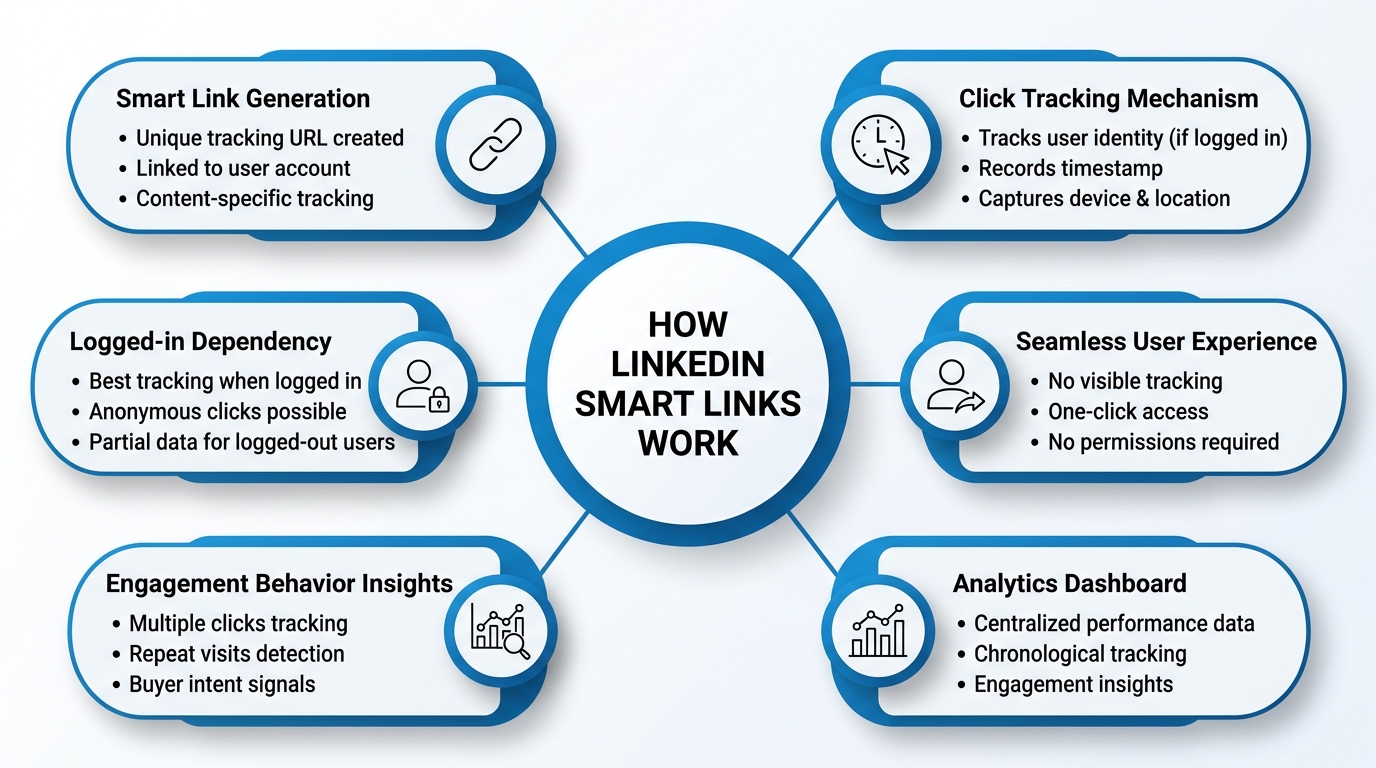
Understanding how LinkedIn Smart Links function at a technical level helps you use them more effectively. When you share content on LinkedIn, particularly documents, articles, or external links, the platform generates a unique tracking URL. This URL is unique to your account and the specific content you’re sharing.
Each time someone clicks this smart link, LinkedIn’s system records several data points: the identity of the person who clicked (if they’re logged into LinkedIn), the timestamp of the click, and information about their device and location. This data aggregates in your LinkedIn analytics dashboard, creating a comprehensive record of engagement.
The process is seamless from a user perspective. Prospects don’t see anything different—they simply click a link and are directed to the content destination. The tracking happens silently in the background, requiring no special action from the prospect or additional permissions.
It’s important to understand that smart link tracking works best when prospects are logged into their LinkedIn accounts. If someone clicks your smart link while logged out, the platform may not capture their identity, though the click itself might still be recorded as a generic interaction.
Platform Integration and Data Collection
LinkedIn Smart Links integrate deeply with the platform’s broader analytics infrastructure. When you access your LinkedIn analytics dashboard, you’ll find smart link performance data organized chronologically and segmented by various metrics.
The data collection extends beyond just who clicked your links. LinkedIn also captures information about engagement patterns. For instance, you can see if a prospect clicked a link multiple times, suggesting they either returned to the content or shared it with others who then clicked through. You can also track the time elapsed between when you posted content and when prospects engaged with it.
This temporal data is particularly valuable for understanding audience behavior. A prospect who clicks your link within an hour of posting might be more actively engaged than someone who waits days to click it. Similarly, someone who clicks a link multiple times over several weeks might be doing research, potentially moving through different stages of the buying cycle.
How to Use LinkedIn Smart Links for Maximum Effectiveness
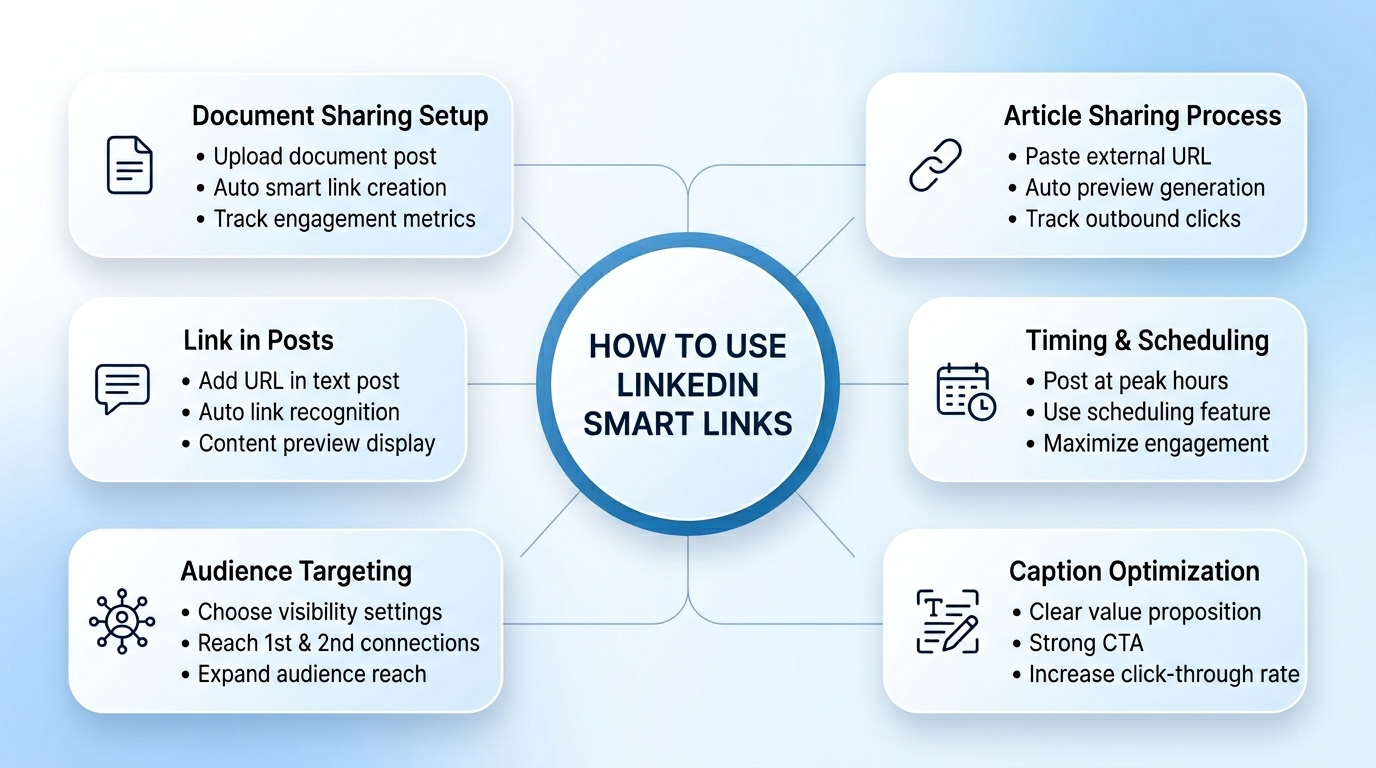
Setting up smart links on LinkedIn is straightforward, though the exact process varies slightly depending on what type of content you’re sharing. Here’s a comprehensive walkthrough:
For Document Sharing: Navigate to your LinkedIn home feed and click the “Start a post” button. Instead of typing a post, look for the document upload option. Select the document you want to share from your computer. LinkedIn will process the document and prepare it for sharing. Before hitting the final publish button, you’ll see options for adding a caption and setting privacy levels.
When you share a document this way, LinkedIn automatically generates a smart link. You don’t need to do anything special—the link is created in the background. You can then view engagement metrics for this document in your analytics section.
For Article Sharing: If you’re sharing an external article or content from another source, the process is similar. Copy the URL of the article, click the “Start a post” option on LinkedIn, and paste the link. LinkedIn will preview the article content. Add any commentary or context in your caption, then publish.
Again, LinkedIn automatically creates a smart link for external content. The platform tracks when your network clicks this link and follows it to the external destination.
For LinkedIn Posts with Links: You can also include smart links directly within regular text posts. Write your post content, and when you paste a URL, LinkedIn recognizes it and potentially converts it to a smart link. The platform will display a preview of the linked content.
How to Customize Your Smart Link Parameters
While LinkedIn handles the technical aspects of smart link generation automatically, you have control over how you present the content through your post caption and settings. Customizing these elements effectively can influence how many people click your links.
Consider your caption carefully. A compelling caption that clearly explains why someone should click your link will generate higher engagement than a vague or generic introduction. Be specific about what value the linked content provides.
You can also control the visibility and reach of your posts containing smart links. LinkedIn allows you to post to your immediate network only, extend to second-degree connections, or broadcast to the entire platform. Your choice here affects both the number of people who see your link and the demographics of those viewers.
Additionally, you can leverage LinkedIn’s scheduling feature to post content at optimal times. The platform provides data on when your network is most active. By scheduling posts containing smart links for these peak times, you increase the likelihood that more prospects will see and engage with your links.
How to Access and Interpret Smart Link Analytics
Where to find your smart link data inside LinkedIn and how to read the metrics that matter most for your engagement strategy.
Finding Your Smart Link Performance Data
LinkedIn provides several ways to access your smart link analytics. The most direct method is through your LinkedIn analytics dashboard, which you can access from your profile menu.
Once in the analytics section, look for content-specific metrics. LinkedIn displays data about each post you’ve made, including those with smart links. You’ll see engagement metrics like impressions (how many people saw your post), clicks on the post itself, and specific link clicks.
For document shares specifically, LinkedIn provides even more detailed analytics. When you upload and share a document, you can track not just link clicks but also views of the document itself within LinkedIn’s preview function. This distinction is important because it shows you who actually viewed the document content versus who just clicked the link.
You can also find smart link data by visiting the document directly. If you’ve uploaded a document to your LinkedIn profile, you can access detailed analytics about its performance from your documents library.
What is Key Metrics and What They Reveal
Smart link analytics present several metrics, each telling you something different about prospect engagement.
Click-Through Rate (CTR): This metric shows what percentage of people who saw your post clicked on your smart link. A higher CTR indicates that your content was compelling and your caption was persuasive. Industry benchmarks vary, but generally, a CTR above 5% is considered good on LinkedIn, with top-performing content reaching 10% or higher.
Click Volume: The absolute number of clicks your smart link receives matters for understanding overall engagement. A post with 100 clicks reached a different audience scale than one with 10 clicks. However, don’t focus solely on volume—context matters. A post reaching 500 people with 50 clicks (10% CTR) is more effective than a post reaching 5,000 people with 50 clicks (1% CTR).
Engagement Over Time: LinkedIn’s analytics show you when clicks occur. This temporal data reveals whether your content sparked immediate interest or gained traction slowly. It also shows you whether prospects return to engage with your content multiple times.
Viewer Demographics: Smart link analytics provide information about who clicked your links. You can see job titles, industries, company sizes, and geographic locations of people who engaged. This demographic data helps you understand which audience segments find your content most valuable.
Referral Source: LinkedIn distinguishes between clicks that came directly from your post versus clicks that came from comments, shares, or other secondary sources. This helps you understand your content’s reach and viral potential.
How to Create a Measurement Framework
To truly leverage smart links for prospect engagement tracking, you need a systematic approach to measurement. Start by establishing clear objectives for your content sharing. Are you trying to generate interest in a specific solution? Build thought leadership in a particular area? Nurture existing relationships?
Once you’ve defined your objectives, identify the key metrics that align with those goals. If your objective is to identify hot prospects, you might focus on click frequency and timing. If it’s to build authority, you might focus on total reach and demographic distribution.
Create a simple tracking system—a spreadsheet or lightweight CRM tool—where you log smart link performance data over time. Don’t just look at individual posts in isolation. Instead, look for patterns across multiple pieces of content. Which topics generate the highest engagement? Which audience segments are most responsive?
How to Use Smart Links for Sales Prospecting and Outreach
Practical strategies for turning smart link engagement data into warmer conversations, better-timed follow-ups, and more personalized outreach.
Identifying Hot Prospects Through Smart Link Engagement
One of the most powerful applications of smart links is using them to identify which prospects are most interested in your offerings. When someone clicks a smart link multiple times or engages with multiple pieces of your content, it signals elevated interest.
Create a tiered system for evaluating prospect interest based on smart link engagement. Prospects who click multiple smart links from you, particularly links to product-focused or detailed content, should receive more personalized outreach. Prospects who’ve engaged once or twice might be best served with gentler, educational content.
LinkedIn Smart Links work exceptionally well in this context because they provide definitive evidence of engagement. You’re not guessing about whether someone watched your video or read your post. You have concrete data that they clicked on specific content.
When identifying hot prospects, also pay attention to the content they engaged with. If a prospect clicked on your smart link to a case study about improving sales efficiency, that’s a clear signal they’re interested in that particular problem. Use this information to personalize your outreach.
Timing Your Follow-Up for Maximum Impact
Smart link engagement data tells you not just who’s interested, but when they’re interested. Someone who clicks your smart link is showing active engagement in the moment. This is the ideal time to follow up.
Implement a system where you monitor smart link clicks and immediately note when specific prospects engage. If you see that a prospect you’ve been trying to reach has just clicked three of your smart links, that’s your signal to reach out immediately while their interest is fresh.
The timing principle works across different timeframes. A prospect who clicks a smart link and then clicks another one from you a week later is showing sustained interest over time. This sustained engagement pattern often indicates serious consideration, warranting more in-depth conversation.
Crafting Personalized Outreach Based on Smart Link Data
Smart link data gives you the foundation for highly personalized outreach. Instead of generic messages, you can reference the specific content a prospect engaged with, showing that you know what interests them.
For example, rather than sending a message saying “I thought you might be interested in our solutions,” you could say “I noticed you checked out our case study on improving sales team efficiency. I’d love to share some additional insights on that topic and understand your current situation.”
This reference to specific engagement creates a sense of personal attention and demonstrates that your message is tailored to the individual, not a broadcast.
You can take personalization even further by using smart link data to sequence your outreach. If a prospect engages with educational content first, follow up with slightly more technical information. If they engage with multiple solution-focused pieces, escalate to a more direct sales conversation.
Building Engagement Sequences Around Smart Link Behavior
Progressive engagement sequences work particularly well when guided by smart link data. Create a series of content pieces that build on each other, each with its own smart link.
Track which prospects engage with which pieces of your sequence. Those who engage with the early educational content but not the follow-up product information might benefit from intermediate content. Those who jump straight to your most detailed solution content are signaling strong buying intent.
Smart link data allows you to automate and personalize these sequences. When a prospect clicks your smart link to a particular piece of content, you can automatically trigger a follow-up message suggesting related content or offering a conversation.
Advanced Strategies for Leveraging Smart Link Data
Going beyond the basics, how to use Smart Link insights for audience segmentation, competitive benchmarking, content optimization, and CRM integration.
Segmentation and Audience Analysis
Use smart link engagement data to build sophisticated audience segments. Rather than treating your entire LinkedIn network as one homogeneous group, divide them based on engagement patterns.
Create segments based on:
- Engagement Frequency: Prospects who consistently click your smart links versus occasional clickers
- Content Preferences: Those who engage with educational content versus product-focused content
- Industry and Role: How different professional segments engage with your content
- Geographic Distribution: Whether prospects in different regions show different engagement patterns
Each segment should receive tailored content that matches their demonstrated interests and engagement level.
Competitive Benchmarking Through Smart Link Performance
Use smart link metrics to benchmark your content performance against industry standards. While you can’t directly see competitors’ smart link data, you can understand how your engagement rates compare to industry norms.
Industry reports and LinkedIn’s own insights provide benchmarks for different content types and industries. If your smart links are performing significantly below benchmark, it signals that your content, messaging, or targeting needs improvement.
Conversely, if you’re significantly above benchmark, you’ve identified a formula that works and should replicate it.
Content Performance Optimization
Track which types of content generate the highest smart link engagement. Do whitepapers outperform infographics? Do case studies get more engagement than research reports? Do educational content pieces drive more clicks than thought leadership articles?
Once you’ve identified your top-performing content types, create more content in those formats. But don’t just replicate topics—understand what made the high-performing content successful.
Look at the captions you used. Were they longer, more specific, or more emotionally compelling? Were they posted at particular times? To particular audience segments? Did they include specific calls to action?
Build a content performance matrix:
| Content Type | Average Click-Through Rate | Total Clicks | Engagement Frequency | Best Performing Topic | Optimal Posting Time |
|---|---|---|---|---|---|
| Case Studies | 8.5% | 1,250 | 2.3 clicks per prospect | Sales Efficiency | Tuesday 10 AM |
| Whitepapers | 6.2% | 890 | 1.8 clicks per prospect | Market Research | Wednesday 2 PM |
| Infographics | 4.1% | 560 | 1.2 clicks per prospect | Industry Trends | Thursday 9 AM |
| Research Reports | 7.3% | 1,045 | 2.1 clicks per prospect | Competitor Analysis | Monday 3 PM |
| Thought Leadership | 5.8% | 780 | 1.5 clicks per prospect | Future Predictions | Friday 11 AM |
This data-driven approach removes guesswork from your content strategy.
Integrating Smart Link Data with Your CRM
For maximum effectiveness, integrate your smart link engagement data with your CRM or sales prospecting tool. When your sales team logs into their CRM, they should see smart link engagement history for each prospect.
This integration ensures that:
- No engagement signals are missed
- All team members understand each prospect’s demonstrated interests
- Outreach can be coordinated and personalized
- Historical engagement data informs account planning
Many modern CRM systems offer LinkedIn integrations that can automatically pull in engagement data. If your CRM doesn’t have native LinkedIn integration, consider using middleware tools or workflow automation platforms to sync data manually.
Best Practices for Smart Link Implementation
The core habits and techniques that separate professionals who get results from smart links from those who just go through the motions.
Crafting Compelling Captions That Drive Clicks
Your smart link’s performance depends heavily on the caption you pair it with. A compelling caption explains why someone should click, creates curiosity, or promises specific value.
Effective captions typically include:
Clear Value Proposition: Tell readers exactly what they’ll gain by clicking. “Discover the 5 strategies that increased sales team productivity by 40%” clearly communicates value. “Check out this document” does not.
Specificity: Generic captions underperform. “We share our best insights on sales” is generic. “Learn how companies cut sales cycle length from 90 days to 45 days” is specific and compelling.
Curiosity Elements: Create mild curiosity without being clickbait. “The #1 mistake companies make when building sales teams” is compelling. Avoid sensationalism that sets unrealistic expectations.
Appropriate Calls to Action: Make it clear that clicking is the desired action. “Read this report,” “Check out the findings,” or “Click to download” explicitly invite engagement.
Target Audience Identification: If your content is relevant primarily to specific professionals, say so. “For sales leaders: How to reduce hiring time by 6 months” immediately identifies who should click.
Optimal Posting Frequency and Timing
Posting too infrequently means your smart links reach fewer people. Posting constantly dilutes your message impact. The optimal frequency depends on your audience and content quality, but research suggests posting 3-4 times per week on LinkedIn yields good engagement without overwhelming your audience.
Timing matters significantly. LinkedIn reports that professional engagement peaks on weekdays during business hours, typically Tuesday through Thursday, between 8 AM and 10 AM, and 5 PM and 6 PM in your audience’s local timezone.
However, your specific audience might vary. Use smart link data to identify when your particular network is most active. If you see that your smart links consistently get more clicks when posted on Mondays at 9 AM, that’s your optimal time, regardless of general benchmarks.
A/B Testing Smart Link Captions and Content
Implement systematic A/B testing to optimize your smart link performance. Create two versions of the same content with different captions, post them separately, and compare results.
For example, you might post the same case study with two different captions:
Version A: “Case Study: How Company X Doubled Their Sales” Version B: “Sales increased 100% in 18 months. Here’s how.”
Track the click-through rates for each version. Even small differences compound over time. If Version B consistently outperforms Version A by 15%, applying that learning across all future posts could significantly boost your engagement.
Similarly, test different posting times, content types, and targeting approaches. Over months, this systematic testing reveals powerful patterns specific to your audience.
Maintaining Compliance and Ethical Use
While smart links are a powerful engagement tool, use them ethically. Don’t manipulate content or create misleading captions that don’t match the actual content. This approach damages credibility and violates LinkedIn’s platform norms.
Be transparent about the fact that you’re tracking engagement. While smart links don’t require special disclosure—they’re part of LinkedIn’s normal analytics—don’t use smart link data in ways that would surprise or concern your contacts.
Respect the content and intellectual property of others. If you’re sharing someone else’s research or article, properly attribute it and ensure you have appropriate permission if required.
How to Troubleshoot Common Smart Link Issues
Solutions to the most frequent problems users encounter with smart links, from low click-through rates to data accuracy concerns.
Dealing with Low Click-Through Rates
If your smart links consistently receive low click-through rates, investigate potential causes:
Content Quality: Is your linked content genuinely valuable? Does it deliver on the promise in your caption? If prospects are disappointed by the content, word spreads, and future engagement drops.
Caption Effectiveness: Your caption might be weak, unclear, or not compelling. Test different caption styles to see if you can improve engagement.
Target Audience Mismatch: You might be sharing content with people who don’t find it relevant. Review who’s seeing your posts and consider adjusting your targeting.
Platform Changes: LinkedIn’s algorithm changes periodically, affecting reach. If engagement drops suddenly across multiple posts, it might be a platform change rather than a content issue.
Frequency Fatigue: If you’re posting smart links multiple times daily, audience fatigue might suppress clicks. Reduce frequency and monitor for improvement.
Tracking Accuracy and Data Limitations
Smart link tracking isn’t perfect. Some clicks might not be captured if prospects are using unusual privacy settings or accessing links through third-party tools.
Additionally, LinkedIn’s tracking is most accurate for prospects who maintain active LinkedIn accounts. Inactive or dormant accounts might engage with your smart links, but their engagement might not be fully captured.
Understand these limitations but don’t let them paralyze your efforts. Imperfect data is still vastly superior to no data. Use smart link metrics as one input among several when assessing prospect engagement and adjusting your strategy.
Distinguishing Real Interest from Casual Clicks
Not every smart link click represents genuine interest. Some prospects might click accidentally, click to satisfy momentary curiosity, or click because the topic is trending without real buying intent.
However, patterns become meaningful. Prospects who click multiple smart links from you over weeks or months are demonstrating genuine interest. Prospects who click similar content consistently show interest in particular topics.
Use frequency and consistency to distinguish meaningful engagement from casual clicks. A single click to a case study is interesting but not conclusive. Five clicks across different content pieces over three weeks is much more meaningful.
Real-World Applications and Case Studies
How different types of professionals are putting LinkedIn Smart Links to work — from individual SDRs to full account-based marketing teams.
Sales Development Representative Strategy
A sales development representative might use LinkedIn Smart Links as follows:
- Share three pieces of educational content weekly: a blog post, an industry report, and a thought leadership article
- Monitor smart link clicks daily
- When a prospect from their target account list clicks a smart link, immediately send a personalized message referencing that click
- Build engagement sequences by sharing progressively more detailed content
- Move to more direct outreach only after observing sustained engagement
This approach generates warm conversations rather than cold outreach, significantly improving reply rates.
Account-Based Marketing Application
An account-based marketing team might:
- Identify 50 key target accounts
- Create customized content for these accounts’ specific industries and challenges
- Share smart links to this content
- Track which accounts engage and with what content
- Coordinate multi-touch campaigns focused on prospects in high-engagement accounts
- Use engagement data to guide account planning
This application turns smart links into account intelligence tools.
Content Marketing Validation
A content marketing team might:
- Create several pieces of content addressing different topics within their expertise
- Share each through smart links
- Compare engagement metrics across topics
- Double down on highest-engagement topics for future content creation
- Repurpose underperforming topics into different formats
- Build content pillars around strongest-performing topics
This ensures content resources are invested in topics your audience actually cares about.
Future Trends in Prospect Engagement Tracking
Where LinkedIn Smart Links and prospect engagement technology are headed — and how to prepare your strategy for what’s coming next.
Artificial Intelligence and Predictive Analytics
LinkedIn continues integrating artificial intelligence into its platform. Future smart link capabilities might include AI-powered predictions about which prospects are most likely to engage, optimal posting times personalized by individual, and automated content recommendations based on audience composition.
Enhanced Privacy and Consent Frameworks
As privacy regulations evolve globally, smart link tracking will need to adapt. Expect LinkedIn to implement more granular consent options, though the platform will likely maintain anonymous engagement tracking even with stricter privacy standards.
Integration with Broader Sales Platforms
Smart link functionality will increasingly integrate with sales enablement platforms, marketing automation tools, and CRM systems. Rather than manually syncing data, these integrations will become seamless and automatic.
Conclusion
LinkedIn Smart Links represent a fundamental shift in how sales professionals and marketers can understand prospect engagement. Rather than wondering whether your content resonates with your audience, you have concrete data about who’s interested and what specifically captures their attention.
The process is straightforward: create valuable content, share it with your LinkedIn network through smart links, monitor who engages, and use that data to personalize your outreach and refine your content strategy.
But the real power of LinkedIn Smart Links emerges when you implement them systematically. Don’t just occasionally check your analytics. Build smart link tracking into your daily workflow. Monitor engagement patterns over weeks and months. Let data guide your content creation and outreach decisions.
The most successful professionals using LinkedIn Smart Links aren’t relying on intuition about what their prospects want. They’re letting their prospects’ actual behavior—clicks on smart links—guide their strategy. They know which topics resonate, which audience segments are most engaged, and which prospects are ready for deeper conversation.
Start small. Share one piece of content with a compelling caption designed to drive engagement. Monitor the smart link performance. Share another piece and compare. Over time, you’ll develop a sophisticated understanding of your audience and a content strategy optimized for engagement.
The future of sales and marketing increasingly depends on data-driven personalization. LinkedIn Smart Links give you the foundational data you need. The question isn’t whether you should use them—it’s whether you can afford not to in a competitive landscape where engagement and relationship building matter more than ever.
Your prospects are already on LinkedIn, already consuming content, already showing interest signals through their clicks. LinkedIn Smart Links simply make those signals visible, actionable, and impossible to ignore. Use them well, and watch your prospect engagement and relationship-building efforts transform.
Frequently Asked Questions
Q: Can prospects tell when I’m tracking their smart link engagement?
No. Smart link tracking is completely invisible to the prospect. They see no indication whatsoever that their engagement is being tracked or monitored. When a prospect clicks your smart link, they are simply redirected to the content destination as normal — nothing looks different on their end. This tracking happens silently in the background as a standard part of LinkedIn’s built-in analytics infrastructure, requiring no special permissions or disclosures from you as the content sharer.
Q: Do smart links work on mobile devices?
Yes. Smart links function identically whether prospects access them from a desktop browser or a mobile device. LinkedIn tracks engagement from both equally and without distinction. Since a significant portion of LinkedIn users browse the platform on their smartphones or tablets, this is an important advantage — you won’t miss engagement data simply because a prospect clicked your link while on the go. The experience for the prospect remains seamless regardless of the device they’re using.
Q: What’s the difference between a smart link click and a post engagement?
These are two distinct types of interaction that measure different things. A post engagement is a broader category that includes actions taken directly on your LinkedIn post itself — such as likes, comments, shares, or reactions. A smart link click, on the other hand, specifically means a prospect took the additional step of clicking the link to access the external content, document preview, or resource you shared. Smart link clicks are generally a stronger signal of interest because they require deliberate action beyond passively scrolling past your post.
Q: Can I edit the target URL of a smart link after posting?
No. Once you publish a post containing a smart link, the destination URL is fixed and cannot be changed or redirected afterward. This makes it especially important to double-check your links before hitting publish. If you’re sharing external content, verify that the URL is correct, active, and leads to the right destination. If you do make an error, your only option is to delete the post and republish it with the correct link, though this means losing any engagement data already collected on the original post.
Q: How far back does LinkedIn store smart link data?
LinkedIn typically provides detailed analytics data going back up to 12 months. Beyond that window, granular historical data becomes less accessible or may no longer be available in your dashboard. However, broader aggregate trends and overall performance summaries may still be visible for longer periods. Because of this limitation, it’s a good practice to regularly export or manually log your smart link performance data so you maintain a long-term record that LinkedIn’s platform alone may not preserve indefinitely.
Q: Should I use different smart links for the same content shared at different times?
Not necessarily. LinkedIn automatically generates the same smart link for the same piece of content, so each time you share a particular document or article, the platform uses the same tracking link. This is perfectly fine and actually useful — LinkedIn’s analytics will consolidate and display all engagement from that link in one place, giving you a complete picture of how that content has performed across all instances of sharing. If you want to track performance separately for each share, you would need to use slightly different versions of the content.
Q: How do I know which prospects clicked my smart links?
LinkedIn’s analytics dashboard primarily shows aggregate data and demographic breakdowns — such as job titles, industries, company sizes, and geographic locations — of the people who engaged with your smart links. For individual prospect-level data, the process requires a bit more manual effort. You’ll need to cross-reference your analytics with your prospect list by visiting individual profiles or reviewing engagement histories. For more detailed and automated tracking at the individual level, integrating your LinkedIn activity with a CRM system that supports LinkedIn data is the most efficient approach, as it allows you to see each prospect’s full engagement history in one place.
Q: Can I use smart links in email campaigns or other platforms?
Smart links are specifically designed and optimized for use within the LinkedIn platform. While the links themselves are technically functional URLs that can be placed in emails, newsletters, or other channels, the tracking accuracy drops significantly outside of LinkedIn. This is because LinkedIn’s tracking relies on users being logged into their LinkedIn accounts at the time of clicking. When someone clicks your smart link from an email or another platform, LinkedIn may not be able to identify who they are, resulting in incomplete or missing engagement data. For best results, keep smart links within LinkedIn-native content.
Q: What engagement rate should I expect from smart links?
Engagement rates vary depending on several factors, including your content quality, caption effectiveness, audience relevance, and posting timing. That said, industry benchmarks suggest that typical LinkedIn smart link click-through rates fall somewhere between 3% and 10%. Well-crafted content with a compelling caption targeting a highly relevant audience can push toward the higher end of that range or even exceed it, while generic or poorly targeted content tends to fall below 3%. Rather than fixating on a single benchmark number, focus on tracking your own performance over time and consistently working to improve your CTR through better captions, content variety, and A/B testing.