


Sales inboxes in 2026 are a graveyard of unread messages. Cold emails average a 3–5% response rate. Generic LinkedIn DMs blend into the noise. Prospects have been burned so many times by templated outreach that their guard goes up the moment a message looks even slightly automated. The result? Most salespeople are shouting into the void, spending hours on outreach that never starts a real conversation.
LinkedIn voice messages offer something different — not because they’re a magic trick, but because they’re rare, human, and hard to fake. When used at the right moment in a sales sequence, a 30-second voice note can do the work of five follow-up emails. It signals effort. It carries tone. It sounds like a person, not a pipeline.
But most guides on this topic stop at “here’s how to record one.” They skip the harder question: when does a voice message actually belong in your sequence, and what should you say? This guide answers both. You’ll find a clear decision-making framework for when to use voice messages and when to skip them, a breakdown of what makes them work structurally, and eight ready-to-use scripts mapped to real sales situations — so you can start using them in your next outreach sequence today.
What Is a LinkedIn Voice Message (and How Does It Work)?
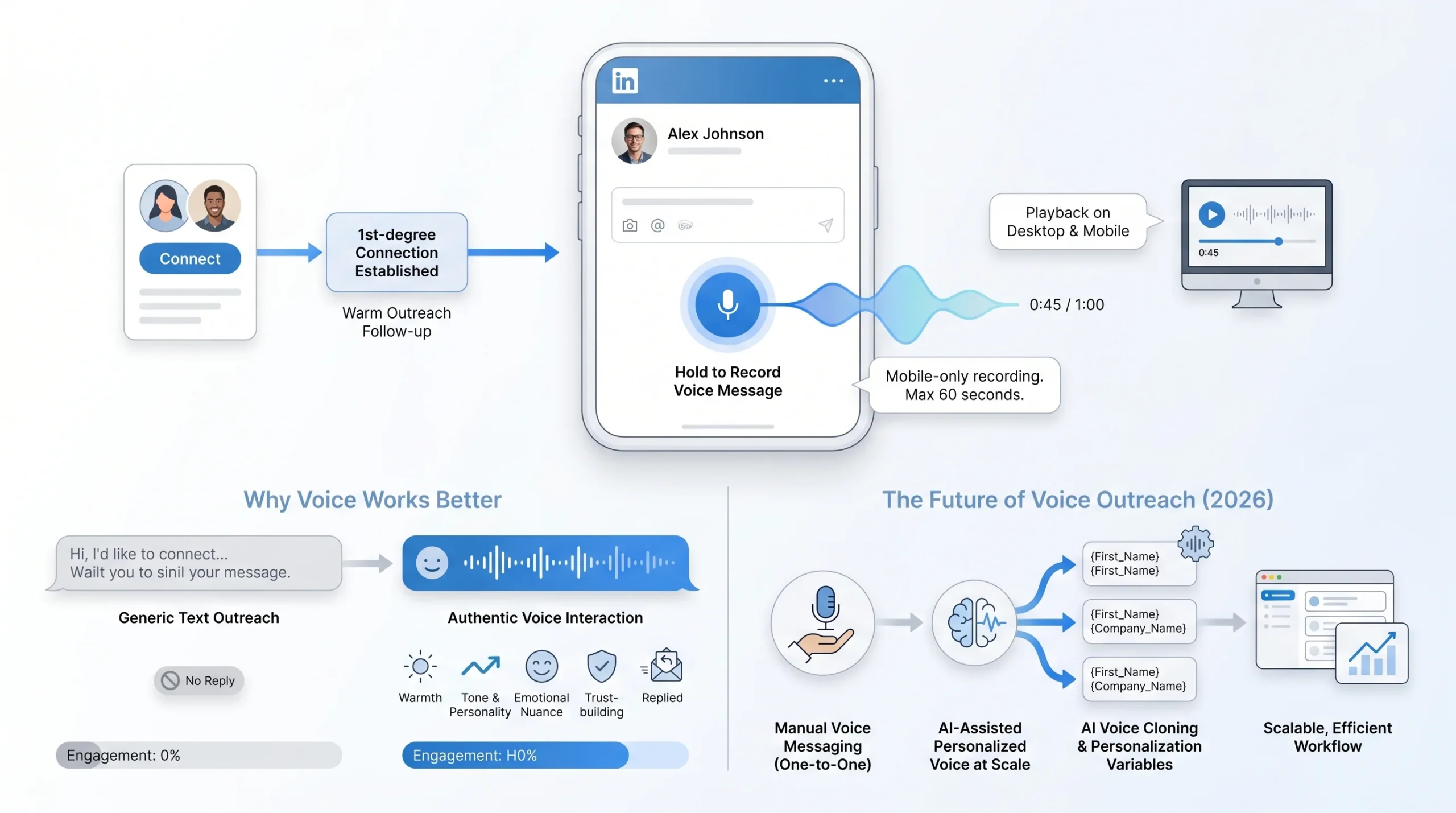
LinkedIn voice messages are audio clips of up to 60 seconds that you can send inside LinkedIn’s messaging interface. They work like a voice note on WhatsApp — you hold down the microphone icon, record your message, and send. The recipient hears your actual voice, with all the warmth, energy, and nuance that text strips away.
There are a few mechanics worth knowing before you use them:
- Recording is mobile-only. You can only record and send voice messages through the LinkedIn mobile app (available on both iOS and Android). You cannot record one from a desktop browser.
- Receiving works on all devices. Your prospect can listen on their phone or on desktop — the audio player appears inside the message thread.
- You must be 1st-degree connections. Voice messages can only be sent to people already in your network. This means they’re not a cold outreach tool on their own — they come after a connection has been established.
- The 60-second limit is a feature, not a bug. It forces brevity and prevents rambling. In practice, the most effective voice messages run between 25 and 45 seconds.
What makes the format interesting from a sales standpoint is its novelty. LinkedIn introduced voice messaging in 2018, but for years it sat almost entirely unused. As one analysis noted, voice notes have been on LinkedIn since 2018, but almost nobody used them — not because they weren’t effective, but because they were impossible to scale. No sales rep can realistically record 50 to 100 personalized voice messages a day by hand.
That equation has started to shift. AI voice technology now allows teams to create natural-sounding messages in their own cloned voice with dynamic personalization inserted at scale — something that once took hours now takes minutes. But even before you consider automation, understanding the fundamentals of why voice messages work is the right starting point.
Why Voice Messages Cut Through Where Text Doesn’t
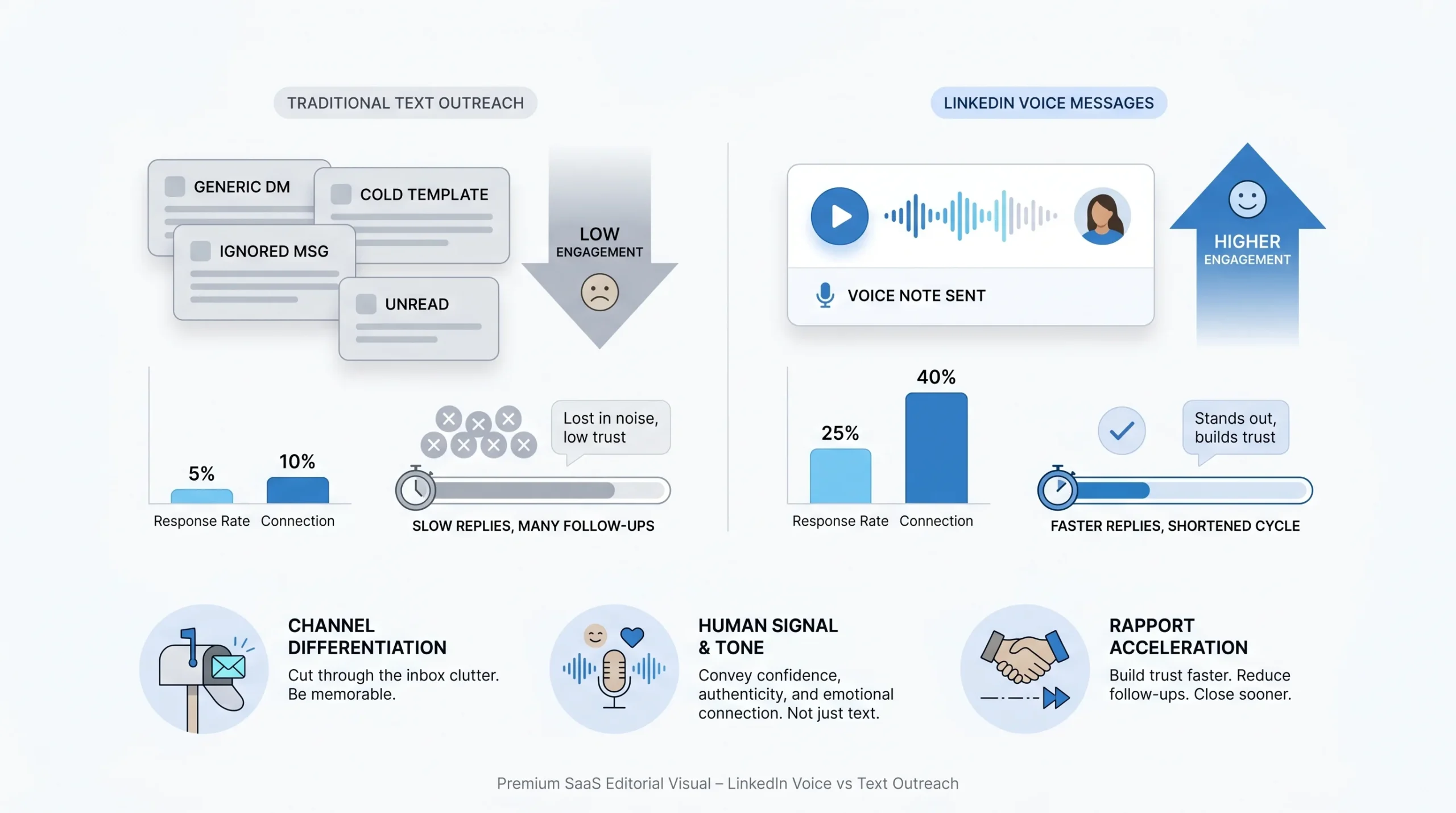
Before asking when or how to use LinkedIn voice messages, it’s worth understanding the underlying reason they outperform standard text in the first place. The answer comes down to three things: channel differentiation, human signal, and structural advantages that text simply cannot replicate.
The channel advantage is real and measurable.
LinkedIn direct messages already outperform cold email — LinkedIn DMs get 10.3% engagement versus 5.1% for cold emails, effectively doubling engagement compared to traditional email outreach. Add a voice message on top of a text DM, and you’re changing the medium entirely. Most of your competitors are sending text. A voice note is immediately different, and different gets noticed.
Voice carries what text can’t.
Tone, energy, confidence, and genuine curiosity are invisible in written messages. A prospect can’t tell from a text DM whether you’re excited about what they’re doing or just working your way down a list. In a voice message, they hear it within the first five seconds. That authenticity signal is difficult to manufacture — and prospects are good at detecting when it’s missing.
The rapport shortcut is significant.
Voice messages are very effective at moving prospects down the funnel and speeding up the entire sales process. One well-crafted voice message can replace as many as fifteen follow-up emails in terms of the relational work it does. You’re not just delivering information — you’re establishing presence, building familiarity, and making yourself memorable in a way that text rarely achieves on the first few touches.
The response rate evidence supports it.
Teams that have tested LinkedIn voice messages systematically report around a 40% response rate in their sequences — a number that far exceeds industry benchmarks for cold text-based outreach. That’s not universal, and results depend heavily on the quality of the message and the relevance of the outreach. But the directional signal is consistent: voice earns more replies than the text equivalent.
Standing out in a crowded inbox is the core problem it solves.
Voice notes stand out immediately in busy inboxes and carry tone and intent in a way text simply cannot. In a channel where most people are sending the same personalized-but-not-really templates, showing up in audio is a genuine differentiator — and that differentiation drives opens, listens, and replies.
When to Use a LinkedIn Voice Message (The Decision Framework)
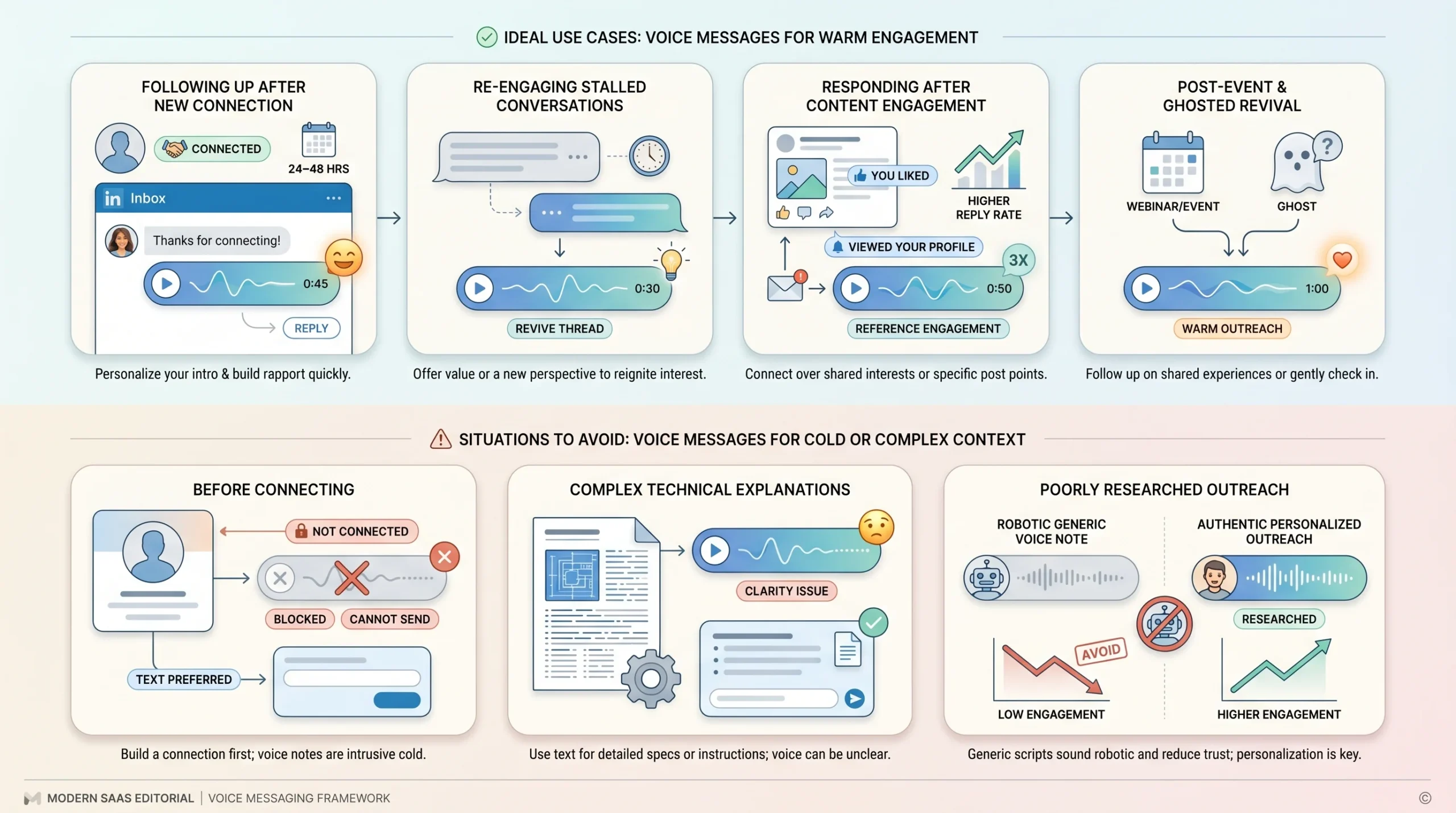
Most sales content on voice messages tells you how to record one. Almost none of it tells you when to reach for the microphone versus when to stick with text. That’s the critical gap — because sending a voice message at the wrong moment can come across as odd, presumptuous, or tone-deaf. Used at the right moment, it’s a standout move. Used carelessly, it just adds friction.
Here is a situation-by-situation decision guide.
Use It When: You’ve Just Connected and Want to Stand Out Fast
The 24–48 hours after a new connection accepts your request is the highest-attention window in the entire LinkedIn relationship. They’ve just seen your name, looked at your profile, and decided you’re worth connecting with. Their guard is as low as it’ll ever be. A voice message at this moment — warm, brief, and relevant to something on their profile — capitalizes on that attention before it fades.
This beats the generic “thanks for connecting” text that almost every salesperson sends and almost every prospect ignores. You’re not pitching. You’re just showing up as a real person who actually looked at who they are.
Use It When: You’re Following Up on a Stalled Thread
If you’ve sent one or two text messages and gotten no reply, you’re facing the same problem as everyone else in that prospect’s inbox — you’ve become part of the noise. Sending a third text DM in the same format confirms that you’re just running a sequence. Switching to a voice message changes the medium and signals genuine effort.
The ideal timing here is three to five days after your last unanswered message. You’re not being aggressive — you’re changing your approach in a way that communicates persistence without desperation.
Use It When: You Engaged With Their Content Recently
If a prospect liked or commented on a post you shared, or if you genuinely engaged with something they published, a voice message referencing that specific piece of content transforms what could feel like a cold outreach into a natural continuation of a real interaction. Messages sent through shared connections or referencing shared context see up to a 25% higher reply rate — and content engagement is exactly the kind of warm signal that makes a voice follow-up feel earned, not forced.
Use It When: You’re Following Up After an Event or Webinar
The 24–48 hours after a shared event — a LinkedIn Live, an industry conference, a webinar — is one of the warmest outreach windows available. You have a natural, credible reason to reach out: you were both there. Referencing a specific moment, a speaker’s point, or a shared observation from the event creates instant context and credibility. A voice message in this window doesn’t feel like cold outreach because it isn’t — it’s a continuation of something that already happened.
Use It When: Re-Engaging a Cold or Ghosted Prospect
When a prospect has gone quiet after two to four weeks of no contact, standard follow-ups rarely break through. They’ve already mentally filed you under “will deal with later,” and a text DM in the same format as your last several messages reinforces that classification. A voice message changes the pattern. It signals that you’re a real person, not an automated sequence, and the shift in medium alone is often enough to prompt a reply.
Skip It When: The Prospect Hasn’t Connected Yet
This is the most common mistake. Voice messages require a 1st-degree connection — you simply cannot send them to someone you’re not connected with. But beyond the technical limitation, trying to jump straight to voice before establishing any connection looks presumptuous. The right order is: send a thoughtful connection request first, let it be accepted, then use voice as a follow-up tool. Skipping that step treats voice like a cold call when it should function more like a warm follow-up.
Skip It When: The Ask Is Complex or Requires Visual Reference
Voice is excellent for short, conversational moments. It is a poor format for anything that requires the prospect to retain specific details, follow a comparison, or understand a proposal. If you need to explain pricing tiers, walk through a feature comparison, or share technical requirements, a voice note will leave the prospect confused with nothing to reference. In those cases, pair a brief voice note with a document, a whiteboard image, or a follow-up written message that contains the details.
Skip It When: You Haven’t Done the Research
A generic voice message is worse than a generic text message. In a text, laziness is invisible. In a voice note, it’s audible — the prospect can hear when you don’t know who they are, what their role involves, or why you’re reaching out to them specifically. The minimum research before recording is: understand their role, identify one relevant trigger (a post they wrote, a job change, a company announcement), and know why that connects to what you do. Without that, you’ll record a message that sounds like a robocall with a heartbeat.
Anatomy of a Voice Message That Gets Replies
Knowing when to use a voice message is half the battle. The other half is knowing what to actually say once you hit record. The best-performing LinkedIn voice messages share a consistent three-part structure, even if individual scripts vary widely in tone and content.
The 3-Part Structure: Hook → Value Signal → Soft CTA
Every effective voice message follows this arc:
- Hook (first 7 seconds): Say something that makes the prospect want to keep listening. This is not “Hi, my name is X and I work at Y.” That’s how you lose them in the first breath. The hook should reference something specific about them — their role, a recent post, a company development, or a shared context — so they immediately understand this message is actually for them.
- Value Signal (next 15–20 seconds): Introduce why you’re reaching out and what’s in it for them. You’re not pitching your product here — you’re signaling relevance. What problem are you addressing? What have you helped similar people achieve? Keep it concrete and brief.
- Soft CTA (final 5–8 seconds): End with a single, low-friction ask. “Would it be useful if I sent over a quick case study?” or “Are you open to a five-minute call this week?” works far better than “Let’s schedule a 30-minute discovery call.” The smaller the ask, the lower the barrier to responding yes.
Length: 30–45 seconds is the target.
Keep voice messages under 45 seconds. The sweet spot is 30–40 seconds — long enough to be substantive, short enough to respect the prospect’s time. Mention their company name, recent activity, or job title to personalize it quickly.
Tone: Conversational, not corporate.
Make sure the message feels natural, like you’re speaking to a friend. Be sure your voice message clearly articulates what’s in it for the prospect — not what’s in it for you. Focus on how your service or product solves a problem they may have or adds value to their work. The moment your message sounds like a script someone wrote for a pitch deck, you’ve already lost the authenticity advantage that makes voice work in the first place.
The pre-send text trick.
One of the most overlooked tactics in LinkedIn voice messaging is what you do immediately after sending. Prospects aren’t always aware of the voice message functionality, so they may be skeptical to open an unfamiliar audio file. A short companion text — something like: “Hi [Name], just dropped a quick message over here, keen to hear back” — prompts them to open and listen. This two-step move (voice note + text nudge) consistently improves listen rates and should be standard practice in your sequence.
8 LinkedIn Voice Message Scripts for Real Sales Situations
The following scripts are structured around the three-part framework above: Hook, Value Signal, and soft CTA. Each is mapped to a specific sales situation. Use them as starting points — the variables in brackets should always be replaced with genuine research about the individual prospect.
Script 1 — The Post-Connect First Touch
Situation: 1–2 days after a connection request is accepted. You have no prior conversation history.
“Hey [First Name] — thanks for connecting. I was looking at your profile and noticed you’re leading [specific function or team] at [Company Name]. I’ve actually been working with a few [their industry] teams recently on [the problem you solve], and something you posted about [topic] resonated with where a lot of them were before we started working together. Just wanted to put a voice to the name — and I’d love to send over a quick resource if it’d be useful. Happy to hear what you’re focused on right now.”
Why it works: It’s personal (references their profile and post), it signals relevance without hard-pitching, and it ends with an open door rather than a demand. The prospect doesn’t feel ambushed — they feel noticed.
Script 2 — The Content Engagement Follow-Up
Situation: They liked, shared, or commented on a post you published — or you genuinely engaged with something they wrote.
“Hey [First Name] — I saw you [liked/commented on] my post about [topic] earlier this week, and I really appreciated that. It made me want to reach out properly. The reason I wrote about that is because it’s something I’m seeing a lot of [their job title or team type] dealing with right now — specifically [the core problem]. We’ve been helping teams like [their company type] work through exactly that, and I thought there might be something worth sharing. If you’re open to it, I’d love to send something over — just reply and I’ll drop it in.”
Why it works: Content engagement is one of the warmest outreach signals available. This script honors that warmth by making the connection explicit — it doesn’t pretend the prior interaction didn’t happen, and it uses it as a natural bridge into a value conversation.
Script 3 — The Pain Point Opener (Cold Outreach)
Situation: ICP-fit prospect, no prior warm signal. You’re using the 10-30-10 framework: 10-second hook, 30-second value, 10-second CTA.
“Hey [First Name] — I looked at your profile and saw you’re [job title] at [Company Name]. I figured I’d just reach out directly because I’ve been working with a handful of [their industry] leaders on [specific challenge], and the pattern I keep seeing is [describe the pain point concisely]. We helped [similar company or role type] cut [specific metric — time, cost, pipeline drop] by [rough figure or outcome], and I thought it might be worth a quick conversation to see if any of this is relevant for you. I’ll keep it there — just let me know if you’d like me to send a bit more context.”
Why it works: The pain point opener works because it leads with a problem the prospect actually recognizes, not a product they’ve never asked for. The 10-30-10 structure ensures nothing runs over, and ending with “just let me know” removes pressure from the ask.
Script 4 — The Post-Event or Post-Webinar Warm Follow-Up
Situation: You and the prospect both attended a LinkedIn Live, industry event, or webinar within the past 24–48 hours.
“Hey [First Name] — I was at [Event Name] yesterday and noticed we were both there. The point [Speaker Name or Topic] made about [specific moment from the event] really stuck with me — I think it touches directly on what a lot of [their industry/role type] teams are wrestling with right now. I’d love to continue that conversation and hear your take on it, especially given what I saw on your profile about [relevant detail]. Happy to send over something useful in the meantime — would that be welcome?”
Why it works: Shared context is the fastest trust accelerator in outbound sales. This script doesn’t feel like cold outreach because it isn’t — there’s a real shared experience that anchors it. Referencing a specific moment from the event (not just its name) proves you were actually there and paying attention.
Script 5 — The Stalled Thread Revive
Situation: You’ve sent one or two text messages with no reply. You’re switching the medium to reset the conversation.
“Hey [First Name] — I know I’ve dropped a couple of messages your way and haven’t heard back, so I thought I’d try something different and just actually talk to you. No pressure at all — I get that timing matters. I’m still reaching out because I genuinely think what we’re doing with [specific use case] could be useful for [Company Name], specifically around [one concrete problem]. If this isn’t the right time, just say the word — but if there’s any curiosity at all, even a quick note back would mean a lot. Either way, thanks for listening.”
Why it works: Acknowledging the previous messages directly disarms the awkwardness. It shows self-awareness without being apologetic. The tone is human and direct — not transactional — and giving the prospect explicit permission to say no often generates a reply either way.
Script 6 — The Social Proof Drop
Situation: Mid-sequence. The prospect has shown light interest (opened messages, visited your profile) but hasn’t replied. You’re adding a proof point to increase credibility.
“Hey [First Name] — quick one. I’ve been working with [Company Type or Industry] teams on [the problem], and I wanted to share one thing that might be relevant: we recently helped [Client Type] go from [before state] to [after state] in [timeframe]. I know everyone says things like that, so I’d rather just show you how it actually works. I can send over a two-minute breakdown — no call required, just a look. Would that be useful? Just reply with a yes and I’ll drop it over.”
Why it works: Social proof is powerful, but it lands harder in a voice message than in text because you can deliver it with genuine confidence rather than having it read as a claim to be skeptical of. Attaching a specific before/after outcome makes it concrete rather than vague.
Script 7 — The Re-Engagement (Ghosted Prospect)
Situation: A prospect who previously showed interest or engaged with your outreach has gone dark for two to four weeks.
“Hey [First Name] — I know it’s been a few weeks since we last spoke, and I don’t want to be that person who just keeps pinging you. But I did want to check in one more time before I close the loop on my end. Last time we talked, you mentioned [relevant detail or pain point from prior conversation]. I’m not sure if that’s still something you’re working on or if the timing has just shifted — either way, I’d rather just hear it directly than guess. If it’s still on your radar, even a quick reply would help me understand how to be useful. If not, totally fine — I’ll leave it there.”
Why it works: Referencing what the prospect said in a prior conversation (even briefly) shows you actually listened. The “close the loop” framing creates a gentle urgency without manufacturing false scarcity. And giving them a clean exit — “if not, totally fine” — removes the social pressure that causes most ghosts to stay silent.
Script 8 — The Voice + Whiteboard Combo
Situation: Your value proposition is visual or conceptual — the prospect needs to see something, not just hear about it. You’re pairing the voice message with a hand-drawn or whiteboard-style image for dramatically higher engagement.
How the combo works: Before recording, draw a simple before/after, a flow diagram, or a one-line visual summary of the problem you solve on paper or a whiteboard. Take a clear photo. Send the voice message first, then immediately send the image in the same thread. The visual creates intrigue that the voice message sets up. This technique — pairing voice with a whiteboard image — produces 4x higher response rates compared to a voice note alone.
The voice script:
“Hey [First Name] — I just sent you something in this thread that I drew up specifically for this message, so take a look after this. I wanted to visualize the exact problem I keep seeing with [their role/industry] teams when it comes to [the challenge]. Rather than send a slide deck or a brochure, I thought a quick sketch would be more honest. The short version is [one-sentence value prop]. Happy to walk you through how it applies to [Company Name] specifically — want me to find five minutes this week?”
Why it works: The script creates anticipation for the image, which means the prospect is more likely to stay in the thread and engage with both pieces of content. The whiteboard signals that you created something bespoke for them — not something pulled from a template library.
6 Recording Tips That Make Your Voice Message Sound Like a Human, Not a Script
Having a great script is only useful if your delivery doesn’t undermine it. The way you record matters as much as what you say. These six habits separate voice messages that feel genuine from the ones that make prospects cringe and skip.
Hook Them in the First 7 Seconds
The first thing out of your mouth determines whether the prospect listens to the rest of the message or abandons it. If you open with “Hi, my name is [X] and I’m a [title] at [Company],” you’ve already lost. You’ve made the message about you. Instead, open with something specific to them — their name, something you noticed on their profile, a recent post, or a company development. The prospect should hear themselves in your first sentence, not you.
Strong opening formulas that work:
- “Hey [Name], I looked at your profile and saw that you’re [specific role] at [Company] — I figured [specific reason] falls into your world.”
- “Hey [Name], I saw you’re leading [function] at [Company] right now — I’ve been working with a few teams in that exact position and wanted to reach out.”
- “Hey [Name], your post about [topic] caught my attention — I’ve been seeing the same thing come up with [their industry] teams lately.”
Do One Take — and Mean It
The instinct to record five or six takes until your message sounds polished is the enemy of authenticity. Over-rehearsed voice messages sound exactly like what they are — a performance. Prospects pick up on it. The energy is flat, the pauses are calculated, and the whole thing sounds like a voicemail someone practiced in front of a mirror.
The best voice messages are almost always the first or second take. They have natural hesitations, genuine energy, and the slightly imperfect quality of a real person speaking in real time. A message that’s 95% perfect and 100% human beats a message that’s 100% polished and 0% real.
If you flub the first take badly, do a second. But if take two sounds over-rehearsed, go back to take one.
Stand Up and Smile While You Record
This sounds like a soft tip, but it has a real and audible effect on how you sound. Standing up opens your posture and gives your voice projection. Smiling changes the shape of your mouth and adds warmth to your tone — it’s something the listener can hear even without seeing your face.
Recording slouched at your desk in a neutral expression produces a voice that sounds tired, flat, and disengaged. If you’ve ever listened back to your own voice messages and thought “that sounds off,” posture and facial expression are usually part of the answer. Get up, smile, and record.
Match the Energy of WhatsApp, Not Voicemail
The mental model that kills most LinkedIn voice messages is treating them like formal voicemails. Corporate voicemails are slow, stilted, and full of filler: “Hi, this is [full name] from [company]. I’m reaching out to touch base regarding a potential synergy…” That register is toxic for voice messages because it signals that you’re in sales mode, not human mode.
The right mental model is a WhatsApp voice note to a contact you know professionally — casual, direct, friendly, and slightly informal. Talk at your natural conversational pace. Use short sentences. Refer to them by first name throughout. Sound like someone who had a thought and wanted to share it, not someone working through a pipeline.
End With a Single, Low-Friction Ask
One of the most reliable ways to kill an otherwise strong voice message is to close with a big ask. “Can we get 30 minutes on the calendar this week?” is asking a lot from a prospect who doesn’t yet know if you’re worth their time. The friction of that ask is enough to stop a reply in its tracks even when the message itself was good.
Always finish with a clear call to action — whether scheduling a demo, booking a call, or simply replying — but make the barrier as low as possible. “Would it be helpful if I sent over a quick case study?” requires a one-word reply. “Are you open to a five-minute call?” is less threatening than thirty. “Just reply if this is relevant and I’ll send more context” asks for almost nothing. Low-friction asks produce more replies, and replies are what open the real conversation.
Always Pair It With a Short Text Nudge
Audio files in a message thread are easy to skip — especially if the prospect isn’t expecting one. Sending a one-line text immediately after the voice note tells them something is there and gives them a reason to open it. Keep the text minimal and non-pitchy:
- “Just dropped something quick in here — worth a listen when you have 30 seconds.”
- “Left you a quick note above — would love to hear what you think.”
- “Tried something different — voice note above. Much easier to explain that way.”
This two-part combination (voice message plus short text nudge) consistently improves listen rates and should be treated as standard practice rather than an optional addition.
7 Mistakes That Kill Your Voice Message Before It’s Even Heard
Even with the right timing and a solid script, poor execution can neutralize a voice message before the prospect has a chance to be impressed. These are the seven most common mistakes — and what to do instead.
Talking Too Fast or Too Slow
Nerves cause most people to rush. Boredom causes others to drag. Both are fatal to a voice message. Talking too fast makes the message feel anxious, hard to follow, and difficult to act on. Talking too slowly makes the prospect feel like their time is being wasted. The right pace is slightly slower than your natural conversational speed — measured enough to be clear, but with enough energy to stay engaging. If you have a tendency to rush, write a one-sentence reminder to yourself before you hit record: “Breathe. Slow down.”
Sounding Scripted and Over-Rehearsed
There is a hard ceiling to how many times you should practice a voice message before recording it. One read-through to understand the structure? Good. Two takes to find a natural version? Fine. Five to seven takes trying to nail perfect delivery? You’ve crossed into the zone where the message will sound rehearsed, and rehearsed does not build trust. If the prospect can hear the script underneath your words, the authenticity advantage of voice messaging disappears entirely.
Leading With Yourself Instead of Them
Opening a voice message with your own name, title, and company before you’ve given the prospect a reason to care is the single most common mistake in sales outreach of any kind — and it’s worse in audio form because there’s no skimming. The first five to seven seconds should be entirely about the prospect or a shared context. Your name can come later. Your company name can come even later than that. Make the first words out of your mouth about them.
Skipping Personalization
A voice message that could have been sent to anyone might as well have been sent to no one. If nothing in the first ten seconds ties the message to the specific person listening — their name, their company, their role, something they wrote or did — it reads as a mass outreach move dressed up as a personal touch. That’s actively worse than a personalized text because it wastes more of the prospect’s time. Do the research. Reference one specific, real thing.
Sending the Voice Note Without a Text Primer
Sending a voice message into a cold thread without any accompanying text is like leaving a voicemail for someone who doesn’t know who you are. Prospects aren’t always aware of LinkedIn’s voice note functionality, and an unexpected audio file sitting in their message thread is easy to ignore. The short text that accompanies or immediately follows the voice note tells the prospect something is there and gives them a reason to listen. Without it, your listen rate drops significantly.
Overexplaining in the First 10 Seconds
One of the structural traps in voice messaging is trying to over-justify why you’re reaching out before you’ve earned the right to the prospect’s attention. “The reason I’m messaging you today is because I’ve been working on a solution that helps companies in your industry address multiple challenges related to efficiency and resource allocation” — by the time that sentence ends, the prospect has already stopped listening. Say what you need to say in the simplest, most direct way possible. Context can come later, once you have their attention.
Forgetting the Ask
A voice message that ends without a clear next step is a monologue, not a sales tool. Even if everything else in the message is excellent, leaving the prospect without a specific action to take means they have no path forward. They’ll move on and forget it. Every voice message needs to end with one clear, low-friction ask — and it should be stated plainly, not implied. Don’t assume the prospect will figure out what you want them to do next. Tell them.
How to Fit LinkedIn Voice Messages Into a Multi-Touch Sequence
LinkedIn voice messages are not a replacement for a well-built outreach sequence — they’re a powerful addition to one. Understanding where they perform best inside a multi-touch sequence is what separates reps who get occasional wins from those who systematically improve their pipeline with voice.
Where voice messages perform best: touch 2 or 3, not touch 1.
The first contact in any cold outreach sequence is a connection request or an opening text message — something lightweight that doesn’t demand too much from a stranger. A voice message as the very first touch can feel jarring to a prospect who has no context for who you are. It works significantly better as a second or third touch, after the prospect has at least seen your name and chosen to connect. At that stage, a voice note feels like a natural escalation — personal, but not intrusive.
A sample 5-step outbound sequence:
Here is a practical sequence that integrates voice messaging at the right point:
- Touch 1 (Day 1): Personalized connection request — short, relevant, no pitch
- Touch 2 (Day 3): Text DM — brief, references the connection and introduces a relevant pain point or question
- Touch 3 (Day 5–6): LinkedIn voice message — uses one of the scripts above, references the prior text, ends with a soft CTA and companion text nudge
- Touch 4 (Day 9–10): Email follow-up — expands on the value signal from the voice message with a proof point or case study
- Touch 5 (Day 14): Final text DM — brief “closing the loop” message that gives the prospect an easy way to reply or opt out
LinkedIn voice messages can also be used as a reminder within an ongoing sales sequence — as a follow-up to a high-relevance first touch via email, adding attention value through the novelty of the channel. Used this way, they break the pattern of text-only outreach and give the prospect a different reason to engage.
Timing guidance.
Tuesday to Thursday mornings consistently yield the best response rates for LinkedIn outreach. Sending a voice message on a Monday morning (when inboxes are flooded) or Friday afternoon (when attention is low) reduces the chance of getting a timely reply. Midweek mornings give your message the best shot at being heard during a window when the prospect is engaged but not yet overwhelmed.
The multichannel multiplier.
Voice messages are most powerful when they’re part of a coordinated multichannel strategy rather than a standalone tactic. Combining email with LinkedIn touches and phone calls boosts results by 287% compared to single-channel outreach. A voice message inside a sequence that also includes email and a phone call is part of a system — and systems outperform individual tactics every time. The voice note is one of the most memorable touchpoints in that system, which is exactly why it should be placed at the moment when you most need to break through.
Scaling LinkedIn Voice Messages Without Losing Personalization
One of the most legitimate objections to LinkedIn voice messaging is the time cost. Recording a thoughtful, personalized 35-second audio clip for each prospect is not something most SDRs can do at scale alongside the rest of their outreach responsibilities. That tension — between the personalization that makes voice work and the volume that modern outreach requires — is real and worth addressing directly.
The manual approach: recording in batches by persona.
For teams not yet using AI voice tools, the most efficient manual approach is to write scripts by persona or ICP segment rather than individual prospects. You’re not scripting one message per person — you’re scripting four or five core messages (one per scenario: cold outreach, post-connect, re-engagement, content follow-up, post-event) and then personalizing the variables for each person before recording.
Batch-record by scenario: record all your “post-connect” messages back to back when you’re in the right headspace, then move to “re-engagement” messages. Having the structure pre-built means the recording time drops significantly, and the quality stays high because you’re not starting from scratch for every prospect.
Using dynamic variables for semi-personalization.
Even in a manual workflow, you can build scripts with deliberate blank spots — [Company Name], [Industry Problem], [Specific Post They Wrote] — that you fill in by reviewing the prospect’s profile for 30 seconds before recording. This structure-plus-variable approach gives the impression of full personalization (because the content is genuinely relevant) without requiring you to build a bespoke message from scratch each time.
The AI approach: voice cloning with personalization at scale.
AI voice technology now allows sales teams to create natural-sounding messages in their own voice, complete with tone and personality, at scale. The workflow typically involves recording a voice sample, then generating scripts with dynamic fields that the AI personalizes and renders in your voice for each prospect. Something that once took hours is now done in minutes.
For high-volume SDR sequences where a rep is reaching out to hundreds of prospects per month, this approach makes voice messaging viable as a channel rather than an occasional tactic reserved for top-tier accounts.
When to keep it manual versus when to automate.
The decision between manual and automated voice messaging comes down to one question: how much does personalization depth matter for this specific prospect? For named accounts in an ABM motion, key enterprise targets, or warm prospects at a late stage in the funnel, the manual approach is almost always the right call. The stakes are high enough that an imperfect but genuinely personal message is worth the extra time.
For high-volume top-of-funnel outreach where you’re working a broad ICP across hundreds of prospects, well-built AI voice personalization can maintain enough authenticity to be effective — especially when combined with genuine variable personalization rather than just a name swap. The rule of thumb: the higher the deal value and the warmer the relationship, the more manual your voice message approach should be.
Quick-Reference: When to Use a LinkedIn Voice Message
The decision framework above covers the nuance, but when you’re in the middle of a sequence and need a fast answer, the table below gives you the short version.
| Situation | Use Voice? | Best Script |
|---|---|---|
| Just connected (24–48 hrs) | ✅ Yes | Script 1 — Post-Connect First Touch |
| They engaged with your content | ✅ Yes | Script 2 — Content Engagement Follow-Up |
| Cold outreach, ICP-fit | ✅ Yes | Script 3 — Pain Point Opener |
| Post-event or post-webinar | ✅ Yes | Script 4 — Post-Event Warm Follow-Up |
| Stalled thread (no reply × 2) | ✅ Yes | Script 5 — Stalled Thread Revive |
| Mid-sequence, light interest | ✅ Yes | Script 6 — Social Proof Drop |
| Prospect ghosted (2–4 weeks) | ✅ Yes | Script 7 — Re-Engagement |
| Complex ask needing visual context | ❌ Pair with image | Script 8 — Voice + Whiteboard Combo |
| Not yet connected | ❌ No | Text DM or connection request first |
| No research done on prospect | ❌ No | Do the research, then come back |
Conclusion
The sales reps getting real results from LinkedIn voice messages aren’t using them as a novelty. They’re deploying them strategically — at the right moment in the sequence, for the right reason, with a message built around the prospect rather than around themselves.
The framework in this guide gives you the when. The scripts give you the what. The recording tips and common mistakes give you the how. Put them together and you have a complete playbook for using voice messages not as a one-off experiment, but as a reliable, repeatable tactic inside your outbound system.
Start with one script. Pick the situation that matches your most common outreach scenario and test it this week. Listen back to your first few recordings, notice what sounds flat and what sounds genuine, and adjust from there. The reps who master this channel will do so through iteration — not by waiting until they feel ready to record the perfect message.
Frequently Asked Questions
Q1. How long can a LinkedIn voice message be?
LinkedIn voice messages are capped at 60 seconds per clip. That said, the platform does not limit how many voice messages you can send in a single thread — so if you genuinely need more than 60 seconds, you can send a second clip immediately after the first. In practice, however, keeping any single sales-focused voice message between 25 and 45 seconds produces better results than using the full 60-second limit. A message that runs 55 seconds often signals a lack of preparation, whereas a crisp 35-second note signals respect for the prospect’s time.
Q2. Can you send a LinkedIn voice message to someone you’re not connected with?
No. Voice messages can only be sent to 1st-degree connections — people who have already accepted your connection request. There is no way to send a voice note via LinkedIn InMail or to a 2nd or 3rd-degree connection. If you want to reach a prospect via voice message, the correct sequence is to send a connection request first (ideally with a brief, personalized note), wait for acceptance, and then use the voice message as a follow-up tool once the connection is established.
Q3. Can you send LinkedIn voice messages from a desktop or laptop?
No. Recording and sending voice messages is only available through the LinkedIn mobile app on iOS (iPhone and iPad) or Android. You cannot record a voice note from a desktop browser or the desktop application. However, recipients can listen to voice messages on any device — desktop, laptop, or mobile — because the audio player renders in the standard messaging interface across all platforms.
Q4. Is there a separate volume limit for LinkedIn voice messages?
There is no separate limit specifically for voice messages. They fall under LinkedIn’s general messaging thresholds, which currently sit at approximately 100 messages per week for free accounts and around 150 per week for paid (Premium or Sales Navigator) accounts. These limits are dynamic and depend on account age, your Social Selling Index (SSI) score, and your historical engagement rates. Since voice messages count toward the same pool as text DMs, factor them into your weekly message volume rather than treating them as a separate, unlimited channel.
Q5. Do LinkedIn voice messages have read receipts or listen notifications?
LinkedIn does not provide a specific “listened to” receipt for voice messages the way some messaging platforms do for audio. You receive the standard message read notification — a small indicator that the message thread has been opened — but this does not confirm whether the prospect actually pressed play on the audio file. This is one of the reasons the companion text nudge (a short text sent alongside or immediately after the voice note) is valuable: it prompts the prospect to open and listen rather than skipping past the audio in the thread.
Q6. What is the ideal length for a sales-focused LinkedIn voice message?
The evidence consistently points to 25–45 seconds as the sweet spot for sales outreach. Messages under 20 seconds can feel too brief to be substantive. Messages over 45 seconds risk losing attention or coming across as unprepared. For context, 30–40 seconds is typically enough to deliver a personalized hook, a one-sentence value signal, and a soft call to action — which is all a strong voice message needs. Keeping it concise also forces the clarity that makes the message more compelling: when you have 35 seconds, you can’t afford filler.
Q7. Can a prospect who doesn’t use LinkedIn on their phone still receive voice messages?
Yes. While you can only record and send voice messages from the LinkedIn mobile app, your prospect can receive and play them on any device — desktop, browser, or mobile. The audio player appears inside the standard LinkedIn message thread and works on all platforms. The only requirement on the recipient’s side is that they can access LinkedIn and play audio, which is standard for any modern device.
Q8. What should I do if my LinkedIn voice message isn’t sending or showing up correctly?
Voice messages on LinkedIn can occasionally appear as a blank line in the message thread rather than an audio player. This is a known technical issue and not a sign that the message failed to send. The fix is straightforward: refresh the page or switch away from the message thread and back again — the audio player should then render correctly. If you send a voice message and immediately try to play it back from your own device, you may find the play button unresponsive; again, switching away from the screen and returning typically resolves it. If you’re concerned a message didn’t send at all, check your sent messages before re-recording to avoid sending duplicates.