


Most LinkedIn automation campaigns don’t fail because the messaging is bad. They fail because they land in inboxes at the wrong time, on the wrong day, in the wrong timezone — and the prospect never sees them at all. Timing is the invisible variable that separates a 6% reply rate from a 20% one, and yet most guides treat it as an afterthought: “send on Tuesday mornings” and move on.
This guide goes deeper. It draws on Expandi’s analysis of over 70,000 real LinkedIn campaigns, benchmark data from the Belkins/Expandi 2024 dataset covering activity from January through December 2024, research from Sprout Social, Hootsuite, Bardeen, and ConnectSafely’s 2026 data review. What follows covers the best days, hours, campaign types, industries, global regions, and safety windows — along with a practical framework for building an automation schedule that compounds results without triggering LinkedIn’s detection algorithms.
Why Timing Matters in LinkedIn Automation (And Why It’s Misunderstood)
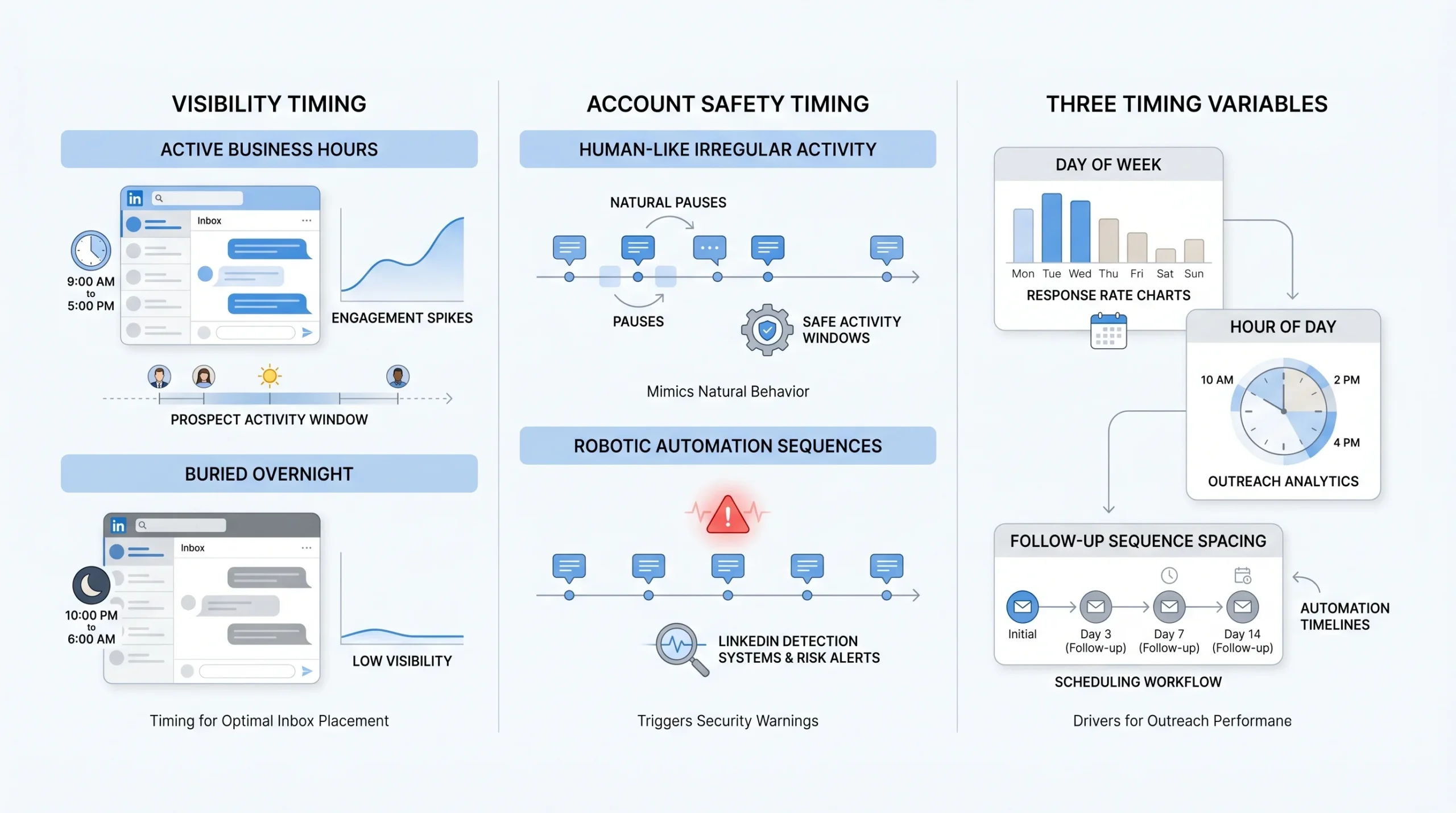
Timing in LinkedIn automation is widely discussed but rarely understood at the level of nuance it requires. Most people treat it as a single dimension — “what time should I send?” — when in reality it operates across two entirely separate mechanisms: visibility and account safety. Confusing these two is one of the most common strategic errors in LinkedIn outreach.
Visibility timing is about when your message lands relative to your prospect’s active window on the platform. A message sent at 2 AM local time gets buried under everything that arrives during business hours. Your prospect never scrolls back far enough to find it, and your reply rate drops not because of your message quality, but because of when it was delivered.
Account safety timing is a completely different concern. LinkedIn’s detection systems are designed to identify non-human behavioral patterns. One of the clearest signals of automation is predictable, mechanical timing — actions that occur at identical intervals, around the clock, without the pauses and irregularities that characterize how real professionals use the platform. Running automation outside normal working hours, or doing so with robotic consistency, raises flags that can restrict or terminate your account.
Both of these timing mechanisms matter and they require different responses. The data bears this out: LinkedIn direct messages now carry a 10.3% average reply rate, more than double the 5.1% average for cold email. But that gap closes significantly when campaigns run at the wrong times, because messages simply don’t get seen. The three timing variables that actually drive outcomes are: day of week, hour of day, and follow-up sequence spacing. Master all three and you are operating with a meaningful competitive advantage. But timing cannot fix a weak ICP list, generic templates, or an account that has never been warmed up. It is a multiplier — and multipliers only work when there is something solid beneath them.
The Data — Best Days to Run LinkedIn Automation Campaigns
Weekday Performance Breakdown (With Reply Rate Data)
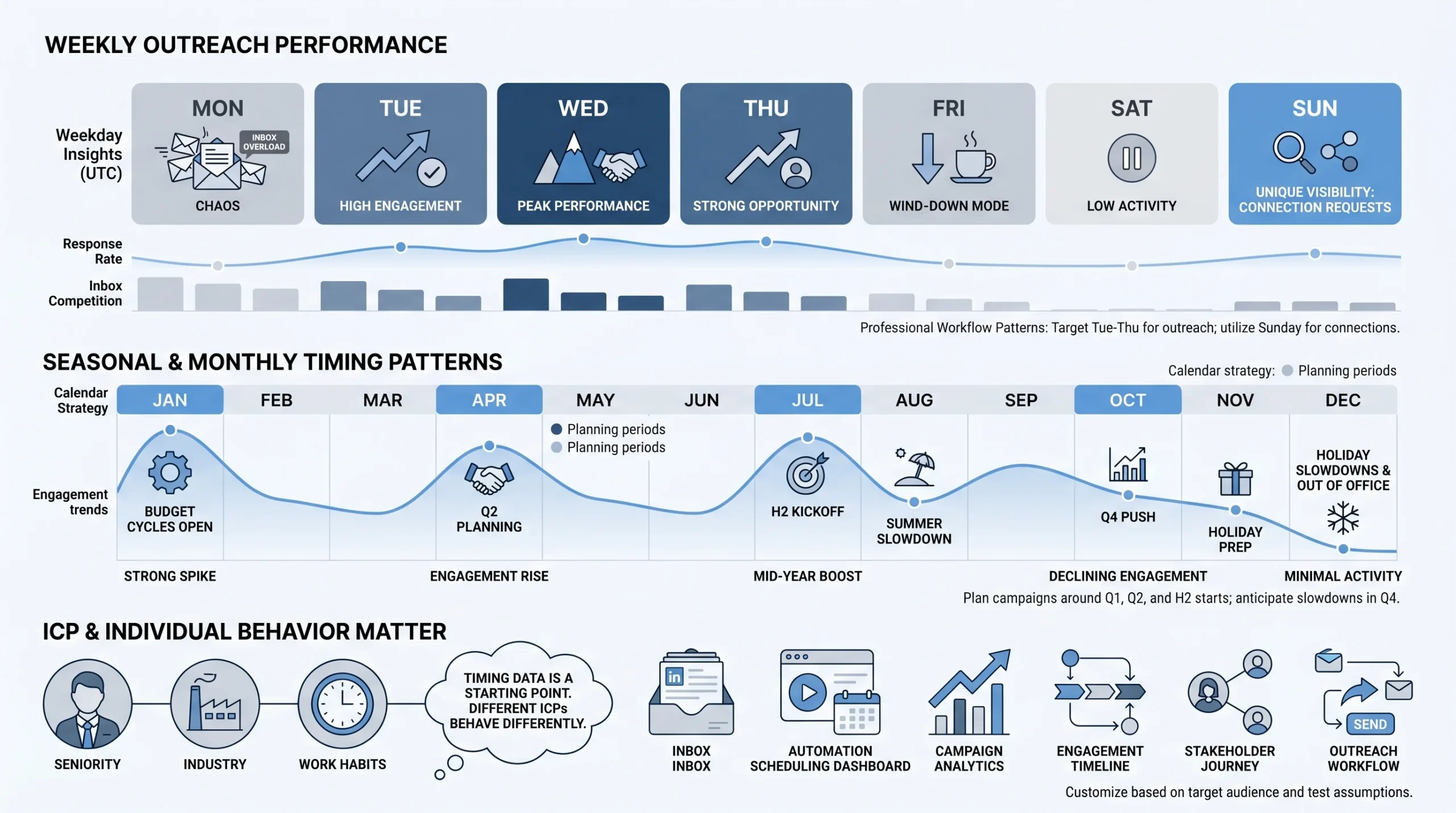
The evidence on which days of the week perform best for LinkedIn outreach is among the most consistent in all of B2B sales research. Tuesday, Wednesday, and Thursday are the strongest-performing days across virtually every major study conducted between 2025 and 2026. Of these three, Tuesday stands out consistently as the single best day, with response rates declining progressively as the week moves toward the weekend.
The reasoning behind this pattern is grounded in how professionals actually experience their workweek. Monday is an inbox-chaos day. After two days away from work communications, professionals return to a backlog of emails, Slack messages, and notifications. LinkedIn is not their priority. They are triaging, reprioritizing, and catching up — not in the headspace to engage with new outreach. Messages sent on Monday compete with everything that arrived over the weekend and get deprioritized or overlooked entirely.
By Tuesday, the chaos has resolved. Professionals are working with a clear head and a focused schedule. They are checking LinkedIn with purpose — looking for industry news, valuable content, and professional updates. This is when new messages surface and get genuine attention.
Friday presents the opposite problem from Monday. Decision-makers are in wind-down mode. Attention drifts toward weekend plans, and there is reduced appetite for engaging with outreach that would require any meaningful follow-through. Sending a message on Friday that requires a response or a meeting booking means it will sit until Monday at best, by which point it has been buried.
One notable exception to the Tuesday-Thursday dominance is worth understanding strategically. Research from AuthoredUp shows that Sunday actually produces the highest connection request acceptance rates of any day of the week — not because professionals are more receptive, but because there is significantly less competition in the LinkedIn feed. Fewer people are sending connection requests on Sunday, which means yours is more visible. This is a tactical option for connection-request campaigns specifically, not for cold message sends where active engagement is required.
Monthly and Seasonal Timing Patterns
The data on monthly and seasonal patterns is as clear as the day-of-week data, and it is almost entirely ignored by most automation practitioners. January, April, and July consistently show the highest LinkedIn engagement levels, while the final quarter of the year — October through December — typically experiences the lowest activity across the platform.
January’s high engagement reflects the “new year, new initiative” mindset that drives B2B buying decisions. Decision-makers return from holiday breaks with fresh budgets, new priorities, and genuine appetite for vendor conversations. April marks the beginning of Q2, when teams that closed Q1 strong are looking to accelerate and teams that fell short are urgently searching for solutions. July sees a mid-year pulse driven by mid-year review cycles and H2 planning conversations.
The Q4 decline is counterintuitive — you might expect the end of fiscal year to create urgency. But LinkedIn-specific engagement drops because professionals are consumed with internal reviews, holiday commitments, and budget decisions that are largely already made. Cold outreach performs poorly in this window not because your message is worse, but because the environment is less receptive.
Practically, this means your automation calendars should be built around these cycles. Ramp up volume and experiment with new campaigns in January, April, and July. Reduce aggressive new-contact outreach in November and December. Use Q4 instead to focus on warming up existing connections and engaging with content — activities that set the stage for a strong January launch.
Beyond monthly patterns, B2B buying cycles have lengthened significantly. According to research tracking B2B customer journeys, deals now frequently stretch over six months from first anonymous touch to close, with an average of 6.3 stakeholders involved. This means timing your outreach to align with the buying cycle stage, not just the calendar, is an increasingly important part of campaign strategy.
What the Data Doesn’t Tell You
Aggregated timing data is a starting point, not a prescription. The studies cited above draw from tens of thousands of campaigns across many industries, roles, and regions. The averages they produce are real, but your specific ICP may behave very differently from the average LinkedIn user.
A healthcare executive’s LinkedIn habits are not the same as a software engineer’s. A founder checking LinkedIn at 6 AM on a Saturday is not unusual. An enterprise procurement manager may only engage with the platform during structured business hours on weekdays. The aggregate data tells you where to start. Your own campaign data, analyzed over time, tells you where to stay.
Best Hours of the Day to Send Automated LinkedIn Messages
The Morning Window (7 AM – 10 AM)
The 7 to 9 AM Tuesday window is cited by HubSpot, Buffer, and LinkedIn’s own research as the single most consistent peak slot for engagement on the platform. This is not arbitrary. There is solid behavioral psychology underneath it.
By 7 AM on Tuesday, working professionals are in what researchers call the “fresh start” mental state. They have moved past the Monday catch-up, they are oriented toward the week ahead, and they are actively consuming professional content during their commute or over their first coffee. LinkedIn content and messages encountered in this window get genuine attention because the reader is goal-oriented and receptive to information that is relevant to their work.
The early-morning window benefits from a second structural advantage: LinkedIn’s algorithm gives new content its first and most important window of distribution in the hour immediately after it is received. Messages and content that generate early engagement get promoted to a wider audience. For automation campaigns, this means messages that land while prospects are actively scrolling are more likely to generate the kind of early interaction that signals relevance to the platform.
The morning window is best used for first-touch outreach: connection requests, opening messages in a new sequence, and InMails to prospects who have not yet engaged with you. These are the messages where first impressions matter most, and they deserve the best available attention window.
The Lunchtime Window (12 PM – 2 PM)
Lunchtime produces its own distinct engagement pattern that is different from the morning window in both mechanism and ideal use case. Between 12 and 2 PM, professionals are catching up on messages they missed during morning meetings and deep-work sessions. They have mental space that they often lack during active project hours. This relaxed, catch-up mode makes them more willing to engage with messages that require a considered response.
Research from We-Connect confirms that midday follow-ups achieve strong response rates specifically because of this mental space dynamic. The prospect has seen the first message, had time to process the context of who you are and what you’re offering, and is now in a more deliberate frame of mind when they encounter your follow-up.
This makes the lunchtime window ideal for follow-up messages to warm prospects — people who have already accepted a connection request, visited your profile, or engaged with your content. It is also a strong window for InMail campaigns where the message requires some reading and a considered response, rather than a quick yes or no.
The Late Afternoon Window (4 PM – 6 PM)
The late afternoon window, roughly 4 to 6 PM, captures professionals as they wind down their structured workday and begin clearing their inboxes. According to Hootsuite research, Thursday afternoons at 2 PM specifically represent a peak engagement window, and the broader 4–6 PM range on Thursdays extends this effect.
In this window, people are more likely to respond to messages that require brief replies. They are not starting new complex tasks; they are closing loops. A well-timed message asking a simple, specific question — or one that offers a clear, low-friction next step — will outperform the same message sent mid-morning when the prospect is deep in focused work.
This window is best used for re-engagement sequences: messages to prospects who have gone quiet after initial engagement, event invitations where the response mechanism is simple, and short follow-ups that reference something specific to prompt a quick reply.
Hours to Avoid (And Why They Trigger Safety Flags)
Sending automation campaigns during nights, weekends, and public holidays is a mistake that damages both reply rates and account safety simultaneously. From a visibility standpoint, messages sent at 11 PM or 3 AM local time get buried under everything that arrives during the following business morning. The prospect will never see them without actively scrolling far back into their inbox.
From a safety standpoint, messages sent outside normal business hours are one of the clearest behavioral signals that LinkedIn’s detection systems flag as automation. A real professional does not send dozens of LinkedIn messages at 2 AM. Scheduling automation to run around the clock means your campaign activity pattern looks nothing like a human being, and LinkedIn’s machine learning systems are specifically trained to identify this. Properly configured automation tools should be set to operate only within defined local business hours — typically 7 AM to 7 PM in the recipient’s timezone — with weekend pauses built in as a default, not an exception.
Timing by Campaign Type — Connection Requests vs. InMails vs. DMs
Connection Request Campaigns
Connection request campaigns are the entry point for most LinkedIn automation workflows, and timing plays a specific role in their performance that is different from messaging campaigns. Expandi’s data from over 70,000 campaigns shows an average connection request approval rate of 29.61% across their user base — a number that is directly influenced by when requests land and who is receiving them.
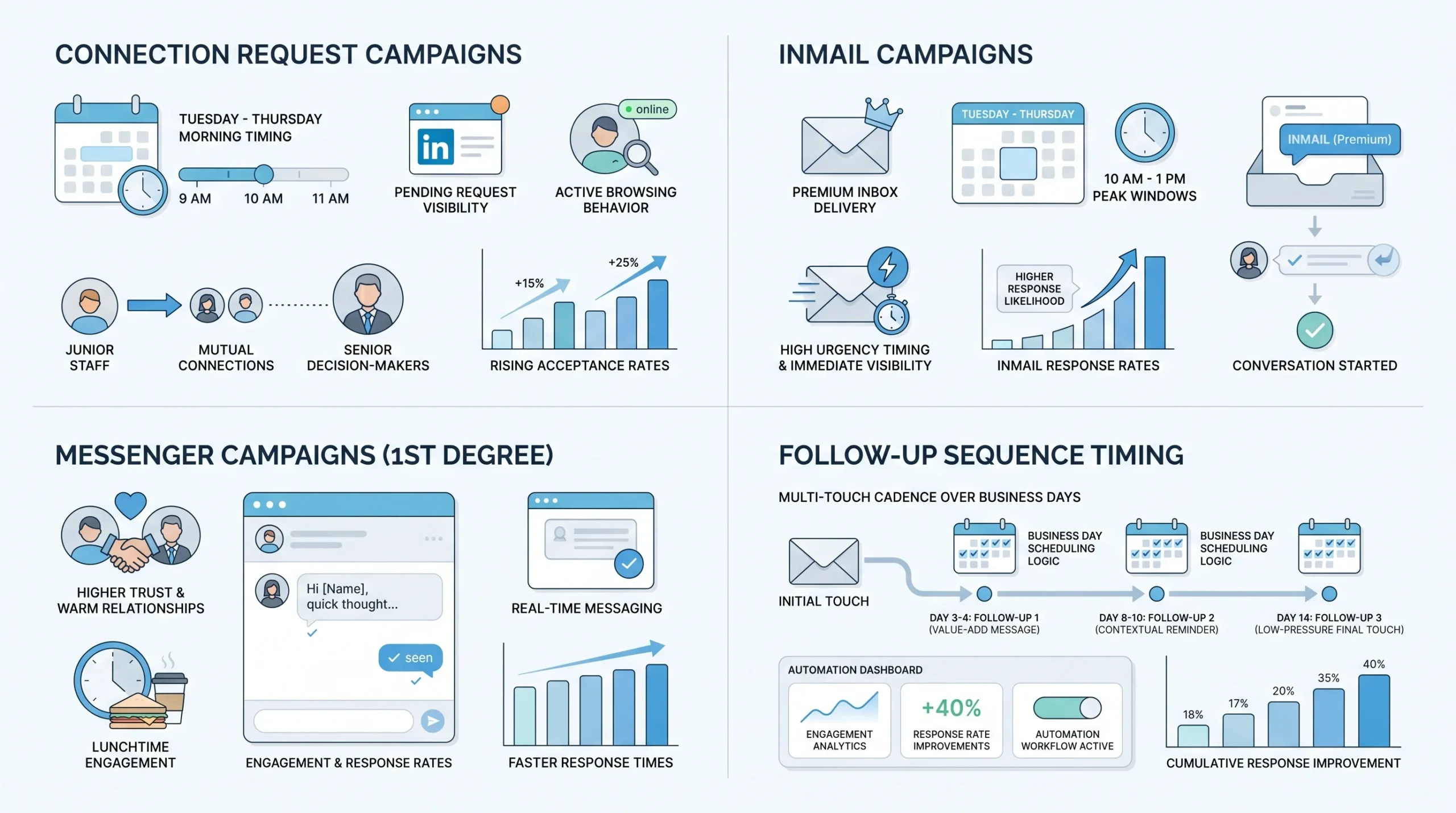
The best timing for connection requests follows the general Tuesday-through-Thursday morning pattern, with one important nuance: the prospect needs to be in active browsing mode, not in a meeting or deep-work session, to notice and act on a pending request. Morning sends that land before 10 AM give the request the entire working day to be seen and acted upon.
One tactic that consistently outperforms cold connection strategies is connecting with junior staff at a target company before approaching senior decision-makers. Starting with sales reps or team members who are generally more open to new connections builds a presence within the company’s network before the real target sees the request. When the decision-maker eventually receives the request, they are more likely to recognize the name or see mutual connections, which dramatically increases acceptance rates.
InMail Campaigns
InMail campaigns operate under fundamentally different timing logic from connection-request campaigns, because InMails are sent to people outside your network and there is typically no second chance. Data from the Belkins/Expandi 2024 study shows that LinkedIn InMail campaigns produce the highest overall response rate of any automated campaign type at 6.38%, and importantly, all of those responses come from the first message — there are no later replies in the dataset. When an InMail lands and the prospect engages, they do it immediately or not at all.
This puts an enormous premium on timing. An InMail that lands when the prospect is actively browsing has a real chance of being opened and responded to in that session. One that lands during a meeting, late at night, or at the weekend is almost certainly going to scroll out of view before the prospect is next in the right frame of mind. Premium InMail campaigns with strong personalization can reach 18 to 25% response rates, but that ceiling is only accessible when timing precision is part of the strategy.
For InMails specifically, the midweek midday window — Tuesday through Thursday, 10 AM to 1 PM — combines the engagement-readiness of the morning window with the more deliberate, catch-up energy of lunchtime. This is the period when prospects are most likely to be actively managing their LinkedIn inbox with the intent of responding to things that matter.
Messenger Campaigns (1st-Degree Connections)
Messenger campaigns — automated messages sent to existing first-degree connections — are the highest-performing category in LinkedIn automation. Research from Expandi’s platform shows these campaigns achieve a 16.86% response rate, well above InMails and connection-request sequences. The reason is simple: there is pre-existing trust. The prospect already knows who you are; they accepted your connection at some point, which means they have some level of awareness of you and your work.
Because of this pre-existing relationship, the timing logic for messenger campaigns is somewhat different from cold outreach. The prospect is already inclined to engage — the question is when they will be in the right frame of mind to do so. The morning window remains strong, but the lunchtime window often performs equally well for messenger sequences because the catch-up energy of 12 to 2 PM is ideal for reading and responding to messages from familiar contacts.
Follow-Up Sequence Timing
The single most important timing insight in LinkedIn automation is not about the first message. It is about the follow-up cadence. Most replies do not come from the first touch. They come from the second or third. Research consistently shows that two to three follow-up messages spaced across one to two weeks, each providing genuine value rather than simply restating the original ask, can push response rates from the single digits into the 20 to 30 percent range for well-targeted campaigns.
The recommended cadence is structured around business days, not calendar days:
- Follow-up 1: 3 to 4 business days after the first message. This is early enough to maintain momentum but gives the prospect adequate time to have seen the original message. This follow-up should add new information — a relevant article, a data point, a specific reference to their company or role.
- Follow-up 2: 8 to 10 business days after the first message, or 4 to 6 days after follow-up 1. By this point, the prospect has clearly seen your messages and not responded — the tone should shift toward providing value that requires no commitment to engage with.
- Follow-up 3: Day 14 from the first message. This is the final automated touch. It should be short, direct, and low-pressure — explicitly acknowledging that this is the last message in the sequence and giving the prospect a graceful way to opt out or a simple, clear next step if they are interested.
Automation tools should be configured to space these sends using business-day logic with the same day-of-week and time-of-day principles that apply to the first message. A follow-up sent on a Friday afternoon will perform poorly for the same reasons the original message would.
Timing by Industry — Which Sectors Respond When
Industry-Specific Timing Variations
One of the most practically useful but underutilized insights from LinkedIn automation research is that optimal timing varies significantly by industry. This is not a minor variance — it is the difference between a campaign that performs at benchmark and one that dramatically outperforms it.
Healthcare prospects respond best on Tuesdays between 8 and 9 AM local time. This is a remarkably narrow window, and it reflects the structured, early-starting schedule common in clinical and administrative healthcare roles.
The software and SaaS sector is the most challenging environment on LinkedIn for automation outreach. Research from the Belkins/Expandi 2024 dataset shows a reply rate of just 4.77% in this sector — the lowest of any industry tracked. This is a direct reflection of message fatigue. Software professionals are among the most heavily targeted groups on LinkedIn, and they have become highly selective about what they engage with. For campaigns targeting SaaS buyers or engineers, timing alone cannot compensate for generic outreach. The combination of hyper-specific targeting, highly personalized messaging, and precision timing is the only route to meaningful performance in this space.
Industries in the mid-tier performance band — education, marketing, and construction — show reply rates between 7 and 9%. These sectors follow the standard Tuesday-through-Thursday morning pattern reliably, making them good environments for testing timing hypotheses before applying learnings to harder segments.
| Industry | Best Day | Best Window | Avg. Reply Rate |
|---|---|---|---|
| Healthcare | Tuesday | 8–9 AM local | Above average |
| Software / SaaS | Wednesday–Thursday | 10 AM–12 PM | 4.77% |
| Education | Tue–Thu | 8–11 AM | 7–9% |
| Marketing | Tue–Thu | 8–11 AM | 7–9% |
| Construction | Tue–Thu | 7–10 AM | 7–9% |
| Southern Europe (all) | Tuesday | Morning | 11.81% avg |
| South America (all) | Tue–Wed | Morning | 9.71% avg |
Seniority-Level Timing Differences
Decision-makers at the C-suite level behave very differently on LinkedIn than managers or individual contributors. Executives typically check LinkedIn in shorter, more intentional bursts — often early in the morning before the formal workday begins, or during brief transition moments between meetings. They are not scrolling passively; they are engaged purposefully when they are on the platform at all.
This means the early-morning window (6:30 to 8:30 AM) can actually outperform the standard 8 to 10 AM window for founder and C-suite targeting, because this is when they are most likely to be in a quiet, reflective mode and open to thoughtful outreach. Messages that arrive after 10 AM compete with an active meeting schedule that makes focused reading unlikely until evening.
Manager-level and individual contributor targets generally follow the broader Tuesday-Thursday morning pattern more closely, with the lunchtime window also being particularly strong for this cohort.
Timing by Region — Global LinkedIn Automation Scheduling
Regional Reply Rate Benchmarks
LinkedIn is a global platform, and the regional variation in outreach performance is one of the most striking findings in recent automation research. A 2025 study analyzing 20 million LinkedIn outreach attempts across nine global regions found substantial differences in reply rates that reflect not just timezone differences but also cultural attitudes toward professional networking and digital communication.
Southern Europe leads all global regions with an 11.81% average reply rate. Countries including Italy, Spain, and Portugal show the highest responsiveness to LinkedIn outreach of any region studied. South America follows at 9.71%, and Northern Europe at 9.41%. Australia and Oceania (8.83%) and Eastern Europe (8.68%) both perform solidly. North American and Asian markets, while high in total LinkedIn user volume, show lower average response rates — reflecting both higher message saturation and more selective engagement habits.
The Middle East region shows lower response rates than most, a gap that researchers attribute to cultural communication norms that place greater emphasis on relationship-building before direct professional solicitation. Campaigns targeting Middle Eastern markets benefit from timing that allows for more gradual, relationship-oriented touchpoints rather than direct cold outreach.
These regional differences carry direct implications for how automation campaigns should be structured. A campaign targeting Southern European markets can justify more direct, shorter sequences with higher expected returns. A campaign targeting APAC or North American enterprise buyers needs longer warm-up sequences, higher personalization, and timing precision to compensate for lower base engagement rates.
How to Configure Multi-Timezone Automation
The practical challenge for any team running global LinkedIn automation campaigns is that a single campaign schedule cannot be correct for multiple regions simultaneously. A sales representative targeting decision-makers in New York, London, and Singapore may need to send messages in the early morning for their US audience, midday for their UK audience, and evening (local sender time) for their Singapore audience — all to ensure each prospect receives their message during their local business hours.
Modern LinkedIn automation tools handle this through timezone-aware scheduling, where messages are dispatched based on the recipient’s detected or configured local timezone rather than the sender’s. When evaluating or configuring automation tools for global campaigns, timezone detection capability should be treated as a non-negotiable feature rather than a nice-to-have.
The 3 AM message problem is worth understanding specifically: a message delivered to a prospect at 3 AM their local time is not just unhelpful for reply rates — it is a behavioral anomaly that signals bot activity to LinkedIn’s detection systems. A real professional does not send dozens of carefully crafted LinkedIn messages at 3 in the morning. Building timezone-aware scheduling into your automation workflow protects both your reply rates and your account health simultaneously.
How Timing Interacts With LinkedIn Account Safety
Why LinkedIn Flags Timing Patterns
LinkedIn’s detection infrastructure has evolved significantly and is now considerably more sophisticated than it was even two years ago. The platform uses machine learning to analyze behavioral patterns across multiple dimensions: activity volume, timing regularity, message duplication, IP address consistency, device fingerprinting, and connection acceptance rates. Actions that occur faster than humanly possible or with mechanical regularity across any of these dimensions raise flags that can lead to temporary restrictions or permanent bans.
Timing patterns are one of the most readable signals in this detection framework. When an account sends exactly 47 messages every day at precisely 9:00 AM, 10:30 AM, and 2:00 PM with no variation for three consecutive weeks, that pattern does not resemble how a human being uses LinkedIn. Real professionals send messages irregularly — sometimes in bursts during a focused session, sometimes sporadically across a day, with days of lower or zero activity mixed in. Automation tools that do not randomize timing intervals between actions are effectively advertising to LinkedIn’s algorithms that they are not human.
Spreading actions throughout the day with randomized delays, diversifying outreach targets across industries and regions to avoid repetitive patterns, and gradually increasing activity volume over time rather than jumping to full capacity immediately are the core safety practices that keep automation accounts healthy. None of these require sacrificing meaningful campaign volume — they require thoughtful configuration.
Daily Limits by Account Type
LinkedIn enforces different daily action limits depending on account type, and operating near or above these limits — even with well-timed, personalized outreach — significantly increases detection risk. The 2026 guidance from practitioners who test these limits continuously provides the following as safe operating parameters:
- Connection requests: No more than 3% of total connections per day as a general rule
- Messages (1st-degree connections): Free account — 50 per day; LinkedIn Premium — 75 per day; Sales Navigator — 250 per day; LinkedIn Recruiter — 300 per day
- Profile visits: Free account — 100 per day; LinkedIn Premium — 250 per day; Sales Navigator — 500 per day; LinkedIn Recruiter — 600 per day
Running automation around the clock to maximize throughput against these limits is one of the fastest ways to trigger a restriction. The reason is behavioral: LinkedIn expects daily limits to be distributed across a working day, not exhausted in two hours at 6 AM through a machine acting at maximum speed. Configuring automation to operate only during defined working-hour windows — with the daily limits spread naturally across those hours — produces activity patterns that are indistinguishable from a highly active human user.
Account Warm-Up and Timing
New LinkedIn accounts — or accounts that have never run automation before — cannot safely operate at full volume from day one. LinkedIn’s systems flag sudden behavioral changes as suspicious, and an account that goes from zero automation actions to 50 connection requests per day overnight is a clear anomaly.
The warm-up process requires new accounts to start at 15 to 20 connection requests per day and increase volume gradually over a period of four to six weeks. Even well-established accounts cap out safely at around 50 to 70 connection requests per day. Anything above that threshold introduces meaningful risk, and the risk compounds with each day that the elevated volume continues.
Timing discipline during the warm-up period is even more important than during normal operation. A new account running automation outside normal business hours, or doing so with perfect mechanical regularity, will attract scrutiny much faster than an established account doing the same thing. The warm-up phase is when behavioral patterns are being established in LinkedIn’s assessment of the account — make sure those patterns look human from the start.
Warning Signs Your Timing Is Triggering LinkedIn’s Algorithms
LinkedIn typically provides escalating warning signals before taking serious enforcement action, and recognizing these early is critical for preventing permanent account loss.
Early warning signs that timing or volume may be triggering detection include:
- Frequent CAPTCHA challenges when logging in or navigating the platform
- “We noticed unusual activity on your account” security emails
- Temporarily restricted profile views
- Noticeably slower page load times
More serious warning indicators include:
- A 7-day ban on sending connection requests
- Forced password resets
- Unusually high rates of ignored connection requests (which LinkedIn reads as a spam signal)
- Account security alerts from LinkedIn’s Trust and Safety team
If any early warning signs appear, the correct response is to stop all automation immediately, log in manually, and allow any restriction period to pass without attempting workarounds. When resuming campaigns, lowering daily limits, increasing personalization, and switching to a tool with stronger built-in safety controls are all warranted. First-time bans are sometimes reversed on appeal. Second-time bans are rarely reversed, which is why prevention is the only viable strategy.
Building Your Optimal Automation Schedule — A Practical Framework
Step 1 — Define Your ICP’s Timezone and Industry Before Setting Any Schedule
Every tactical timing decision in LinkedIn automation should flow from a single upstream decision: who is the prospect, where are they, and what does their typical workday look like? Building a campaign schedule around the sender’s timezone and preferences rather than the recipient’s is one of the most common and costly errors in automation setup.
Before configuring any campaign, define:
- The primary timezone of the target audience (and whether it is homogeneous or distributed across multiple regions)
- The industry, which determines both the optimal day-of-week pattern and the expected reply rate ceiling
- The seniority level of the target contacts, which affects both the best time window and the appropriate message length and format
Tools that offer automatic timezone detection based on the recipient’s profile data should be prioritized over those requiring manual timezone configuration, especially for campaigns targeting multiple regions. When timezone detection is not available, segment your prospect lists by region and configure separate campaign schedules for each segment.
Step 2 — Map Campaign Type to Time Window
Not all automated actions belong in the same time window. A properly structured automation schedule maps each action type to the window where it will perform best:
- Connection requests → Tuesday through Thursday, morning window (7–10 AM local time)
- First-touch cold messages / InMails → Tuesday through Thursday, 8–11 AM local time
- InMail campaigns → Midweek midday (10 AM–1 PM local time)
- Follow-up messages → 3 to 5 business days after the previous touch, in the morning or lunchtime window
- Messenger sequences (1st-degree) → Morning or lunchtime window, Tuesday–Thursday
- Re-engagement messages → Thursday late afternoon (2–5 PM local time)
These are default mappings backed by the data reviewed in this guide. Your own campaign data should be used to refine these windows over time based on what performs for your specific audience.
Step 3 — A/B Test Your Windows Systematically
The industry and regional benchmarks in this guide tell you where to start. Your own A/B testing tells you where to stay. Systematic timing experiments are the only way to move from benchmark performance to genuine outperformance for your specific ICP.
A well-structured 4-week timing test works as follows:
- Week 1–2: Run the campaign using the benchmark timing window (Tuesday morning) as the control
- Week 3–4: Split a comparable prospect segment and run the same campaign at an alternative window (Thursday lunchtime, or Wednesday afternoon)
- Variable isolation: Change only the timing variable. Keep message content, sequence structure, and targeting criteria identical between the two groups
- Minimum sample size: Each segment should contain at least 100 prospects to produce statistically meaningful data
The key performance indicators to track are:
- Open rate — the percentage of recipients who opened the message, indicating whether the send time affects visibility
- Reply rate — the percentage who responded, indicating whether the timing affects decision-making readiness
- Conversion rate — the percentage who took a desired action (booked a meeting, replied with interest), the ultimate measure of campaign effectiveness
- Connection acceptance rate — for request campaigns, the percentage who accepted during the relevant tracking period
Review your automation tool’s analytics and cross-reference with your CRM data to build a clear picture of which windows outperform for your audience. Then iterate every 30 to 60 days, because audience behavior on LinkedIn evolves alongside the platform itself.
Step 4 — Build in Randomization and Breaks
Fixed, predictable timing is a bot signal. Variable, irregular timing is what human behavior actually looks like. Every automation tool used for LinkedIn outreach should be configured with randomized delays between actions — not a fixed 90-second interval between every message, but a range that varies dynamically (sometimes 40 seconds, sometimes 4 minutes, sometimes longer) so that no detectable pattern emerges.
Beyond intra-session randomization, the campaign calendar should include structural breaks that mirror how a real person uses LinkedIn:
- Weekend pauses: Campaigns should not run on Saturday and Sunday as a default. This is both a safety measure and a practical one — reply rates are lower over the weekend and the safety risk is disproportionate to any marginal throughput gained
- Holiday blackouts: Build a list of major holidays in your target markets and pause campaigns during these periods. An active campaign during a national holiday is another behavioral anomaly that can trigger detection
- Periodic rest days: Configuring occasional mid-week days with reduced or zero automation activity mirrors the natural variation in how professionals use platforms like LinkedIn
Campaigns that operate within defined daily activity windows, distributing actions naturally across working hours with variable timing, produce activity profiles that are consistent with a single active human user. This is precisely what LinkedIn’s algorithms are designed to see — and when they see it, the result is not a ban or a restriction, but a sustained, long-running outreach capability that compounds results over months and years.
Timing Is a Multiplier — Not the Foundation
Understanding optimal timing for LinkedIn automation campaigns is valuable. Treating it as the primary lever is a strategic mistake. Timing is a multiplier, and multipliers only work when there is something solid beneath them.
The actual hierarchy of factors that determine LinkedIn automation campaign performance runs in this order: ICP accuracy comes first. A precisely defined, well-researched target list of prospects who have a genuine reason to care about what you are offering is the non-negotiable foundation. Without it, perfect timing delivers perfectly timed irrelevance. Message personalization comes second. Generic templates sent to a well-targeted list underperform personalized messages sent to the same list by factors of two to three in reply rate terms. Sequence design comes third — the structure of your follow-up cadence, the value you deliver at each touch, and the spacing between messages. Timing optimization comes fourth, as the final refinement that extracts maximum performance from everything that precedes it.
The most important reframe in this guide is this: the prospect who has already seen your content, engaged with your posts over multiple weeks, and recognizes your name when the message arrives is not primarily governed by timing. When a prospect already trusts you, they will read your message when they see it because they want to hear from you. The right strategy, therefore, is to invest in warm outreach — profile views, post engagement, commenting on their content — before sending the first automated message. When the message eventually arrives, the timing question becomes almost irrelevant. Any time becomes the right time because the relationship context already exists.
Timing optimization is the final 10 to 20 percent of performance. But in a competitive outbound environment where every reply rate point translates into pipeline, that final 10 to 20 percent is absolutely worth getting right.
Conclusion
LinkedIn automation timing is not a single decision — it is a set of layered decisions that, when made correctly, compound into a meaningful competitive advantage. The six highest-impact timing decisions from the research in this guide are:
- Lead with Tuesday mornings. The 7 to 10 AM window on Tuesday is the highest-performing time slot across all campaign types and nearly all industries. Make it your default starting point.
- Match campaign type to window. Connection requests belong in the morning window. InMails belong at midweek midday. Re-engagement belongs on Thursday afternoons. Sequence each action type to the window where its specific mechanics perform best.
- Localize to the recipient’s timezone. A campaign that ignores timezone differences is not just leaving reply rate performance on the table — it is creating behavioral anomalies that signal automation to LinkedIn’s detection systems.
- Build follow-up cadence around business days, not calendar days. Three touches over fourteen business days, each adding new value, will consistently outperform a single well-timed first message.
- Randomize timing and schedule structural breaks. Fixed, predictable timing is a ban accelerant. Variable timing with weekend pauses and occasional low-activity days is the behavioral profile of a healthy human account.
- Plan your calendar around January, April, and July. These are the highest-engagement months on LinkedIn. Maximize campaign volume and experiment with new approaches during these windows; dial back aggressive new-contact outreach in Q4.
The next step is practical: audit your current automation schedule against these six principles. Identify which timing decisions are already aligned with the data and which represent the largest gap between your current approach and what the research shows is possible. Start with the highest-impact change — typically timezone localization or switching your primary send window to Tuesday morning — and run a structured A/B test against your current baseline. Let the data tell you how much performance is available, and build from there.
Frequently Asked Questions
What is the single best time to send a LinkedIn automation message?
Based on consistent data from multiple large-scale studies conducted in 2025 and 2026, the single best window is Tuesday morning between 8 and 10 AM in the recipient’s local timezone. This window combines peak platform activity, professional receptiveness, and the psychological “fresh start” effect of early-week engagement. Wednesday and Thursday mornings follow closely behind.
Does timing matter differently for InMails vs. DMs?
Yes, significantly. InMails are sent to out-of-network prospects who have no prior relationship with you, and the data shows that virtually all InMail responses come from the first message — there are no later replies to fall back on. This puts a premium on landing InMails during active browsing windows (midweek, mid-morning). DMs to first-degree connections carry more timing flexibility because the pre-existing relationship means the prospect is more likely to engage even when they encounter the message outside their peak browsing window.
Can sending messages at the wrong time get my account restricted?
Yes, particularly if the wrong timing is also predictable timing. LinkedIn’s detection systems are designed to identify non-human behavioral patterns, and mechanical regularity in send times — especially outside normal business hours — is one of the clearest signals of automation. Messages sent at 3 AM local time, or with perfect robotic consistency day after day at the same intervals, will attract scrutiny regardless of whether the message content itself is high quality.
How do I schedule LinkedIn automation across multiple time zones?
Prioritize automation tools that support timezone-aware scheduling, where sends are triggered based on the recipient’s local timezone rather than a single global schedule. For tools without this capability, segment your prospect lists by region and configure separate campaign instances for each geographic segment, each set to the appropriate local working-hour window.
What is the best follow-up cadence for automated LinkedIn sequences?
Two to three follow-ups, spaced across the first two weeks after the initial message, represent the optimal automated cadence based on current research. Follow-up 1 should land 3 to 4 business days after the first message. Follow-up 2 should arrive 8 to 10 days after the first message. Follow-up 3, if used, should be sent around day 14. Each follow-up should deliver standalone value rather than simply restating the original ask. This cadence can push total sequence reply rates into the 20 to 30 percent range for well-targeted, personalized campaigns.
Should I pause automation on weekends?
Yes. Weekend pauses should be a default configuration in any LinkedIn automation setup, not an exception. Reply rates are materially lower on weekends, and the account safety risk — from running automation outside the behavioral norms of professional LinkedIn usage — is disproportionate to any marginal volume gain. Use weekends for manual engagement activities: commenting on content, liking posts, and reading industry news that can inform better personalization in the following week’s campaigns.
How does LinkedIn detect that my campaign timing is automated?
LinkedIn uses machine learning to analyze behavioral patterns across multiple signals: the volume of actions per unit time, the regularity or irregularity of timing intervals between actions, IP address consistency, device fingerprinting, message duplication, and the ratio of connection requests sent to requests accepted. Any behavioral pattern that is inconsistent with how a real professional uses the platform — including perfectly regular timing, 24/7 activity with no breaks, or very high action velocity — can trigger the detection system. The best protection is configuring automation to produce activity patterns that genuinely mirror human behavior.