


LinkedIn has cemented itself as the number one platform for B2B lead generation — and for good reason. With over 1 billion members globally, it gives agencies direct access to decision-makers, founders, and senior buyers that no other platform can match. But there is a significant gap between running outreach for one client and running it for five, ten, or twenty simultaneously. That gap is where agencies either build a scalable, profitable service line — or quietly burn out.
The moment you take on a second or third client, the complexity multiplies fast. You are no longer managing one messaging strategy, one set of prospect lists, and one inbox. You are managing multiple brand voices, multiple ICPs, multiple campaign timelines, and multiple sets of expectations — all tied to real human LinkedIn profiles that carry professional reputations. A misstep like spammy messaging can damage brand credibility, and an off-brand tone is inconsistent with a client’s identity — both of which are unforgivable errors when you are operating as a trusted extension of someone else’s business.
This guide is built for agency owners, account managers, and SDR team leads who are serious about turning LinkedIn outreach into a repeatable, scalable service. It covers everything: how to onboard clients systematically, how to structure and operate campaigns across multiple accounts, how to choose the right tools, how to report results clearly, and how to grow your operations without sacrificing quality. Every recommendation in this post is grounded in what is actually working for agencies running multi-client LinkedIn programs right now.
One number worth anchoring to before you dive in: well-executed multichannel campaigns — the kind this guide will help you build — can boost engagement by up to 50%, because prospects respond better to varied, personalized interactions across multiple touchpoints. The upside is real. The system is the difference.
Why Managing LinkedIn Outreach for Multiple Clients Is Uniquely Hard
The Compounding Complexity Problem
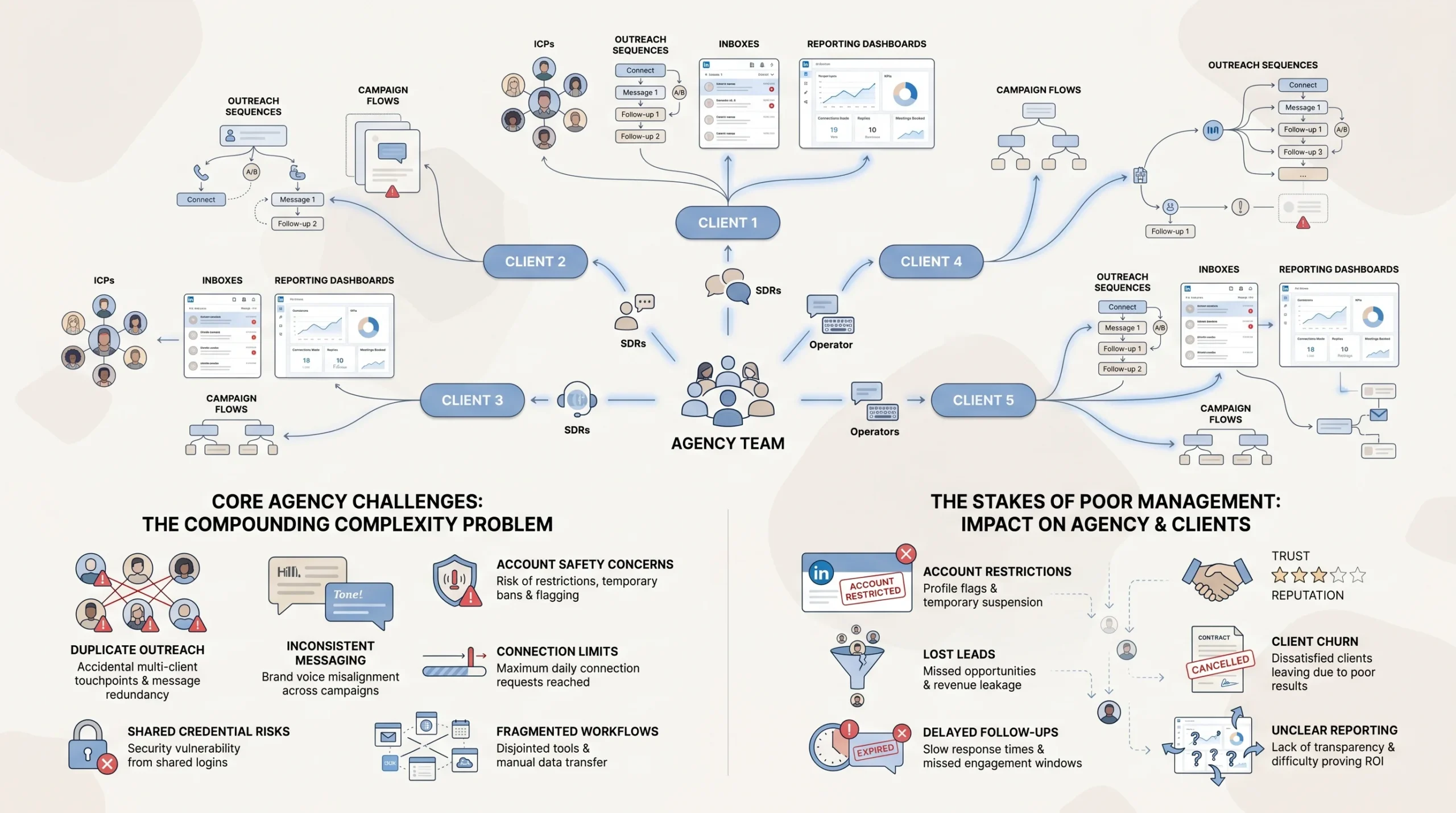
Managing LinkedIn outreach for a single client is a manageable challenge. You learn the ICP, write the messaging, set up the sequence, monitor replies, and report on results. Add a second client, and you have doubled nearly every variable. Add a third, fourth, and fifth, and you are no longer dealing with a linear workload — you are managing an interconnected web of accounts, personas, sequences, and client relationships that all require individual attention.
What makes LinkedIn uniquely difficult compared to email or paid advertising is that every campaign is anchored to a real, individual human profile. You cannot create a faceless brand account and blast messages anonymously. Each outreach message comes from a person’s LinkedIn identity — their professional reputation, their connection network, their history on the platform. That means every mistake is personal, every account restriction affects a real human profile, and every client’s trust in your agency is tied directly to how you handle their digital identity.
As you scale, the operational surface area grows in ways that are easy to underestimate: more accounts to monitor, more inboxes to manage, more prospect lists to deduplicate, more copy variants to approve, and more reporting cycles to run — often on staggered schedules across clients.
Core Challenges Agencies Face
Agencies face challenges like strict connection limits, account safety risks, and time-intensive manual processes. These are not edge cases — they are the default conditions of running LinkedIn outreach at agency scale in 2025 and 2026.
Scaling across a team introduces coordination challenges that compound quickly:
- Duplicate outreach: Two account managers or campaign operators might accidentally contact the same lead on behalf of different clients, or contact a prospect who was already reached out to in a previous campaign. This creates confusion for the prospect and erodes trust in both the agency and the client.
- Inconsistent messaging: Without tight systems, some team members follow the approved script while others go off-script entirely. The result is a fragmented brand voice that makes each client’s outreach feel random rather than intentional.
- Unsafe practices: When teams are understaffed or under pressure, people resort to sharing login credentials across multiple operators instead of maintaining individual account access — a practice that raises immediate red flags for LinkedIn’s security systems and puts client accounts at risk of restriction or ban.
Beyond internal coordination, there is a strategic trap that catches many agencies off guard: the challenge of constantly navigating new industries, personas, and marketing strategies leads many agencies to use ineffective and outdated outreach tactics that do more harm than good. What worked for a SaaS client in one vertical often gets copy-pasted into a campaign for a professional services client in a completely different market — and the results suffer accordingly.
The Stakes of Getting It Wrong
The consequences of poor multi-client LinkedIn management are not abstract. They are specific, costly, and often irreversible in the short term.
- Account restrictions or bans: If LinkedIn flags an account for suspicious activity — too many connection requests in a short window, unusual login patterns from shared credentials, or high spam-report rates from generic messaging — the affected profile belongs to your client, not your agency. Their professional network and reach are the collateral damage.
- Lost leads to competitors: Slow, inconsistent, or poorly timed follow-up means warm prospects go cold. In competitive B2B markets, a 24–48 hour delay in responding to a positive reply can cost a meeting that was already within reach.
- Client churn from opaque reporting: Clients who cannot see what is happening with their campaign — what is being sent, who is responding, and what is moving toward pipeline — lose confidence quickly. Without clear reporting, even strong results fail to build the trust required for long-term retainers.
Building Your Agency’s Operational Foundation
Define a Repeatable Client Onboarding Process
The single most important investment an agency can make in multi-client LinkedIn management is a standardized onboarding process. Without it, every new client engagement starts from scratch — and that means inconsistent quality, slower time-to-launch, and a higher chance of making avoidable mistakes early in the relationship.
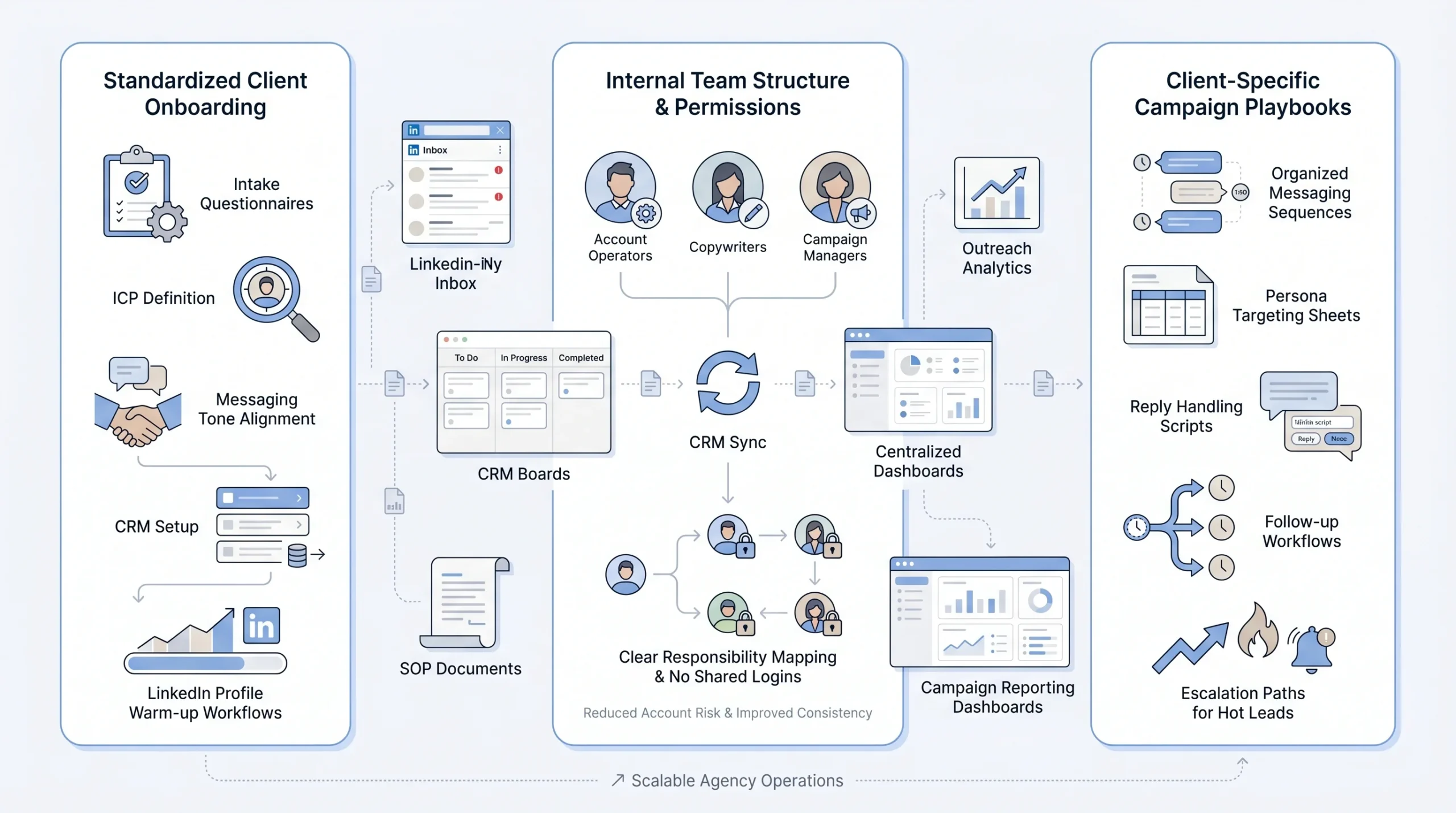
A strong onboarding process begins with a structured intake questionnaire. This document becomes the source of truth for every campaign decision that follows, and it should cover:
- ICP definition: Who is the ideal prospect — job title, seniority level, company size, industry, geography? The more specific, the more targeted the outreach, and the higher the acceptance and reply rates.
- Messaging tone and voice: Is the client’s brand conversational and direct, or more formal and consultative? Ask for examples of past messaging they liked or disliked. Request access to their existing sales materials to match their established voice.
- Industries and accounts to avoid: Are there competitors, existing customers, or prospect categories that should be excluded from outreach? This question prevents embarrassing or damaging contacts.
- Existing LinkedIn presence: How active is the client’s profile? How large is their current network? Has there been any prior outreach activity on this account? A brand-new account with zero connection history needs to be warmed up differently than an established profile with 2,000+ connections.
- CRM in use: What is the client’s preferred system for tracking leads — HubSpot, Salesforce, Pipedrive? Knowing this upfront allows the agency to configure proper integrations before the first message is ever sent.
Beyond the questionnaire, setting clear expectations during onboarding is critical. Clients need to understand LinkedIn’s current connection limits, realistic timelines for seeing results, and what metrics will be used to define success for their specific vertical and offer.
Establish Roles and Permissions Inside Your Team
Operational clarity inside the agency team is just as important as clarity with the client. When multiple account managers, copywriters, and campaign operators are working across dozens of clients, undefined roles create gaps — and gaps create mistakes.
Best practices for your team structure include:
- One account, one operator: Each LinkedIn account should be assigned to one dedicated team member who is solely responsible for monitoring and managing that account. LinkedIn’s security systems are sensitive to logins from multiple devices and locations — shared access is a fast path to account restrictions.
- Consistent templates with room for personalization: Build a library of approved message templates for each campaign stage, but design them with dynamic variable slots so operators can add genuine personal touches without going off-script entirely.
- CRM sync as a non-negotiable: Every LinkedIn interaction — connection requests sent, responses received, meetings booked — should sync to the client’s CRM in real time. This is the primary defense against duplicate outreach and the primary source of accurate reporting.
- Centralized performance visibility: Build a simple dashboard — whether inside your outreach tool, in Google Data Studio, or in a shared reporting template — so team leads and account managers can see campaign performance across all clients without having to log into each account individually.
Define a clear RACI (Responsible, Accountable, Consulted, Informed) framework for every function in the campaign workflow: who writes the copy, who approves it before it goes live, who monitors replies and handles the inbox, and who is responsible for delivering the client report. When these roles are documented and agreed upon, accountability is clear and quality stays consistent even as the team grows.
Create Client-Specific Campaign Playbooks
Every client needs their own campaign playbook — a documented, version-controlled guide that contains everything a team member needs to run that client’s LinkedIn outreach correctly. This is not a one-time setup document. It is a living resource that evolves with the campaign.
A complete campaign playbook for each client should include:
- Target persona summary: Job titles, industries, company sizes, and any qualifying criteria that define a good prospect for this client’s offer.
- Connection request message: The approved text (and any tested variants) used for the initial outreach, including any personalization variables.
- Follow-up sequence: A 2–3 touch follow-up plan with approved messaging for each step, timing between touches, and the conditions under which each message is sent (e.g., follow-up 1 sent 5 days after connection if no reply).
- Reply-handling scripts: Pre-approved responses for common reply types — interested prospects, “not right now” responses, objections, and referrals. These scripts help operators respond quickly and consistently without needing to escalate every reply to a senior team member.
- Escalation path for hot leads: A clear protocol for what happens when a prospect expresses genuine interest — who gets notified, how quickly, and how the handoff to the client’s sales team is structured.
Treat each playbook as a living document. Review it monthly against campaign performance data and update messaging based on A/B test results. What works in month one rarely remains optimal by month three.
Choosing the Right Tools for Multi-Client LinkedIn Management
What to Look for in an Agency-Grade LinkedIn Tool
Not all LinkedIn automation and outreach tools are built with agencies in mind. Many are designed for individual users or small sales teams — and while they work well at that scale, they quickly become bottlenecks when you are managing 10, 20, or 30 client accounts from a single agency dashboard.
When selecting a LinkedIn tool for your agency, the evaluation should focus on three key priorities: automation that saves time, compliance features that protect client accounts, and scalability to match agency growth. Beyond those three core criteria, agency-specific capabilities to look for include:
- Multi-account management from a single dashboard: The ability to view, manage, and switch between client accounts without logging in and out repeatedly is a baseline requirement, not a premium feature.
- Role-based access controls: Agency team members should be able to access only the accounts and campaigns relevant to their role — not every client account in the system.
- Anti-duplication logic: The tool must prevent the same prospect from being contacted twice across different campaigns or client accounts. This is a non-negotiable safety feature at agency scale.
- Native CRM integrations: HubSpot, Salesforce, and Pipedrive integrations should be built-in, not workarounds through Zapier.
- Campaign-level analytics per client: Reporting should be separable by client, so you can pull clean data for each account without manually filtering a unified dataset.
Top Tools Agencies Are Using in 2025–2026

DealsFlow — Best for AI-native conversation automation
DealsFlow is built from the ground up as an AI-first LinkedIn outreach platform, not a traditional automation tool with AI bolted on afterward. Its core capability is Arlo, an AI engine that does not just send the initial message — it reads every reply, determines the best response, handles objections in the prospect’s own conversational context, and books the meeting, all while maintaining the sender’s voice throughout the thread. For agencies that want to remove the manual reply-handling bottleneck without sacrificing conversation quality, this is what separates DealsFlow from every other tool in the category.
DealsFlow supports up to 50 LinkedIn accounts from a single dashboard, handles account warmup and safety limits automatically upon connecting a profile, and provides per-client reporting — making it structurally designed for agencies running outreach across 10 to 50 clients. Its built-in prospect CRM assigns an AI warmth score (Hot, Warm, Neutral, Cold) to every lead, so account managers can prioritize which conversations need human attention without manually reading every inbox. For agencies where operational bandwidth — not strategy — is the primary growth constraint, DealsFlow’s AI conversation layer directly addresses that bottleneck.
HeyReach — Best for high-volume multi-account agencies
HeyReach is purpose-built for the multi-account, multi-client use case. With LinkedIn’s current limits of 20–40 invites per day per account, the only way to meaningfully scale outreach is by running multiple LinkedIn senders simultaneously on one outreach sequence. HeyReach’s multiple senders feature has anti-duplication security built into its architecture, which means the same prospect cannot be messaged twice across different sender accounts — and it allows agencies to manage clients’ LinkedIn accounts on their behalf directly through the platform.
For agencies with a large client base, HeyReach offers an Agency plan that supports up to 50 LinkedIn accounts, and an Unlimited plan that removes the account cap entirely, making it one of the few tools that can genuinely grow alongside an agency’s roster without forcing a re-platforming decision later.
Expandi — Best for team collaboration and campaign monitoring
Expandi has earned a strong reputation specifically among agency users for the depth of its team management capabilities. It allows agencies to simplify setup and management with roles and permissions, monitor campaign performance across accounts from a unified view, integrate with CRMs, and use history features to track how each campaign has evolved over time. For agencies that want strong internal visibility and accountability without sacrificing outreach effectiveness, Expandi offers a well-rounded package.
Salesflow — Best for multichannel campaigns
Salesflow is the top-rated tool for agencies that want to move beyond LinkedIn-only outreach. It combines LinkedIn and email outreach in a single platform, with a unified inbox that consolidates replies across both channels, advanced analytics, and strong safety features designed to protect accounts from LinkedIn’s automated detection systems. For agencies whose clients require coordinated LinkedIn-plus-email sequences — which is increasingly the standard for high-performance B2B outreach — Salesflow eliminates the need to manage two separate tools.
Meet Alfred — Best for team inboxes and AI personalization
Meet Alfred’s team collaboration features enable agencies to assign specific roles, manage shared team inboxes, and analyze campaign performance with team-level insights. Its personalization capabilities are particularly strong for agencies managing clients in relationship-driven industries where message quality matters as much as message volume. Meet Alfred also provides 24/7 customer support, with dedicated account managers assigned to teams on larger plans — a meaningful operational support layer for agencies running complex, high-volume programs.
CRM and Data Layer
The tool stack for a well-run agency LinkedIn program extends beyond the outreach platform itself. Two additional layers are essential: CRM integration and data quality.
On the CRM side, all LinkedIn activity — connection requests sent, acceptance rates, replies received, meetings booked — should sync in real time to whichever CRM each client uses. This serves two purposes: it prevents duplicate outreach by giving the outreach tool visibility into existing contact records, and it gives the client’s sales team the context they need to continue conversations that start on LinkedIn.
On the data quality side, the quality of your prospect list is the single biggest variable in campaign performance outside of messaging. Using enrichment tools like Clay or PhantomBuster to build contact lists helps agencies target real decision-makers instead of generic addresses. The goal is to combine data sources — LinkedIn employee exports, company databases, intent signals — to produce lists where every contact is a qualified, reachable prospect, not a placeholder entry that wastes outreach volume.
Structuring Campaigns Across Multiple Client Accounts
Campaign Architecture Per Client
Each client’s campaign should exist in complete isolation from every other client’s campaign. This means separate sender accounts, separate prospect lists, separate sequences, and separate analytics environments — no cross-pollination of any kind.
The campaign architecture for each client should map to the four stages of the LinkedIn outreach funnel:
- Awareness stage: Profile views and profile follows that make the sender’s name recognizable to a prospect before any direct message is sent. This step primes the prospect and increases connection acceptance rates.
- Connection stage: The outbound connection request, with or without a personalized note, depending on what testing has revealed works best for that client’s target audience.
- Nurture stage: A 2–3 touch follow-up sequence sent to connected prospects who have not yet replied, spaced to feel natural rather than automated. Each message should add value or offer a different angle rather than simply repeating the initial ask.
- Conversion stage: The point at which an interested prospect is handed off — either to the client’s sales team for a discovery call, or to a meeting booking link that captures a specific slot in the pipeline.
This funnel architecture makes it easy to diagnose performance at each stage. A low connection acceptance rate points to a targeting or initial message problem. A low reply rate despite high acceptance points to a follow-up sequence problem. A low conversion rate despite high replies points to an offer or handoff problem. Diagnosing in stages is far more efficient than treating the whole campaign as a black box.
Staying Inside LinkedIn’s Limits Safely
LinkedIn’s enforcement of platform limits has become more sophisticated over time, and agencies that treat those limits as mere suggestions tend to learn the hard way. The unofficial community consensus from practitioners, based on observed account behavior, is that accounts face meaningful restriction risk when they exceed roughly 100–400 connection requests per week — though the actual threshold varies based on account age, connection acceptance rate, and overall activity patterns.
To stay well within safe operating parameters across multiple client accounts:
- Rotate sender profiles daily: Field knowledge from practitioners suggests rotating between 5–10 sender profiles daily to intelligently distribute activity and maintain safety. This prevents any single account from running at full capacity every day, which significantly reduces the signal pattern that triggers LinkedIn’s automated detection.
- Warm up new accounts gradually: A brand-new LinkedIn account or a previously inactive profile should never be pushed to high send volumes on day one. Begin with 5–10 connection requests per day and increase the volume incrementally over 4–6 weeks until reaching the target operating pace.
- Use randomized send timing: Fixed-interval automation — where messages go out at perfectly regular intervals, like one every 30 minutes — is a detectable pattern. Set your outreach tool to use randomized delays that mimic the irregular timing of a human manually working through their LinkedIn inbox.
Personalization at Scale
Personalization is not at odds with scale — it is the mechanism that makes scale produce results. The agencies that consistently outperform on LinkedIn are the ones that have figured out how to make automated outreach feel like a genuine, considered message from one professional to another.
To scale LinkedIn outreach without burning leads, the approach that works uses automation to reach audiences with multiple touchpoints — LinkedIn and email in combination — while personalizing outreach to ensure each interaction feels like a genuine connection rather than a broadcast.
Practical personalization tactics that work at agency scale include:
- Dynamic variables in templates: First name, company name, job title, and recent company news or funding announcements can all be pulled from enriched prospect data and inserted into message templates automatically. A message that references something specific about the prospect’s company or role converts at a meaningfully higher rate than one that does not.
- Warm-up engagement before connection requests: Automating a profile view and a post like or comment on a prospect’s recent LinkedIn activity before sending the connection request makes the sender’s name recognizable. This is a low-cost step that can meaningfully lift acceptance rates, particularly for cold audiences.
- A/B testing message variants: Run two or three versions of each message step simultaneously and route equal prospect volumes to each. Track acceptance and reply rates by variant, and consolidate on the winner after a statistically meaningful sample. This is how agencies improve campaign performance systematically rather than relying on intuition.
When to Hand Off to a Human
Automation handles the front end of the funnel efficiently. But the moment a prospect signals genuine interest — a positive reply, a question about the client’s offer, or a request for more information — the conversation needs a human being.
The workflow that works best is to automate initial outreach, then take over manually once the lead responds. As one practitioner put it: “A lot of the workflow is automated. We step in manually with positive leads, who are more likely to convert, so we’re not wasting time on every single reply.” This hybrid approach delivers the efficiency of automation for prospecting and the quality of human judgment for conversion — the best of both without the cost of running everything manually.
Build this handoff into your agency’s SOP explicitly. When a positive reply comes in, who sees it? Within what timeframe must they respond? What is the approved first response, and who has authority to customize it for a specific prospect’s situation? These questions should have written answers before the campaign goes live.
Client Reporting and Communication
What Metrics Actually Matter
Reporting is where agencies either build long-term client retention or accelerate churn. Clients who receive clear, consistent performance data develop trust in the agency’s process — even when results are still building. Clients who receive vague, delayed, or jargon-heavy reports lose confidence quickly, regardless of what the underlying numbers say.
The metrics that matter most for LinkedIn outreach reporting, and the benchmarks that provide context for each:
- Connection acceptance rate: The percentage of sent connection requests that are accepted. A healthy benchmark for well-targeted outreach with a relevant message is 20–35%. Below 20% typically signals a targeting problem, a weak connection message, or an account that needs more warm-up activity before sending at full volume.
- Reply rate: The percentage of accepted connections who reply to the follow-up sequence. A benchmark of 10–20% is achievable with strong personalization and a relevant offer. This metric is a direct indicator of messaging quality and ICP fit.
- Positive reply rate: The subset of total replies where the prospect expressed interest, asked for more information, or agreed to a meeting. This is the metric most closely correlated with actual pipeline impact, and it is the one clients care about most.
- Meetings booked per month: The number of qualified discovery calls or demos directly attributable to LinkedIn outreach. This is the ultimate output metric for most agency clients and should be tracked and reported clearly every period.
- Cost per meeting booked: Total agency fee for LinkedIn outreach divided by meetings booked in the period. This metric contextualizes the value the agency is delivering in terms clients can tie directly to their revenue math.
Building a Reporting Cadence
A clear, consistent reporting cadence is as much a client retention tool as it is a performance tracking mechanism. Clients who hear from their agency regularly — with specific, accurate data — feel in control of their investment. Clients who only hear from their agency when something goes wrong feel anxious and underserved.
A functional reporting cadence for agency LinkedIn programs operates on two levels:
- Weekly internal check: Every week, the account manager responsible for each client should review the campaign’s performance data and flag any anomalies — account warnings from LinkedIn, unusual spikes in spam reports, sudden drops in acceptance rate, or reply volumes that are significantly above or below baseline. These signals need to be caught and addressed before they become client-facing problems.
- Bi-weekly or monthly client report: Depending on the volume and pace of the campaign, clients should receive a formal performance report on a regular schedule. The report should cover performance against agreed targets, insights from message testing (what variants performed better and why), and pipeline contribution — specifically, how many meetings were booked and what the estimated value of those opportunities is.
Build a shared reporting dashboard where clients have live visibility into their campaign’s core metrics. Most agency-grade outreach tools provide API access or native dashboard features that can be connected to Google Data Studio or a similar visualization tool. When clients can check their campaign status without waiting for a scheduled report, trust compounds.
Setting Realistic Expectations
Perhaps the most underrated aspect of client reporting is what happens before the first message is ever sent. The expectations set during onboarding determine how clients interpret every data point they see in the months that follow.
Agencies should proactively educate clients on two realities that are often misunderstood:
- LinkedIn’s evolving limits: Platform limits on connection requests, message volumes, and automation activity change periodically. Clients who understand that these limits exist — and that working within them is a feature, not a limitation — are far more patient when campaigns are designed for safety over speed.
- The improvement curve: Most well-structured LinkedIn outreach campaigns improve significantly between month one and month three. Month one is a testing and calibration phase — prospect lists are refined, message variants are tested, and the account warms up to its operating volume. Frame early months explicitly as an investment in learning that pays off in month two and beyond, so clients are not measuring a calibration phase against the performance standards of a mature campaign.
Scaling Your Agency’s LinkedIn Operations
Productize Your Service Offering
Agencies that try to build a fully custom engagement model for every new client find that growth creates operational chaos. Every client becomes a bespoke project that consumes disproportionate time and creates inconsistent quality. The agencies that scale LinkedIn outreach profitably are the ones that have productized their service into defined tiers with standardized deliverables.
A tiered LinkedIn outreach service packaging model might look like this:
- Starter tier: One sender account, targeting up to 500 prospects per month, one connection message, and two follow-up touches. Suitable for clients testing LinkedIn as a channel for the first time or operating in a narrow, well-defined niche.
- Growth tier: Three sender accounts with rotation, targeting up to 2,000 prospects per month, a full 3-step sequence, A/B testing on message variants, and bi-weekly reporting. Suitable for clients with an established sales process looking to meaningfully scale pipeline.
- Scale tier: Five or more sender accounts, combined LinkedIn and email multichannel outreach, advanced personalization with enriched data, weekly reporting, and dedicated account management. Suitable for clients with high-volume pipeline requirements and the sales capacity to handle a significant increase in meetings booked.
Standardized tiers make onboarding faster, margin more predictable, and resource allocation cleaner. When a new client signs, the agency already knows exactly which templates, tools, and team resources are needed — there is no need to design the engagement from the ground up.
Build a Multichannel Layer
LinkedIn outreach alone has a ceiling. Connection limits, the inherent passivity of message threads, and the fact that not every B2B buyer is highly active on LinkedIn all constrain what a LinkedIn-only program can achieve. The agencies that consistently deliver the strongest results for clients combine LinkedIn with email outreach in a coordinated, sequenced multichannel program.
Well-executed multichannel campaigns that combine LinkedIn with email, SMS, and other communication channels create cohesive workflows that engage prospects across multiple touchpoints and can boost engagement by up to 50%. In practical terms, this means:
- LinkedIn-first, email-follow-up sequences: Send the initial connection request and first follow-up on LinkedIn. If a prospect has not responded after two LinkedIn touches, trigger an email sequence to the same contact using their business email address (sourced through enrichment). The email can reference the LinkedIn connection as a warm opener.
- Email-first for non-LinkedIn-active prospects: Some ICPs — particularly in certain industries or senior roles — are simply not active LinkedIn users. For those segments, email is the primary channel, with LinkedIn engagement (profile views, post likes) running in parallel as a supporting signal.
- Coordinated timing: Both channels should be orchestrated through a single campaign timeline to prevent the prospect from receiving both a LinkedIn message and an email on the same day, which can feel aggressive rather than persistent.
Hire and Train for the LinkedIn Role
As an agency’s client roster grows, the quality of the team running those accounts becomes the primary constraint on growth. Hiring account managers who understand LinkedIn’s nuances — its cultural norms, its technical limits, and the difference between automation that feels human and automation that gets flagged — is meaningfully different from hiring a generalist marketing coordinator.
When building the team that manages LinkedIn outreach at scale:
- Document a comprehensive SOP library: Every repeatable task in the campaign workflow — account setup, prospect list import, sequence configuration, inbox monitoring, reply escalation, reporting — should have a written standard operating procedure. New account managers should be able to own a client account independently within their first week on the job, and that is only possible when the SOP library is complete and current.
- Build LinkedIn-specific training: The platform’s rules, limits, and best practices evolve. Maintain an internal training resource that is updated whenever LinkedIn changes something material, and make it part of the onboarding curriculum for every new hire.
- Negotiate volume discounts on tooling: For agencies managing 10 or more accounts, many platforms offer 10–20% off their standard per-seat rates. As the account roster grows, revisit vendor pricing annually to ensure the tool costs remain proportional to the revenue being generated.
Protecting Client Relationships at Scale
Growth creates a specific kind of risk for LinkedIn agencies: the temptation to prioritize volume over quality as the client base expands. More accounts, more sequences, more messages — but if the personalization and targeting standards slip in the process, the metrics that clients care about start to deteriorate. A declining positive reply rate is an early warning signal that the agency is drifting toward volume optimization at the expense of quality.
Two practices help agencies protect quality at scale:
- Never sacrifice personalization for volume: If connection acceptance rates or positive reply rates start declining on a client’s campaign, treat it as an immediate investigation priority — not a lagging indicator to note in the next monthly report. Declining rates almost always trace back to either messaging drift (templates becoming generic over time) or targeting drift (prospect lists expanding to lower-quality contacts).
- Conduct quarterly audits: Every 90 days, review each client’s campaign against their current ICP, their evolving offer, and the competitive landscape in their market. ICPs shift, offers evolve, and what resonated with prospects six months ago may not land the same way today. Campaigns that are not audited and updated become stale, and stale campaigns erode both results and client trust.
Conclusion
Managing LinkedIn outreach for multiple clients is not primarily a technology problem — it is a systems and process problem. The tools available in 2025 and 2026 are genuinely excellent, and any of the platforms covered in this guide can power a high-performing multi-client program. But tools without operational structure produce inconsistent results, and inconsistent results produce client churn.
The agencies that win at scale are those that treat multi-client LinkedIn management as a professional service discipline: standardized onboarding so every client campaign starts from the same quality baseline, strict account hygiene so no client’s LinkedIn profile is ever put at risk by careless practices, intentional personalization so outreach feels human even when it is automated, and clear client reporting so every stakeholder can see exactly what is happening and why it matters.
The system described in this guide is not theoretical — it is drawn from the patterns of agencies that are actually scaling LinkedIn outreach profitably right now. Whether you are currently managing three clients or thirty, the foundation is the same: start with structure, build the right operational layer, choose tools that match your scale, and layer in automation as an accelerant — never as a substitute for strategic thinking.
If you found this guide useful, explore the related posts on writing LinkedIn outreach messages that get replies, understanding LinkedIn’s connection request limits, and comparing the top outreach tools for agencies in depth. Each of those pieces builds directly on the framework laid out here.
Frequently Asked Questions (FAQs)
Q1. How many LinkedIn connection requests can an agency safely send per account per week?
LinkedIn’s connection request limits vary depending on account type. Free accounts should target no more than 80 connection requests per week to stay on the safe side, while premium and Sales Navigator accounts can operate closer to 100–200 per week, depending on account age and overall account health. Importantly, LinkedIn uses a rolling weekly limit — the reset happens exactly seven days after the first connection request is sent in a given cycle, not on a fixed calendar day.
Agencies need to treat these limits as hard ceilings, not soft targets. LinkedIn’s algorithm monitors for rapid spikes in activity, high rejection rates (invitations ignored or marked as spam), and suspected automation use. Any one of these signals can trigger temporary restrictions or “LinkedIn Jail” — a state where the account cannot send connection requests for a period ranging from 24 hours to several days. For new or reactivated accounts, it is best practice to begin at 5–10 requests per day and scale gradually over 4–6 weeks before approaching the weekly cap.
Q2. How long does it typically take to see results from a LinkedIn outreach campaign?
Most clients managed by agencies start seeing the first replies and booked meetings within 30–60 days after a campaign goes live. The initial setup phase — which includes ICP validation, profile optimization, sequence configuration, and prospect list building — typically takes about two weeks. From that point, the campaign scales steadily as messaging gets refined and the account warms up to its operating volume.
The first month is best understood as a testing and calibration phase rather than a peak-performance period. During this time, connection acceptance rates for well-targeted outreach typically range between 20–40%, and initial response rates range from 5–15%. These numbers improve as the agency identifies which messaging resonates, which industries respond fastest, and which connection timing works best. Full optimization of a campaign generally takes 2–3 months. Agencies that set this expectation during onboarding build more patient, trusting client relationships than those who imply results are immediate.
Q3. Is it safe to use LinkedIn automation tools for client accounts?
Yes — with the right tools and the right operating discipline, automation can be used safely on client LinkedIn accounts. The key is choosing tools built with compliance and account safety as design priorities, not afterthoughts. Agency-grade platforms like HeyReach, Expandi, and Salesflow are purpose-built to mimic human behavior patterns: they use randomized send timing, gradual activity ramp-ups, and per-account daily limits to stay within LinkedIn’s detection thresholds.
Practices that make automation unsafe and that agencies must avoid include: sharing login credentials across multiple operators for the same account, logging into a client account from multiple devices or geographic locations simultaneously, sending connection requests at perfectly fixed intervals (a detectable machine pattern), and jumping to high send volumes on accounts that have not been warmed up. When automation is configured correctly and operated within platform limits, it significantly reduces manual workload without putting client accounts at risk.
Q4. How should an agency prevent the same prospect from being contacted across multiple client campaigns?
Deduplication must be enforced at the tool level, not managed manually. Without active anti-duplication logic, the same prospect can appear in multiple client prospect lists and receive connection requests or messages from different clients managed by the same agency — sometimes within days of each other. This is both confusing for the prospect and damaging to the credibility of both clients involved.
The correct approach is to use an outreach platform that has anti-duplication security built into its architecture — meaning the system flags or blocks any prospect already present in another active campaign before the message is ever sent. In addition to tool-level enforcement, agencies should sync all outreach activity to each client’s CRM in real time. This creates a cross-reference layer that allows account managers to identify existing contacts before launching new prospect lists. Manual spot-checks before campaign launches are a useful supplementary step, but they are not a substitute for automated deduplication logic at the platform level.
Q5. How many clients can one account manager realistically handle?
The realistic capacity for one account manager depends heavily on how standardized and tool-assisted the agency’s processes are. In an agency with a well-documented SOP library, agency-grade outreach tooling, and a clear division of responsibilities between copywriting, campaign setup, inbox monitoring, and reporting — one account manager can typically handle between 5 and 10 active client campaigns without sacrificing quality.
Beyond that range, quality tends to slip: response times in client inboxes slow down, reporting gets delayed, and personalization across campaigns becomes inconsistent. The agencies that successfully scale past 10 clients per account manager tend to do so by productizing their service into standardized tiers (reducing the custom-work overhead per client), building a strong SOP library that enables faster onboarding, and using tools with centralized dashboards that allow an account manager to monitor all campaigns from a single view without logging into individual accounts.
Q6. What is the difference between running LinkedIn outreach on a client’s own profile versus a separate sender account?
Running outreach from a client’s own personal LinkedIn profile uses their existing network, connection history, and professional credibility — which typically produces higher acceptance rates, especially in industries where the client is a recognizable name. The downside is that the client’s professional reputation is directly on the line if messaging is off-brand or if the account gets restricted.
Running outreach from a dedicated sender account (a profile created or designated specifically for outreach purposes) separates the operational risk from the client’s primary LinkedIn identity. It also allows the agency to scale volume by running multiple sender accounts in parallel without any one account approaching LinkedIn’s limits. The tradeoff is that cold sender accounts start with a smaller network and lower credibility, which can suppress acceptance rates early in a campaign until the account builds history and connection density. Most agencies use a combination: outreach runs from optimized sender accounts, while the client’s primary profile is reserved for relationship-building, content, and high-value manual engagement.
Q7. How should an agency report LinkedIn outreach results to clients?
A complete LinkedIn outreach report should cover five core metrics: connection acceptance rate (with a healthy benchmark of 20–35% for well-targeted campaigns), reply rate (benchmark: 10–20%), positive reply rate (prospects who expressed interest or requested more information), meetings booked per month, and cost per meeting booked (total agency fee divided by meetings generated in the period).
Beyond the numbers, reports should include qualitative context: which message variants outperformed others and why, what ICP adjustments were made during the period, and whether any account-level issues arose that affected send volume or delivery. Reporting should follow a consistent cadence — bi-weekly or monthly depending on campaign pace — and should be delivered through a shared dashboard that gives clients live visibility into their campaign’s core metrics between formal reports. Clients who can see their campaign data in real time are significantly less likely to churn during the early calibration phase when results are still building.
Q8. Can LinkedIn outreach work across very different client industries at the same agency?
Yes, but it requires strict process discipline and genuine messaging customization for each client. The mistake many agencies make when managing clients across different industries is reusing templates and strategies that performed well in one vertical without adapting them to the new context. What resonates with a CFO at a mid-market manufacturing company is structurally and tonally different from what resonates with a VP of Engineering at a Series B SaaS startup.
Agencies that successfully manage multi-industry client portfolios maintain separate campaign playbooks for each client, conduct thorough ICP research for each new vertical before writing a single line of outreach copy, and resist the temptation to recycle high-performing sequences from one industry into another without meaningful revision. The underlying system — onboarding process, tool stack, reporting structure — can and should be standardized across all clients. The messaging, targeting criteria, and value proposition framing must be built fresh for each client’s specific audience.